 Alvin Ashcraft 🐿️
Dew Drop – May 18, 2026 (#4670)
https://www.alvinashcraft.com/2026/05/18/dew-drop-may-18-2026-4670/
#dotnet #webdev #ai #visualstudio #cloud #vscode #csharp #windowsdev #appdev #devops #dewdrop
Dew Drop – May 18, 2026 (#4670)
https://www.alvinashcraft.com/2026/05/18/dew-drop-may-18-2026-4670/
#dotnet #webdev #ai #visualstudio #cloud #vscode #csharp #windowsdev #appdev #devops #dewdrop
✏️️ Microsoft annonce la disponibilité de Visual Studio Code 1.120, avec une nouvelle fenêtre « Agents », des améliorations pour les modèles BYOK et un aperçu des différences en Markdown....
🔗 Lire l'article sur Developpez.com: https://visualstudio.developpez.com/actu/383292/Microsoft-annonce-la-disponibilite-de-Visual-Studio-Code-1-120-avec-une-nouvelle-fenetre-Agents-des-ameliorations-pour-les-modeles-BYOK-et-un-apercu-des-differences-en-Markdown/
Segment Heap support for C++ projects in Visual Studio
Segment Heap support for C++ projects in Visual Studio
https://devblogs.microsoft.com/cppblog/segment-heap-support-for-c-projects-in-visual-studio/
#cpp #visualstudio #programming #debugging #softwaredev #windowsdev
Dew Drop – May 15, 2026 (#4669)
https://www.alvinashcraft.com/2026/05/15/dew-drop-may-15-2026-4669/
#dotnet #windowsdev #ai #cloud #appdev #csharp #webdev #visualstudio #vscode #devops #dewdrop
How I learned about the PathMap MSBuild property
https://www.damirscorner.com/blog/posts/20260515-AReasonVsDebuggerMightNotHitBreakpoints.html
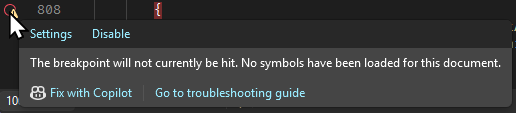
There's an open source application plugin written in .NET I occasionally contribute to. As a regular part of my workflow, I sometimes have to attach the debugger to the application with the plugin loaded to troubleshoot unexpected behavior. When I did that the last time, the breakpoints in Visual Studio for some reason didn't work.
From the Visual Studio blog...
In case you missed it earlier...
VSLive! Microsoft AI Hackathon 2026: Send Your Team Home With Working Code
https://devblogs.microsoft.com/visualstudio/vslive-microsoft-ai-hackathon-2026-send-your-team-home-with-working-code/ #Events #VisualStudio #vslive
From the Visual Studio blog...
VSLive! Microsoft AI Hackathon 2026: Send Your Team Home With Working Code
https://devblogs.microsoft.com/visualstudio/vslive-microsoft-ai-hackathon-2026-send-your-team-home-with-working-code/ #Events #VisualStudio #vslive
Dew Drop – May 14, 2026 (#4668)
https://www.alvinashcraft.com/2026/05/14/dew-drop-may-14-2026-4668/
#dotnet #windowsdev #ai #webdev #csharp #cloud #visualstudio #vscode #appdev #sqlserver #dewdrop
Visual Studio 2026 18.6.0
Visual Studio 2026 在 2026 年五月的例行性更新推出了,這次的版本推進到了 18.6.0,官方的更新紀錄可以參考 release note。
這次更新的項目,包括了:
按照慣例,更新比較多的還是和 GitHub Copilot 相關的東西。以往由於 Heresy 沒在訂閱、再加上免費版本的 GitHub Copilot 用量非常有限,所以 Heresy 都沒認真玩;不過最近由於有開始透過串接自有 LLM 伺服器來使用,所以以後應該也會來記錄相關的變更吧。
MSVC Build Tools v14.51
在三月份的 18.3、微軟就推出了 MSVC Build Tools 14.51 預覽版、號稱題更了更好的 C++23 相容性、必提升了效能。而在這次的 18.6,則是釋出了 14.51 的正式版本了~這次的官方紀錄是《MSVC Build Tools version 14.51 (GA) now available》。
至於新版的變動,主要是要看之前 RC 版的介紹《MSVC Build Tools Version 14.51 Release Candidate Now Available》,裡面的變更算是相當多。
至於正式版和 RC 差別、似乎只有加入 Intel APX (Advanced Performance Extensions) 指令集? 不過,現在有處理器有支援嗎?
不過,14.51 的 C++23 標準目前還是標記成預覽版、使用的設定是 /std:c++23preview;要變成正是支援,應該還是要等到之後的 14.52 了(參考、參考)。
GitHub Copilot 支援 Ollama
雖然更新紀錄沒有寫,但是 GitHub Copilot 的「管理模型」的功能,現在加入了「Ollama」的設定了!
和其他的提供者不同,他不需要輸入金鑰,而是要直接輸入端點 URL;而且也不要 Azure 一樣只支援可認證的 https。
不過實際上…在新增模型的時候,還是可以另外指定端點,所以技術上應該是可以對應多個伺服器。
雖然他寫的是 Ollama,但是它實際上走的應該還是 OpenAI 相容 API,Heresy 自己嘗試用LM Studio 來跑也是沒問題的~不過考慮到他不能設定金鑰,所以基本上就只能對應私有的內部服務了。
考慮到小型模型在開發上的能力…恩,個人應該不太會用吧。
計畫模式
Visual Studio GitHub Copilot 以往主要的模式只有「agent」和「ask」(話說,之前都還有中文翻譯、現在又都變英文了),如果想要讓他規劃的話,通常是使用詢問模式避免他直些修改;而現在終於正式加入一個「plan」模式了。
官方建議使用的時機是:
根據官方的說法,他會透過下面兩個步驟來處理:
理論上 Copilot 會將計畫以 Markdown 的形式儲存成 .copilot/plans/plan-{title}.md 這樣的檔案,方便後續編輯、確認;不過個人覺得很謎的,是他這邊產生的路徑居然是個人資料夾、而不是專案資料夾…
在開始撰寫計畫書前,可能會先詢問開發者一些需要釐清的問題,之後在而計劃書完善後,會有一個「實作計畫」的按鈕,按下去就會切換到 agent 模式、根據計畫書開始實作了。
下面就是一個測試用的計畫:
在他繼續實作的時候,還會去改變裡面的進度、也會在下方的「計畫步驟」前面打勾作狀態的修改;這樣整個流程會變得可以更直覺、明確地看到大型任務的進度,個人覺得還滿棒的。
而除了手動使用 plan 模式外,現在在 agent 模式要做 AI 模型覺得比較大幅度的改動的時候,似乎也會主動建立一個類似 plan 模式的計畫書、然後再直接開始實作;這個狀況下其實和 plan 模式很像,只是缺少的檢查計畫書的時間。
不過 Heresy 這邊有一個問題:使用者目錄下的這些檔案是要自己去刪除嗎?感覺計畫完成他就留在那了啊…感覺如果是在專案目錄還好,但是全部都是在個人目錄下啊…
另外,不知道他是不是會挑模型?gpt-5.4、gpt-5.4-mini 看來都可以正常對應這個流程,但是有的內部模型測試的時候,似乎會跳出這個流程?所以如果使用非官方模型、可能也是要試試看才知道了。
Context Window 使用指標
現在聊天框的右上角會有一個顯示目前 context window(內容視窗)使用量的圓環,點下去會顯示目前的使用狀況:
再點下去也可以展開系統、使用者內容的細節。
如果 context window 被塞滿的話,他可能就會忘記之前的內容、進而造成奇怪的問題。所以如果這個發現這個圈快滿了、也可以點選「摘要交談」的按鈕、來針對較早的對話進行內容的分析、壓縮,避免遺失重要的上下文。
這個按鈕按下去不會輸出摘要後的內容,而是只會顯示「摘要已完成」,然後理論上 context window 的使用比例就會變少了。
多檔案變更的彙整
Copilot 在編輯檔案後,會在聊天框上方列出變更過的檔案;以往只能一個一個點開來看改了什麼,不過現在可以點選「開啟變更摘要檢視」、來透過單一文件視窗確認所有的變更了。
不過老實說,這樣的檢視方式,感覺只適合每個檔案都只改依兩行的狀況?
Agent Skill 管理
現在在聊天窗格右下角的工具設定裡面,除了本來的 MCP 外,現在也加入了簡單的 Skill 列表。
不過這邊的功能現在真的很簡單,只能開啟資料夾和編輯 SKILL.md,並沒有類似建立新的 skill 的輔助工具;微軟目前應該是還在測試建立 Skill 的功能,或許下個月正式版就會有機會看到了吧?(參考《Agent Skills in Visual Studio: Teach Copilot How Your Team Works》)
至於 Visual Studio 的 Skill 到底要怎麼設定呢?根據官方文件的說法,應該就是要自己撰寫 SKILL.md、然後按照特定的邏輯放在指定的資料夾裡了。
或者是 awesome-copilot 這個專案裡面放了很多 Skill 可以參考(連結)。
大概就先這樣了。
開始認真用 GitHub Copilot 後,發現現在的 GitHub Copilot 真的和以前差很多;而由於最新的高階 LLM 的進步,寫出來的程式的可用性和複雜度也提高相當多了。
但是,高階的模型的 token 真的燒很快、錢也扣得很兇啊…
而且開始用了之後,真的覺得人會懶得思考啊…
 Developpez.com 🤖
 Nemeski
 Damir Arh
 Barret
 Heresy's Space