 windowsCult
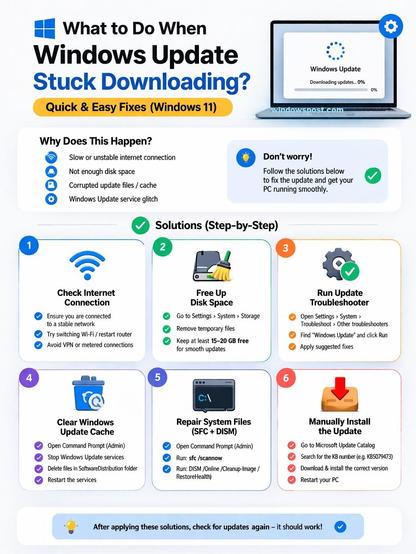
Windows 11 update stuck at 0%?
This usually happens due to a slow or unstable internet connection, low disk space, corrupted update files or cache, or issues with Windows Update services.
Here's what actually works: https://windowspost.com/windows-update-stuck/
1/ Check internet connection: Make sure you're connected to stable Wi-Fi or Ethernet
2/ Restart Windows Update services: Open services.msc → Restart Windows Update & BITS
3/ Clear Windows Update cache: Stop services → Delete SoftwareDistribution → Start services
4/ Repair system files (SFC & DISM): Run sfc /scannow and DISM /RestoreHealth
5/ Free up disk space: Keep at least 15–20 GB free space on C drive
6/ Run Windows Update troubleshooter: Settings → Troubleshoot → Windows Update
7/ Manually install the update: Download from Microsoft Update Catalog
#Windows11 #windows #WindowsUpdate #kb5079473 #technology #tech

 JustGeek