 Wesley Fryer
My updated iPad “Sharing” app menu…
Channel links on:
https://www.wesfryer.com/after/
More about “Discovering Useful Ideas:”
https://wiki.wesfryer.com/Home/handouts/ideas
#MediaLit #edtechSR #edtech #sharing #iPadEd #AppleEdu #ADEchat
My updated iPad “Sharing” app menu…
Channel links on:
https://www.wesfryer.com/after/
More about “Discovering Useful Ideas:”
https://wiki.wesfryer.com/Home/handouts/ideas
#MediaLit #edtechSR #edtech #sharing #iPadEd #AppleEdu #ADEchat
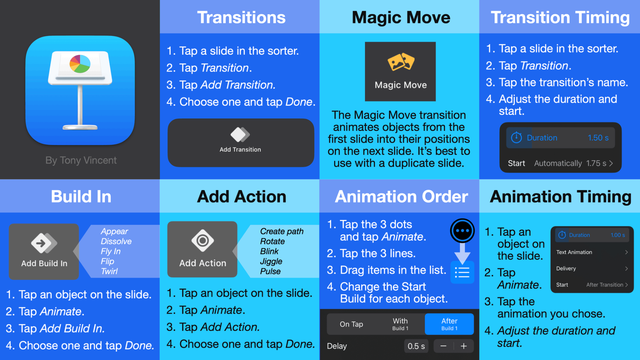
💨 I made this slide for a lesson I taught to 5th graders showing them how to make animations in Keynote for iPad. Maybe you'll find it helpful?
#fetc #AppleEdu #Keynote #edutooter #teaching #iPadEd @edtech
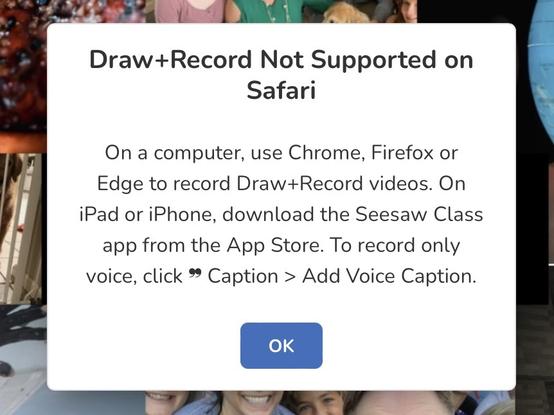
Only thing I forgot is that iPadOS Safari does NOT support audio recording on the #Seesaw website. iPad requires the Seesaw app to record audio. Alternatively students can use iOS screen recording https://support.apple.com/en-us/HT207935 or record on a laptop
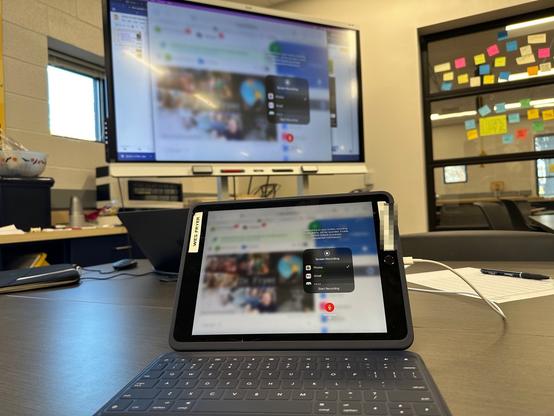
I used a lightning USB cable to mirror my student iPad today in class during lesson demonstrations (using QuickTime Pro software & moving recording / source change feature) https://support.blindsidenetworks.com/hc/en-us/articles/4407788663309-How-to-mirror-your-iPad-iPhone-screen-to-a-Mac-computer-with-QuickTime
 Tony Vincent