 Sven Jacobs
Hot take: AI coding tools will do more to popularize Git worktrees than a decade of documentation ever did.
#AI #LLM #Git #Worktree #GitWorktree #SoftwareDev #SoftwareDevelopment #Claude #ClaudeCode #Copilot #GitHubCopilot
Hot take: AI coding tools will do more to popularize Git worktrees than a decade of documentation ever did.
#AI #LLM #Git #Worktree #GitWorktree #SoftwareDev #SoftwareDevelopment #Claude #ClaudeCode #Copilot #GitHubCopilot
Ever been deep in a feature branch when an emergency hotfix lands on your desk?
❌ Don't waste time stashing and praying.
❌ Don't waste disk space cloning the repo again.
The Fix: Use Git Worktree in SmartGit.
It lets you have multiple branches checked out at the same time from the same repo. One shared history, multiple independent workspaces.
Watch Rakia show you how to master this workflow in seconds: 🔗 https://youtu.be/TJ_6nToEfJs

Am i the only one who is baffled by the supposed benefits of #git worrktrees?
» No context switching
Work on multiple features simultaneously
Compare code side-by-side
Run different tests in parallel«
Erm, no.
That are the benefits of checking out one repo several times.
The minor benefits of git worktrees are that you save disk space in the several `.git` directories, and that you save a bit of time on `git fetch`es.
#worktree #gitWorktree
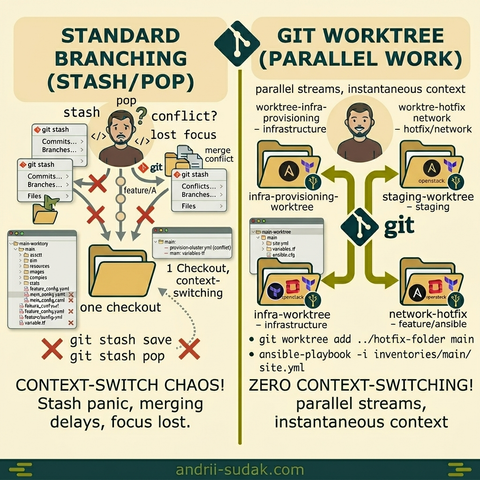
Stop the Stash-Pop Panic! Why Git Worktree is my IaaS Game Changer.
Have you ever been deep into a complex feature branch, and suddenly… BOOM. A critical bug in main or production needs your immediate attention.
You reach for git stash. You pray you won't forget where you were. You switch. You fix. You stash pop… and then the anxiety hits. Wait, which stash was that? Did I just overwrite my local terraform state?
For me, this was the ultimate flow-killer. Until I integrated Git Worktree into my workflow.
The Problem with the "Standard" Way:
As an IaaS specialist, my changes aren't just code, they represent infrastructure states. Standard branching meant:
* git stash my complex IaaS changes.
* git checkout main and wait for the local environment to sync.
* Fix the bug, deploy, and verify.
* git checkout feature and wait again.
* git stash pop and spend 15 minutes regaining focus.
The Solution: Git Worktree
Git Worktree allows you to have multiple checkouts of the same repository in different directories simultaneously. It’s a game manager.
Instead of switching branches in one folder, I simply add a new worktree:
git worktree add ../hotfix-folder main
* Zero Context Switching: My feature branch remains open and untouched in its own folder.
* Instant Parallelism: I can run a long Terraform plan in one worktree while fixing a bug in another.
* No Stash Chaos: No more "which stash is which?" or accidental data loss.
The PyCharm Factor:
I’m a dedicated PyCharm fan. I love its built-in Shelf tools for quick code shifts. But for IaaS, where context is everything, Worktree takes it to the next level. It’s not about replacing PyCharm’s tools, it’s about giving your IDE multiple entry points into the same project state.
The Takeaway:
A worktree is essentially a branch that lives in its own directory. It’s the fastest way to handle "urgent" tasks without losing your "deep work" momentum. If you’re tired of the stash/pop dance, this is your sign to switch.
#git #gitworktree #iaas #infrastructureascode #pycharm #devops #productivity #workflow #softwareengineering #cloudinfrastructure
📰 git worktree を Worktrunk で管理したら手放せなくなった (👍 37)
🇬🇧 Managing git worktree with Worktrunk (3.6k⭐) makes parallel Claude Code workflows seamless. Multiple work dirs from one repo.
🇰🇷 Worktrunk로 git worktree 관리하면 Claude Code 병렬 워크플로우가 편해짐. 하나의 레포에서 여러 작업 디렉토리.
Claude Code + Docker + git worktrees = parallel AI agents with zero permission prompts.
Key decisions:
→ Docker socket mount (not full DinD)
→ Same-path mounting for compose compatibility
→ Host-side worktree creation
→ Read-only credential mounts
→ Entrypoint patches config, strips auth
One Dockerfile. One launcher. Full autonomy.
git worktreeとCursorで爆速並列開発!複数ブランチを同時に作業するワークフロー
https://qiita.com/sugumura/items/232710ff53c87c10eaba?utm_campaign=popular_items&utm_medium=feed&utm_source=popular_items
git-worktree-runner (gtr) で実現するAI時代の並列開発
https://qiita.com/kazuki_ogawa/items/c006c5a7ea64684eae1e?utm_campaign=popular_items&utm_medium=feed&utm_source=popular_items
AI 코딩 에이전트 여러 개를 동시에 돌려도 안전한 이유: Vibe Kanban의 워크플로우 혁신
여러 AI 코딩 에이전트를 충돌 없이 병렬 실행하는 오픈소스 플랫폼 Vibe Kanban. Git worktree 기반 격리와 통합 리뷰로 개발자의 역할을 코더에서 오케스트레이터로 전환합니다.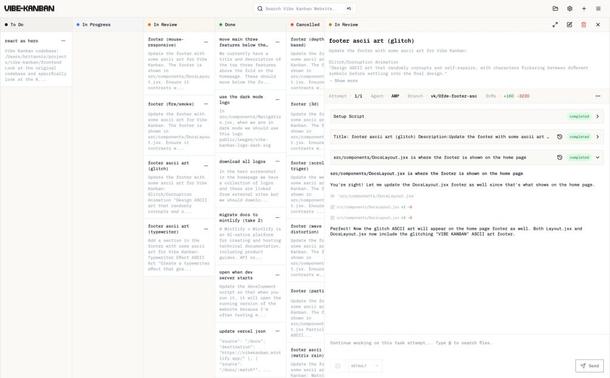
Check the right answer here 👉 https://www.youtube.com/post/Ugkx8mz3Ubt8VEgRXwGfG1y_7AlYHgTuB4np
Ready to stop cloning around and start working smarter 🚀?
Go check out the SmartGit Download Page 👉 https://www.smartgit.dev/ to get started, or dive deeper into our Git How To Guide: https://blog.syntevo.com/ to master more pro tips!
#Git #GitWorktree #ContextSwitching #DevProductivity #CleanCode

 SmartGit
 ospalh
 Andrii Sudak
 Zenn Trends
 Dariusz Gafka
 Qiita - 人気の記事
 AI Sparkup