 Highlander
It started as a quest to port Fuel Tracker+ from iOS to VisionOS. Well, the quest evolved from VisionOS and ended on macOS. 🥳
But … will macOS be the end? 😎
#indiedev #xcode #apple #visionpro #macOS #iOS #fueltrackerplus

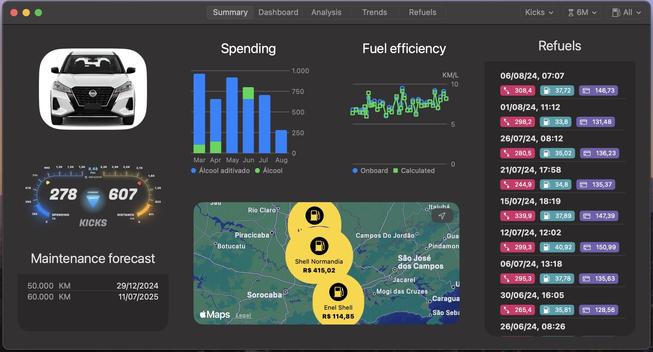
It started as a quest to port Fuel Tracker+ from iOS to VisionOS. Well, the quest evolved from VisionOS and ended on macOS. 🥳
But … will macOS be the end? 😎
#indiedev #xcode #apple #visionpro #macOS #iOS #fueltrackerplus
Proto-typing Fuel Tracker+ on VisionOS. Cleaner, working filters and selectors and detachable window. Coming soon!
#indiedev #applevisionpro #visionpro #apple #fueltrackerplus

Proto-typing 😎 - Fuel Tracker+ running on VisionOS coming soon!
#indiedev #applevisionpro #visionpro #apple #fueltrackerplus

Well... its getting beutiful! Soon on Apple Vision Pro 🥳 🎉
Fuel Tracker+ on AppStore: https://apps.apple.com/br/app/fuel-tracker/id6476114668
#visionpro #applevisionpro #swiftui #fueltrackerplus #Xcode #apple #indiedev

How much did I spend on fuel this month and in the last 6 months? Is my monthly fuel spending average? Is my car's fuel consumption increasing? Is the cheapest fuel really the cheapest? When will the next maintenance be? Get instant answers to all these questions and more with the Fuel Tracker+ app…
That's a good start, isn't it? To recap what I've shared so far: Fuel Tracker+ is 100% written in SwiftUI, I followed the VOODO architecture proposed by Mark, applied advice from Tjeerd, and one year into the adventure of writing this app, I'm convinced I made the right architecture choice for the app: I achieved great results when porting the app to Apple Vision Pro (which will be available on the Vision Pro AppStore in the second half of 2024!).
A few small adjustments here and there, and today I'm confident that the benefits I reaped when porting the app to Apple Vision Pro (speed, code reuse) are also due to the advice and approach from Tjeerd in that post. Highly recommended reading! (For those who prefer video, the post includes a video on the topic as well).
This post helped me validate whether my choices of where to place business rules in the code were well-made or deserved refactoring. By applying the author's proposal to my project, I discovered that I could further improve the app's architecture by achieving proper isolation between UI, business rules, and data representation.
As I'm nearing completion of the Fuel Tracker+ app for iOS, I came across a very interesting post by Tjeerd in't Veen @tjeerdintveen titled "What if your feature was a Command Line Tool?" (available at: https://www.swiftindepth.com/articles/what-if-your-feature-was-a-command-line-tool).
I decided to use the VOODO architecture in Fuel Tracker+, and a year later, I have no regrets about that decision. On the contrary, it has proven very useful and effective, greatly facilitating the porting of the app to Apple Vision Pro.
To learn more about VOODO, I recommend a single post: https://swiftuivoodo.com. Everything you need to know about VOODO is on that page.
