@scumsuck
When I did my top software list for #freesoftwareadvent I noticed some tech folk who had never heard of AO3. I think most techy guys who aren't writers don't know the problems of fanfiction, and might be malleable to help with a project if the parameters were clearly stated.
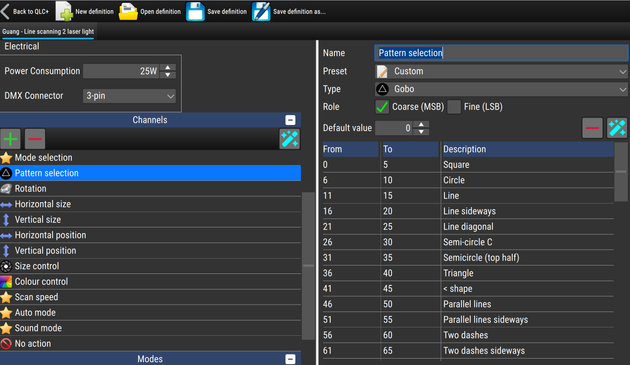
And because I'm a nerd, the first thing I did with the lasers was hook them up to QLC+ (sorry, I missed #FreeSoftwareAdvent) and defined a new custom fixture. However, as the laser is unbranded with no model number or writing on it (was very cheap from AliExpress), I don't think the QLC+ project will accept it in their repo. #DMX

@HI_Greens Possibly worth listing the most useful equivalents! Simon Dobson has a good few under his #FreeSoftwareAdvent
Some are rather specialised but a good number are generally useful like #LibreOffice here:
https://mastodon.scot/@simoninireland/115741439244229122

Also hardware: https://libreboot.org/
Explains why you should use a different Bios!

Simon Dobson (@[email protected])

#FreeSoftwareAdvent Day 18: Libre Office A serviceable alternative to the Microsoft Office suite for those times when it can't be avoided. Each component tool has rough edges (especially for presentations) -- but then again so does Office itself. There are probably better alternatives to each of the tools individually, but I find Libre Office invaluable for interacting with the non-FOSS world. https://www.libreoffice.org/

mastodon.scot
I recently participated in #FreeSoftwareAdvent suggested by @neil , coming up with 25 FOSS packages that I rely on.

Today, I collected those (and 2 extra that I thought about afterwards) into a new article on my Production Log:

"27 Essential FOSS Packages Our Animation Studio Relies On"
https://lunaticsproject.org/2025/12/29/essential-foss-packages/

I changed the order to be slightly more topically organized, although the text for each packages is nearly the same as what I used in my thread.
27 Essential FOSS Packages Our Animation Studio Relies On – Lunatics Production Log

I'm never quite sure whether Advent should run 24 or 25 days, so if you're of the "24" persuasion, consider today's #FreeSoftwareAdvent a bonus 🙂

Today it's rss2email¹, which is I read my RSS feeds². I prefer to read my RSS via email for a number of reasons:

• I don't need to learn Yet Another Set of Keyboard Bindings because I already know my MUA's key-bindings

• I can use any standards-compliant MUA to read my RSS feeds, whether I have them delivered to my mbox file and read with mail(1), or delivered to my normal mail account and read them via mutt/neomutt/Claws/Thunderbird/whatever

• I have offline access via OfflineIMAP/mbsync and any changes (deleting entries, read-status, flagging, stars, tags, filing, etc) gets synced back up to my server, even across multiple machines

• I have all the filtering power of my MUA

• plenty of utilities also speak IMAP, so I can write scripts to (post-)process my RSS feed too

• sharing an interesting article with friends is as simple as forwarding an email

• my backup process for email also automatically backs up my RSS feeds too

• because it runs from cron(8) on a schedule I establish, I have more control of my distractions (I usually run it around 4am gathering feeds for me to read with breakfast). I found if it ran hourly or even multiple times per day, I'd get sucked into constantly checking to see if anything new/interesting had arrived

• control remains with me on my machine rather than handing my reading habits over to some 3rd party RSS reader-service

And I love RSS because it is a pull rather than a push. If I subscribe to your email newsletter, I have to trust that you'll respect my email address and not share it or lose control of it, and cutting off email subscriptions is sketchy. But with RSS? I just stop polling that feed if I'm done with it and it's gone.


¹ https://github.com/wking/rss2email

² https://blog.thechases.com/posts/reading-rss-feeds-via-email-on-the-cli/

GitHub - wking/rss2email: open-source tool for Windows, Mac OS and UNIX for getting news from RSS feeds in email

open-source tool for Windows, Mac OS and UNIX for getting news from RSS feeds in email - wking/rss2email

GitHub

#freesoftwareadvent

DAY 25 - LINUX
https://static.lwn.net/Distributions/

Arguably the most important free software is Linux. The open source operating system that runs all of the other software. It can run on a desktop, or on smaller devices, even a USB stick.

Linux is the software that runs the computer. Resilient, customizable, supported by a diverse worldwide community and free to download and use. It is the present and the future of computing. Switch to using Linux now. It's the best!

LWN Distributions List

This blog post links to all my #FreeSoftwareAdvent posts which are revolving around tools used in our VFX pipeline.

https://www.comp-fu.com/2025/12/free-software-advent-2025/

Free Software Advent 2025 | Stefan Ihringer's Comp-Fu

This post is a recap of my Mastodon series for #FreeSoftwareAdvent 2025! The hashtag is/was about free and open-source software that we rely on every day (although I didn’t manage to post every day). These are the FOSS tools and apps I’m using at work for our VFX pipeline. The links below are pointing to […]

Here are the last of my recs for #freesoftwareadvent 2025

DAY 24 - XFCE4-PANEL
https://fandom.ink/@Rozzychan/115776604751319471

DAY 25 - LINUX
https://fandom.ink/@Rozzychan/115780681581021242

And that's all folks. Thanks for playing.

#freesoftwareadvent

DAY 24 - XFCE4-PANEL
https://docs.xfce.org/xfce/xfce4-panel/start

This is the software for the little panel at the bottom of the screen in my Linux instance. I mention it because I often modify it and it is easily overlooked.

I have different desktops and I show them on this panel so I can switch back and forth. I also add clocks and CPU monitors. I just added silly eyes that stare at my mouse. I just wanted to mention it, because it's always there with me. 😎

xfce:xfce4-panel:start [Xfce Docs]

#freesoftwareadvent

DAY 23 - PS2PDF

This one was a recommendation.

PS2PDF is a command-line program that converts a postscript file into a pdf file. This program is awesome because some programs make pdf files that are MUCH too big. Using this utility can covert a big file into a much smaller file. PS is the format that goes to the printer, and if you can save it as a ps, then you can convert it.
Actually I saved an image file from GIMP as a pdf it was 38MB but this saved it as 2MB