
Gestern habe ich den Raspberry Pi 3 ins Gehäuse vom Anycubic i3 Mega geschraubt. Der wird über das 12V Netzteil betrieben. Aktuell gibt es keine Probleme mit dem 2A Step-Down Wandler auf 5V.

Leider habe ich noch keine schöne Lösung für die Verbindung zum USB Port: das Kabel wird unschön von innen nach außen zum normalen Anschluss geführt.

Schön wäre es wenn man über die Header Pins direkt mit dem Trigorilla Board verbinden könnte 🤔
#Ai3M #3Dprinting #raspberrypi

Ich habe gerade die modifizierte Cover-Plate für den Anycubic i3 Mega X-Carriage [Mk4] Mod veröffentlicht.

Damit kann man den Orbiter v2 befestigen wenn man das originale Hotend (e3d v5) weiterbenutzen möchte: https://www.printables.com/model/1265946-anycubic-i3-mega-x-carriage-mk4-cover-plate-for-e3 #ai3mega #ai3m

Anycubic i3 Mega X-Carriage [MK4] Cover-plate for E3D V5 Hotend and Orbiter V2 extruder by coding-lemur.de | Download free STL model | Printables.com

Modded Cover Plate for X-Carriage [MK4] to use with ED3 V5 hotend and Orbiter V2 extruder | Download free 3D printable STL models

Printables.com

Heute Abend 18 Uhr stelle ich auf dem #MakerME3D im #MakerPort #Stralsund den Umbau meines Anycubic i3 Mega vor.

Wer in der Nähe ist und Interesse an unseren Projekten hat, kann gerne vorbei kommen 😇 #Ai3M #3Dprinting
https://makerport.de/events/makerme3d-dein-3d-druck-stammtisch-757-812/

MakerME3D - dein 3D-Druck Stammtisch - MakerPort Stralsund

Liebe Community, nach über einem halben Jahr 3D Druck Stammtisch/MakerME3D, in welchem wir neben unseren Input-Workshops auch den Werkstattabend eingeführt haben, möchten wir einen Rückblick wagen. Neben unseren regelmäßigen Treffen haben wir auch immer kurze Treffen zum Austausch und Fachsimpeln gefunden, die nicht ungesehen bleiben sollen. Die Community präsentiert ihre Bau- und Bastelprojekte, die in…

MakerPort Stralsund

Nun ist auch der neue Orbiter Extruder am 3D Drucker montiert und nach und nach konnte ich fast alle Probleme lösen.

Fazit: So filigrane Arbeit mache ich nicht so gerne.. Hoffe, der läuft nun noch ein Weilchen und ich muss da nicht mehr ran 🙂 #Ai3M #3Dprinting #Klipper

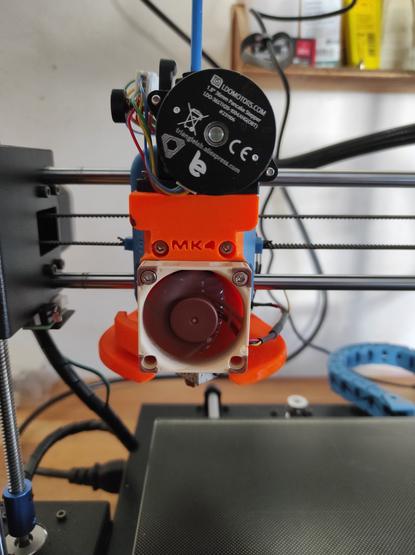
Mein Anycubic i3 Mega hat nun das #MK4 X-Carriage und neue Hotend Lüfter bekommen 😇 #Ai3M

https://www.thingiverse.com/thing:3537449

Anycubic i3 Mega X-Carriage [MK4] by ML3DPrinting

Check out HCV 3D Printer--Anycubic i3 Mega X-CarriageMK4 - e3d v5 & v6 Version + Marlin 2.0 FirmwareThis is the new generation (MK4) of the previous MK3 design of my famous free-to-use X-Carriage for the Anycubic I3 Mega (S)The MK4-Design was completely re-designed from scratch for most parts to gain more flexibility and a better user experience.Thanks to all supporters of this project & their suggestions/ideas for new stuff which I took for improvements of this new generation of the Carriage!Check out the (free to use) Direct Drive UpgradeThe whole MK3 project is included in the MK4 project folder which can be downloaded here.If you enjoyed this project please share your Make,leave a Like and Collect for the community.To show your acknowledgment and support for my large Effort on thisI appreciate your donation via my PayPal-LinklThe main design features:e3d v5 (stock), e3d v6 & e3d v6 volcano hotends are supportedFully new X-Carriage with better & more flexible bearing holding systemFaster Hotend change due to improved Carriage systemLess weight compared to MK2 & MK3(mainly due to weight reduction of the mandatory fasteners)Increased build volume in z direction (205-210mm)Extremely effective belt tensioners included in the CarriagePCB on the backside of the carriageNew fanduct design which combines the powerful cooling from the MK3 with an easier assembling process and a more effective blower position & inflowBLTouch usage possible (probe offset: X=+29, Y=-15)Usage of Linear Ball Bearings (LM8LUU) or slide bearings (IGUS) in the same CarriageEither hex nuts or threaded brass inserts can be usedCable Harness guiding with spiral tube or drag chain (10x20) possibleInstructions on the stl-files, print settings & assembling process can be found in the project folders as a pdf file which is name '00_Instructions(...).pdf'. The assembly instructions are summarized in an instructional video which can be found here:https://www.youtube.com/watch?v=LadxXGYkU20The project also contains the newest Marlin 2.0.6 Firmware on the one hand for manual mesh bed leveling (MBL) and on the other for automatic bed leveling (ABL) with BLTouch. Special Thanks go to Christian H. for adapting and managing the Firmware part for the MK4 project. https://www.thingiverse.com/thing:4358979/You DO NOT have to change the firmware if you do not want to, its optional.Print/Slicing settings are given in the PDF-instruction files!The project folder "MK4_Project_Repo.zip" contains the following sub-folders for the project organization:01_MK4_Hex_Nuts.zip(In this variant all bolts are fixed with hex nuts)01_Standard02_BLTouch02_MK4_Threaded_Brass_Inserts.zip(In this variant most bolts are fixed with brass inserts)01_Standard02_BLTouch03_Various_Parts.zipxx_MK3_Carriage_repository.zipNote:03_Various_Parts.zip contains additional parts which are optional to be used for example a dragchain rear bracket for using a 10x20 drag chain, an axialfan adapter for using axialfan as partcooling, a second alternative fanduct (B) which has a different mounting position of the fan in case of unwanted vibrations with fanduct (A) & a carrier plate for the e3d v6 volcano hotend.If you want to use a drag chain (10x2) you just must print the ´vp02_Dragchain_Rear_Bracket.stl´ instead of the regular rear bracket, additionally you have to print ´vp03_Dragchain_Extruder_Mount.stl´ which is mounted at the extruder. To mount the drag chain you will need 4x M3x10 bolts + nutsIf you mounted all parts on the printer take care before first homing! You may have to adjust the two z-screws on the linear carriage of z-axis so the nozzle doesn't crash on the heated bed, because it comes slightly lower with this carriageThe layout of the small hotend PCB is: HOTEND = Heating Catridge FAN2 = Coldend/Heatbreak Axialfan FAN0 = Partcooling (Radial-)Fan T0 = T0-Sensor (Thermistor)Do not unplug a fan when the printer is turned on or do not turn the printer on when a fan is not plugged in you may risk damage to a transistor on the mother PCB!Latest Changes (see full changelog in summary.pdf):13.06.2020:Axialfan adapter for print part cooling with an axialfan (user wish)Alternative Fanduct (B) with different fan orientation in case your radialfan tends to vibrate in the way its mounted with Fanduct (A) - To use it an additional mount is necessaryOptimization of the fanduct design / inner flow channels for better outlet stream conditionsAdaption of the fanduct support in terms of thinner walls for less waste materialRevised e3d v6 cover plate with slightly bigger air in- and outlet for better heatsink coolingAdaption of the BOM & addition of part lists for v6 hotend configurationsAdaption / optimization of the necessary bolt lengths for threaded insert parts (less weight)Slight change of the PCB mount at the Carriage to reduce the fracture susceptibilityAddition of a e3d v6 VOLCANO carrier plateFirmware update20.06.2020: Increase of tolerance oversize of the hex nut recesses by another +0.1mmBugfix: Missing Part vp 02_Extruder_Dragchain_Mount.stl added to 03_Various_Parts06.07.2020: Firmware update (pause function, M600, BLTouch settings improvement, …)Minor tolerance change for cover-plates and carrier-plates heatsink groove mount16.08.2020: Firmware update to Marlin 2.0.614.07.2022: .tar folder added containing all 3D-STEP models of this project (single parts)

Thingiverse

Das Modding meines #Ai3M eskaliert etwas:

Gestern im #makerport habe ich den Raspberry ins Gehäuse verlagert ✅

Leider gibt es große Probleme mit dem Extruder: Der Anpressdruck ist zu hoch und das Filament verklemmt nach einiger Zeit 🤐