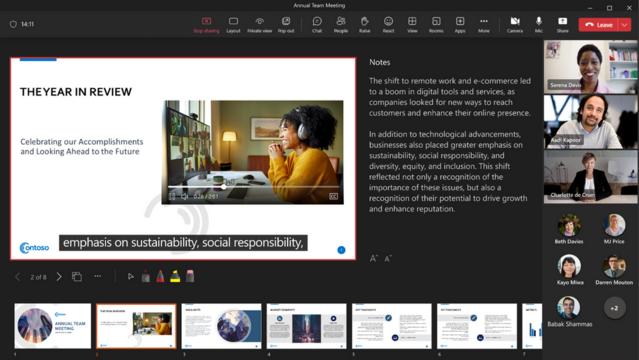
Do you use Microsoft Teams with PowerPoint Live? Annoyed how you have to disable Private View for your audience so they can't skip ahead in your slides for every presentation?

"Private view - Should be disabled as a default"
https://feedbackportal.microsoft.com/feedback/idea/dca5af9a-efab-ed11-a81b-002248519701

#powerpointlive #microsoft #microsofteams #privateview

Community

How would you like to ace your next presentation in #MicrosoftTeams? 🚀
You can do it with the help of #PresenterCoach, a smart tool that helps you improve your presentation skills by giving you instant feedback on your speech, pace, tone, and more. 🎤

You can use Presenter Coach not only in PowerPoint, but also in Teams meetings. Just turn it on when you are presenting using #PowerPointLive and get private tips on how to make your presentation more impactful and captivating. 🙌
The best part is that the feedback is visible in real time but is private to you. And you even get a full report at the end to help you develop your skills.

This is a great opportunity for anyone who wants to enhance their confidence and wow their audience in Teams meetings. 💯 Check out my short video to see how to set up and use this great feature!

🎥 https://buff.ly/3t93Cah

#PresentationSkills #PublicSpeaking #TeamsTips #YouTube #Boost #FediTips

Feedback for Your Presentations with Speaker Coach in Microsoft Teams

YouTube

Introducing Closed Captions in PowerPoint Live for Microsoft Teams Meetings

Microsoft is announcing a new feature in Microsoft Teams Meetings. Closed Captions in PowerPoint Live allows deaf or hard-of-hearing people who have difficulty processing auditory information, have a language barrier, or are simply attending the meeting from a noisy environment to better understand the auditory content being shared.

#Microsoft #MicrosoftTeams #PowerPointLive

Mit PowerPoint Live erweitert Microsoft sein 365-Paket. Präsentationen lassen sich auf andere Clients übertragen und in Echtzeit untertiteln sowie übersetzen.
PowerPoint Live: Präsentationen auf den Laptop übertragen und untertiteln lassen
#Microsoft #MicrosoftOffice #MicrosoftOffice365 #MicrosoftPowerPoint #MicrosoftTeams #PowerPointLive #Präsentation
PowerPoint Live: Präsentationen auf den Laptop übertragen und untertiteln lassen

Mit PowerPoint Live erweitert Microsoft sein 365-Paket. Präsentationen lassen sich auf andere Clients übertragen und in Echtzeit untertiteln sowie übersetzen.