 Franz Geffke
I wrote a new installer for PantherX, that also supports plain #guix and #nonguix installs: https://github.com/franzos/guix-install. Have fun!
 Chip Butty
Hmm... Does Firefox build on #nonguix?
 futurile
@mike_k hmm you failed when you tried #nonguix image as well huh?
Most of the failures I see are due to drivers and/or a complex partition/existing filesystem set-up that the installer doesn't know about.
If you know what your steps were that landed-up with efi messed up a bug report on #guix codeberg would be very welcome.
 Anthk
AnthkAnd, about my last toot: having a free firmware matters, *a lot*.
From security to privacy, and to avoid kernel panics, even under
not totally free operating systems as #openbsd (atheros ath9k
supported wireless devices).
Dear Dave Thompson, if your sole issue it's the firmware, why is #nonguix
full of software (non firmware) crap? Do we really need these:
- MakeMKV
- Nvidia GL libraries
- Nvidia utilities
- Electron
- Google Chrome
- Genesis Plus GX
- Steam
- Zoom
- Allegro Common Lisp (SBCL works you know and it's #FLOSS)
- Zotero
- Obsidian
- Nvidia AI libraries
- Anydesk
- Unrar
And a few more, clojure and docker/k8s related.
 Cayetano Santos
So here we go.
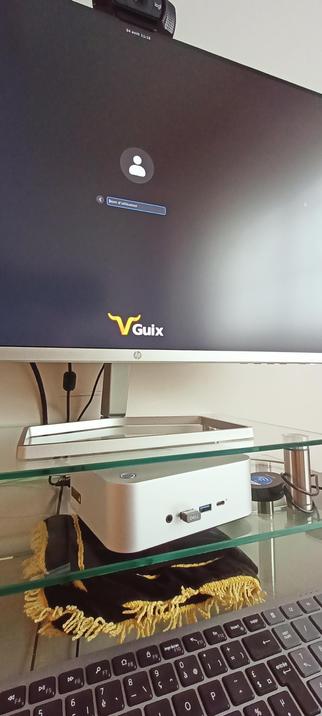
After more than 10 years of loyal service, my old pc passed by. Time to try something new, time for a #slimbook pc.
The #guix compatible and friendly #slimbookone mini pc runs #GuixSystem smoothly, thanks to the #nonguix repository.
Would be great to have #guix as an option among the several #linux distributions available @slimbook.
Is substitutes.nonguix.org down for others too? (I need to get on irc) #nonguix
 hako
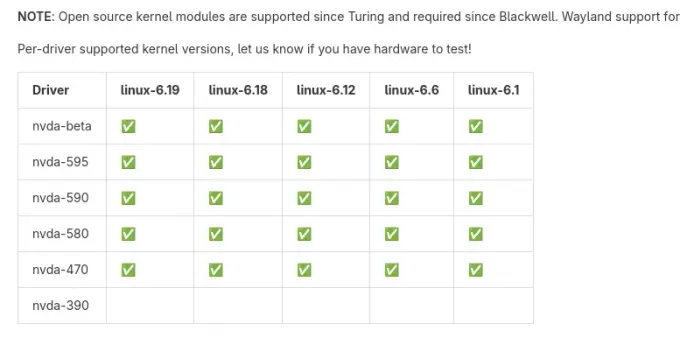
hakoAll tested kernel versions are now supported. (See "NVIDIA graphics card" section in Nonguix README / Codeberg mirror)
#guix #nonguix
#guix #nonguix
https://cache-test.guix.moe is now available for testing. It currently serves substitutes for #Guix and #Nonguix, mirrored from their official publish servers, retaining signing keys.
This new
If everything goes well, I'll deprecate existing setup on guix.moe mirrors and deploy the new configuration. Feedback welcome!
#guix-moe
This new
cache-test server uses mirror-substitutes (and store paths from guix-store-paths) to mirror substitutes from any upstream.If everything goes well, I'll deprecate existing setup on guix.moe mirrors and deploy the new configuration. Feedback welcome!
#guix-moe
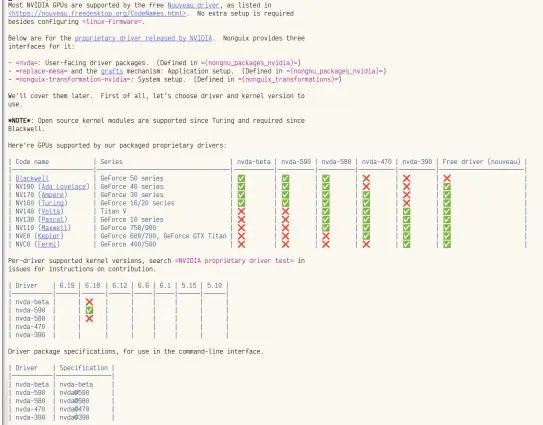
(Work-in-progress) Legacy series (390.xx, 470.xx), aarch64-linux support, improved documentation and verrsion selection support for Nonguix NVIDIA proprietary driver!
https://gitlab.com/nonguix/nonguix/-/merge_requests/845
#guix #nonguix
https://gitlab.com/nonguix/nonguix/-/merge_requests/845
#guix #nonguix
@lukasrotermund #guix maybe, but is not easy to start, altough you can choose several window managers at start. The issue would be #nonguix for propietary video and wireless, but if you need to use that, theres a way to blacklist every propietary blob modulo the wireless. For instance if I have to boot a non free kernel I disable all the mei* blobs and a few intel GPU ones which are not needed for OpenGL 4.6/Vulkan and video decoding.