 スパックマン クリス
Haven't mentioned in a while, but I am still using and very happy with my @system76 #LaunchHeavy #MechanicalKeyboard
My wife is now using my original #LaunchKeyboard and having no problems.
Haven't mentioned in a while, but I am still using and very happy with my @system76 #LaunchHeavy #MechanicalKeyboard
My wife is now using my original #LaunchKeyboard and having no problems.
Realized the other day that I am totally comfortable now with my #System76 #LaunchHeavy keyboard. Feels good, works well, no mechanical issues.
I haven't had any more trouble on boot (but I also don't plug an additional keyboard in at boot any more either). Although I ended up not needing it, System76 support was excellent.
Wants:
* ability to set keys and shift+keys individually, not just as a set
* System76 to sell sets of additional keycaps (or individual ones).
Rebooted with both the #Kinesis gaming and the @system76 #LaunchHeavy plugged in. Once again, the LaunchHeavy acted weird. Key presses not registering and keys repeating when they shouldn't. (Similar to last time.)
The Heavy worked great for the last many weeks, no issues at all. Suddenly, issues again. Maybe a usb / keyboard driver conflict between them?
No idea how to troubleshoot something like this' though.
(Also, key lighting suddenly not working on the Kinesis.)
Not sure what happened with my #LaunchHeavy, but it is still working fine (after acting quirkily - new word! - after a power outage).
Went back to #Kinesis gaming keyboard for a few days, and missed the Heavy more than I thought I would. Glad Heavy is working properly again, but not sure why / how it got quirky.
Take that back - the issues with the #LaunchHeavy #MechanicalKeyboard are gone.
We had a power outage here the other day, and after rebooting, there were some key press issues. But, now totally gone. Keyboard works great, just like before.
No idea what happened.
Would love a #Kinesis gaming + LaunchHeavy keyboard. Open, solidly built with numpad & usb ports like Launch. Split with extra keys on left like Kinesis gaming. Plus Kinesis text config files.
That would be perfect++.
#LaunchHeavy #MechanicalKeyboard is having some issues - sending it back to @system76 for them to check. Their support is very good, though.
In meantime, switched back to #Kinesis gaming keyboard. Ofc, it is bigger, feels better on the hands, but the lack of some keys and num pad is an issue. Also, not quiet.
Kinesis has dedicated (lit) button for layout. LH doesn't. Matters when you reboot and main layout isn't the first one. LH config software needs some presets, at least.
Probably my all time favorite keyboards. The #Kinesis gaming is probably my current number 1, but the #System76 #LaunchHeavy is a close number 2. (Negative: notice the lights reflected on the monitor.)
The #TouchStream is the best _mouse_ I have ever had. As a keyboard, it takes a lot of getting used to. Been using it off and on for around 20 years, though. It is excellent for environments (like HS state testing) that must be silent.
And, yes, I really use 3 mice.
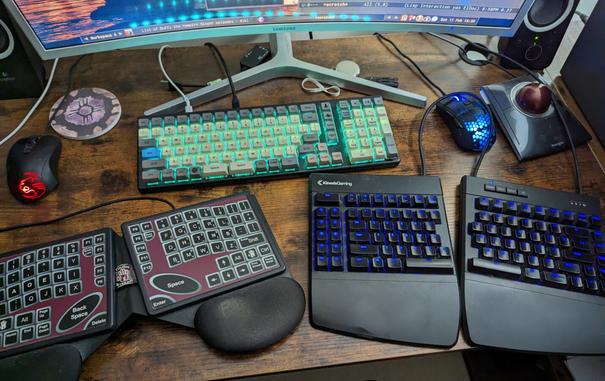
Update on #System76 #LaunchHeavy #MechanicalKeyboard because I am procrastinating right now:
Still using it as my day-to-day main keyboard. I've gotten used to not having the extra keys on the left (that my #Kinesis has) and thus having to use Super+F[1-8] to change desktops.
Layout reverts to layer 1, QWERTY at reboot, which is annoying, but I got used to it.
I'm liking having the numpad, but lack of indicator has got me a few times after rebooting.
Day 9 (iirc) of using #LaunchHeavy. So far:
* Feels a little cramped after the #Kinesis Gaming #MechanicalKeyboard
* 1st time I've wanted a wrist pad. Built into the Kinesis, now miss it
* The key LEDs shine out the back onto the monitor. Annoying at night, have to turn off (the LEDS).
* Launch Heavy is great keyboard, though. No problems with typing, love the feel of the keys.
* Like key repeat delay & speed better.
* In my house, the quiet keys are important, and these are great.
The #LaunchHeavy has 4 layers. The first is qwerty. I set up the third as dvorak - my main layout. Second is set up to control the LEDs.
Love the idea to have the less frequently needed keys on an easily accessible layer.
Thanks! I think I'm going to try that.