 windowsCult
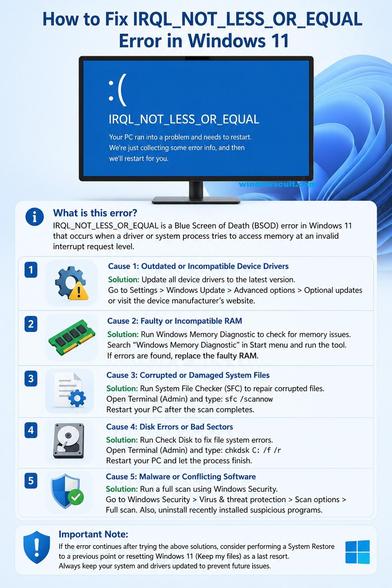
The IRQL_NOT_LESS_OR_EQUAL error occurs when a system process or device driver attempts to access a memory address it does not have permission to access, or accesses paged memory at an interrupt request level (IRQL) that is too high. This issue is usually caused by incompatible or faulty device drivers, particularly for graphics cards (like Nvidia GeForce) or network adapters. Again, it can also stem from corrupt system files, faulty RAM, or hardware conflicts.
Read the Fixes for IRQL_NOT_LESS_OR_EQUAL error https://www.windowscult.com/irql-not-less-or-equal/
Update or Roll Back Drivers: The primary cause is faulty drivers, particularly for network adapters or graphics cards. Use Device Manager to update or "Roll Back" recent driver updates.
Run System File Checker (SFC): Open Command Prompt as administrator and run sfc /scannow to repair corrupted system files.
Run DISM Commands: In CMD, execute dism /online /cleanup-image /restorehealth to fix Windows image issues.
Check Memory (RAM): Type "Windows Memory Diagnostic" in the search bar, select "Restart now," to check for faulty RAM.
Disable Overclocking/XMP: If your CPU or RAM is overclocked, revert to stock speeds in BIOS.
Perform a Clean Boot: Start Windows with minimal drivers and programs to rule out software conflicts.
If these do not work, consider performing a system restore to a point before the errors started.
#BSOD #IRQL_NOT_LESS_OR_EQUAL #bluescreenofdeath #Windows11 #howto #Tech #techarticle