Please hurry up with that Motorola support, @GrapheneOS because stock #Android needs to die.

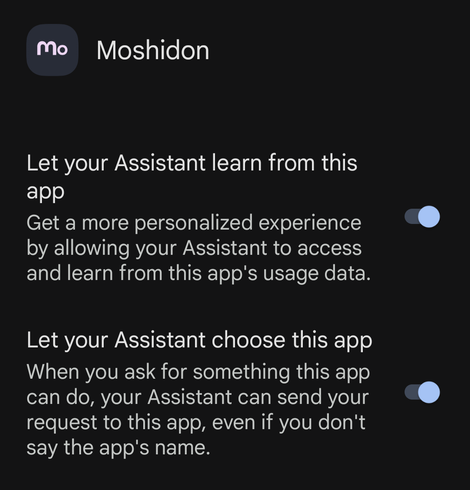
While trying to find a way to turn off the new "help me write" misfeature on Gmail, I discovered that the Google Assistant had been enabled for every app on my phone including #Signal, #Veilid Chat, my medical chart and insurance apps, and #Tor Browser.

And you have to go into the assistant settings to turn it off in every app individually.
#GoogleBeingEvil

HT @violetblue and her amazing cybersecurity roundup: Android Mastodon users should check their privacy settings STAT:

https://tech.lgbt/@FalconMarkSix/111109708488470509

(I'm on an iPhone, but use[d] chrome there so I had to confirm I had disabled this pernicious attempt by Google to get around Apple's privacy protections)

#GoogleBeingEvil #Android

Mark A. {FalconMarkSix} (@[email protected])

Attached: 3 images PSA: Google has now begun to roll-out the Ad Topics "feature" onto Android itself. It's not just in Chrome you have to disable the settings. Please #Boost to spread awareness. If you didn't get the pop-up screen on your Android device (it looks like the first two screenshots), to opt-out of these settings: 1. Go to your device Settings 2. Press "Google" 3. Press "Ads" - While you're here, press the "Delete Advertising ID" button and delete it 4. Press "Ad Privacy" 5. Review: "Ad Topics", "App-suggested ads", and "App Measurement". Make sure all are labelled as "OFF". (This page will look like the third screenshot) If you don't see "Ad Privacy" in Step 4 then it means that it hasn't been rolled out to you yet. You might need to wait and check back in a couple of days to see if/when it has been implemented to disable these settings. *EDIT:* There's another setting to review. In step 2, scroll to "Personalize using shared data". Turn everything off. **Pt. 2 in Replies** #Android #Google #Privacy #AdTopics

LGBTQIA+ and Tech