 infosertecla.com
Samsung Wallet acepta pasaportes digitales, pero los riesgos no son pocos
Samsung anunció que los usuarios de Estados Unidos pueden agregar su pasaporte a Samsung Wallet para usar en más de 250 puntos de control del TSA, en colaboración con la empresa privada CLEAR. La comodidad es real, pero los interrogantes sobre privacidad, infraestructura y puntos de falla también (Fuente TechRadar).
La propuesta suena tentadora: llegar tarde al aeropuerto, acercar el Galaxy al lector del TSA y pasar sin buscar el pasaporte físico. Samsung anunció que los usuarios en Estados Unidos pueden agregar su pasaporte estadounidense a Samsung Wallet, una función lanzada en colaboración con CLEAR que promete soporte en más de 250 puntos de control del TSA en todo el país.
El detalle que no siempre queda claro en el anuncio es que CLEAR no es un programa gubernamental. Es una empresa privada que genera ingresos cobrando a los consumidores por acceso más rápido a infraestructura de seguridad pública que ya existe. Samsung afirma que toda la información del pasaporte se cifra en el propio dispositivo, pero no proporciona contexto sobre qué hace CLEAR con los datos de verificación en su propio sistema, una distinción que tampoco se comunica con suficiente claridad al usuario promedio durante la configuración inicial.
Más allá de la privacidad, hay una lista concreta de puntos de falla que el pasaporte físico simplemente no tiene. La batería del teléfono puede agotarse. La app puede cerrarse inesperadamente. Una actualización de software puede introducir un problema de compatibilidad con el lector del TSA. El usuario puede quedar bloqueado fuera de su cuenta de Samsung. El teléfono puede ser robado camino al aeropuerto. El pasaporte físico, en cambio, tiene un único punto de falla: olvidarlo en casa.
Hay también una limitación de alcance que reduce significativamente el atractivo de la función. El pasaporte digital solo sirve para viajes domésticos dentro de Estados Unidos. Para viajes internacionales, el pasaporte físico sigue siendo obligatorio, lo que hace que la función sea prácticamente irrelevante para quienes viajan poco dentro del país pero sí al exterior con frecuencia.
Lo que Samsung está construyendo en realidad, más allá del discurso de conveniencia, es algo más ambicioso. Samsung Wallet ya almacena tarjetas de pago, tarjetas de embarque, llaves de hotel, tarjetas de fidelidad y credenciales de acceso al hogar. Un pasaporte digital es el paso lógico hacia convertir el teléfono en el token de autenticación único para toda la vida del usuario. Esa ambición no es necesariamente negativa, pero merece más escrutinio del que recibe cuando se empaqueta como una simple mejora de comodidad en el aeropuerto. Por ahora, el pasaporte físico no va a ningún lado, y el propio Samsung lo reconoce implícitamente al recomendar llevarlo siempre para viajes al exterior.
#aeropuerto #CLEAR #DatosPersonales #GalaxyPhone #identidad #IdentidadDigital #pasaporteDigital #PORTADA #privacidad #Samsung #SamsungWallet #SeguridadDigital #tecnologia #tsa #viajes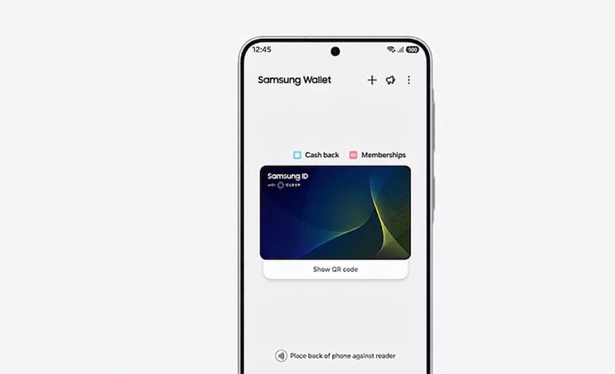
 SquaredTech
 Gravitas

 Dan Stafford
 DragonFlame
 GhostsheetZ
 Marc Carson
 Techies Review
 Techies Review