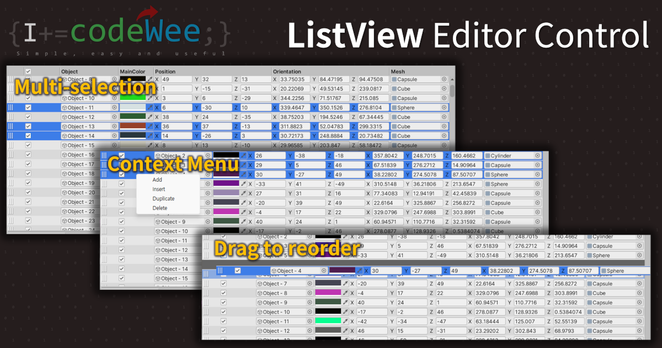
ListView Editor Control | Utilities Tools | Unity Asset Store

Use the ListView Editor Control from CodeWee on your next project. Find this utility tool & more on the Unity Asset Store.

What makes SwiftUI's 𝐶𝑜𝑛𝑡𝑒𝑥𝑡𝑀𝑒𝑛𝑢 so effective for building power-user interfaces? Wesley de Groot explores the design patterns behind context menus—those long-press menus that give users quick access to actions without cluttering your interface. A smart choice for interactive apps.

🔗: https://wesleydegroot.nl/blog/contextmenu by 𝗪𝗲𝘀𝗹𝗲𝘆 𝗱𝗲 𝗚𝗿𝗼𝗼𝘁

#SwiftUI #ContextMenu #UXDesign

Contextmenu - Wesley de Groot

SwiftUI continues to surprise us with its elegant solutions to common UI patterns. One such gem is the ContextMenu—a powerful modifier that lets you attach contextual actions to any view. Think of it as the right-click menu for touch interfaces. What is Contextmenu? The Contextmenu in SwiftUI is a view modifier that allows you to present a context menu when the user performs a secondary click (right-click) on a ...

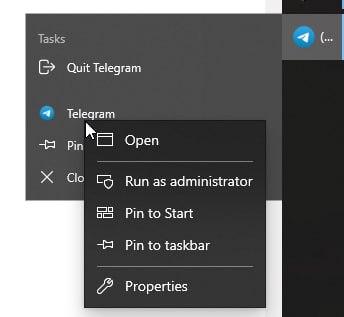
We don’t talk enough about the fact that in Windows context menu has context menu.

Thanks @komarovman for the picture

#Windows #ContextMenu

Työkoneella joutuu valitettavasti käyttämään Windows 11 -käyttistä ja yksi iso ärsytys on Explorerin typerä oikean klikkauksen valikko.

Löysin eilen onneksi keinon palauttaa Windows 10:n toimivampi valikko tämän uuden hirvityksen tilalle:

https://www.solveyourtech.com/windows-11-how-to-always-show-more-options-in-context-menus/

#Windows11 #ContextMenu

Windows 11: How to Always Show More Options in Context Menus - Solve Your Tech

Learn how to tweak Windows 11 to always display more options in context menus, simplifying your navigation and boosting productivity.

Solve Your Tech

How to remove “AMD Software Adrenalin Edition” from Context Menu in Windows 11

Problem: After installing the AMD Adrenalin Software, a new entry appeared in the Explorer Context Menu. What I find super annoying is that it dows nothing else than opening the Adrenalin Software. There is no Context at all. So: get rid of it.

A quick Search reveals that this is a common problem. Yet a lot of solutions pointing towards deleteing the according entry in the Registry Editor were not applicable as the entry didn’t exist in my case.

Solution: On Reddit, I found this thread which mentions to remove the entry via the following command in Powershell:

Get-AppxPackage -AllUsers AdvancedMicroDevicesInc-RSXCM | Remove-AppxPackage -AllUsers

Note: RSXCM might be an abbreviation for Radeon Software X[something] Context Menu

#AdrenalinSoftware #AMD #ContextMenu

Share menu on macOS is the stupidest thing ever. The amount of unnecessary mouse travel is crazy. I call it “there and back again”

Thanks Fuchen for reporting this

#macOS #ContextMenu #Share #AirDrop

Nearly one year without a post on my blog ! Well not anymore :
https://mrlixm.github.io/blog/windows-explorer-context-menu/
Fun exploration of creating context-menu that involved a bit of theory around command line interfaces. I show some pretty cool use case with #Arnold #maketx, #ffmpeg, #oiiotool, ...

Make sure to have a look cause it can really improve your workflow with those tools !

#Windows #contextMenu #batch

Creating custom context menu for Windows file explorer.

Making tx, rescaling image, displaying alembic content all as fast as a right click can be.

Liam Collod's Blog

@freedcreative
Don't know whether it can be as simple as #rsync, and/or #nextcloud or #syncthing, combined with a #launcher button/icon on your #desktop somewhere (or a custom right-click menu action, often called a #contextMenu, accessible from your #fileExplorer).

Not experts here either, though.
@neauoire

@redstarfish
If your distro allows you to produce your own right-click #contextMenu options, direct from the #fileManager, it might save you some time and mental energy.

Ugh, I wish it was easy to reorganise the #Windows10 #contextMenu...
I found tools to disable/enabled context menu items, and even one that could create a submenu with your own set of submenus, even with custom commands, but I haven't found one yet that allows you to *move* existing context menu items and especially extensions created by other applications, into your own set of submenus.

#Windows #organisation #WindowsExplorer