When Figma Starts Designing Us / Design Systems International

LinkFigma 對設計流程的影響與隱憂
https://example.com/figma-design-critique

📌 Summary:
本文回顧作者從 2013 年初次接觸 Figma 起,至今十年內該工具如何深刻改變設計流程,特別是幫助推動遠距設計實踐的重要性。然而,作者也對 Figma 近年朝向工程思維過度傾斜的設計特色感到憂慮。功能如 Smart Components、Variables、Auto Layout 以及 Interactive Prototypes,雖然提升了設計與工程的接軌,但同時限制了創意自由,讓設計師過早被框限於結構化思維,削弱在探索初期的彈性與即興發揮。文章以 Auto Layout 與 Dev Mode 兩個功能為例,說明這類工具令設計過程過於優化與僵化,阻礙設計師自由嘗試不同可能性,甚至導致設計被視為「準備好給工程師實作」的交付品,忽略了設計本質上應持續迭代與探索的特性。作者強調跨領域合作應是讓設計與工程各自保持獨立思考,而非設計師被迫接受工程師的工作模式。最後呼籲設計工具應保留初期混沌、試驗與發問的空間,才能激發出真正創新的設計成果,而非從一開始便強調整齊與一致的結構,避免整個設計領域陷入同質化困境。

🎯 Key Points:
→ 初遇 Figma 及其帶來的遠距設計便利:2013 年見到 prototype,十年後成為重要設計工具,推動完全遠距團隊運作。
→ 功能趨勢與工程化傾向:Smart Components、Variables、Auto Layout、Interactive Prototypes 等功能推動設計師向工程思維靠攏,卻犧牲自由探索。
→ Auto Layout 問題解析:表面便利,但限制自由移動與佈局嘗試,導致設計初期過早鎖死形態,影響創意發展。
→ Dev Mode 的矛盾:理論上銜接設計與開發流程,但實際上強化設計師與技術脫節,花大量時間製作複雜原型,卻無法直接用於開發,與鼓勵快速原型迭代的理念相違背。
→ 早期過度結構化設計的風險:過早做決策、過度結構化,減少靈活度,限制創造力與設計空間,導致設計趨同化與塑造有限制的「設計單一文化」。
→ 跨領域合作真正意義:強調設計與工程應保持各自視角與思維方式,而非盲從某一方思考模式。
→ 呼籲設計工具要保留試錯與自由發展空間:設計不應從一開始就追求完美的秩序,而應從問題、遊戲與混亂中孕育創意,避免侷限於既有格局。

🔖 Keywords:
#Figma #設計工具 #AutoLayout #Dev_Mode #跨域合作

When Figma Starts Designing Us / Design Systems International

The subtle ways in which design tools shape how we think and what we make

Design Systems International

Today's one of those days where I'm spending hours replicating something in #SwiftUI that would've taken be about 5 minutes to do using #AutoLayout.

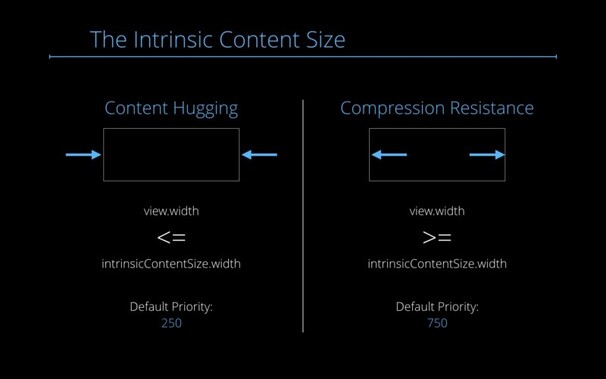
I miss contentCompressionResistancePriority and contentHuggingPriority.

Oops! I did it again... 😅
#AutoLayout #UIKit

SwiftUI Challenge: 🏆

Can You Port this from #AutoLayout to #SwiftUI? Does it take you 10 minutes (like Auto Layout), less or more?

https://christiantietze.de/posts/2024/03/swiftui-challenge-port-from-auto-layout-to-swiftui

Share your solutions! 🔥

SwiftUI Challenge: Can You Port this from Auto Layout to SwiftUI?

“Der Teilweise” proposed an interesting benchmark to see whether SwiftUI is production ready. Takes 10 minutes to do in Auto Layout. How long do you need for SwiftUI?

Christian Tietze

#UIKit poll: when you add #AutoLayout constraints, do you use SystemSpacing in any capacity?

I'm curious because I’ve finally made the effort to find out what it is and why its there

Never (= always use constants)
66.7%
Sometimes
27.8%
All the time (= never use constants)
5.6%
Poll ended at .

#AppKit #AutoLayout

(I fixed something by making a separate test project, but still don’t fully understand why it now works and didn’t before)

@me_ Haha the color of the floating box might indicate that this is an #AutoLayout issue, notoriously annoying 😆

Watched the WWDC 2011 video that introduced #AutoLayout, and… I get that the two presenters are excited, having worked on it, but I wonder about the trajectory that ultimately led to 2019’s #SwiftUI having such a different approach to layout that seems to mostly abandon the concepts they’re praising.

Informed, I’m sure, in part by what other folks have been doing. But we never got a public postmortem/retrospective, did we?

Are the WWDC 2012 session videos still available somewhere? https://gist.github.com/mmorris/071de01f219e6d7622d63c6f67864d08 looked promising, but the one I tried is a 404.

Specifically looking for #AutoLayout stuff.

WWDC 2012 HD video URL list

WWDC 2012 HD video URL list. GitHub Gist: instantly share code, notes, and snippets.

Gist

The Auto Layout Comprehendium™ • Mischa HildebrandMischa Hildebrand https://mischa-hildebrand.de/en/2017/11/the-auto-layout-comprehendium/

Wow, I wish I had known this since 2017 instead of just now!

#AutoLayout

The Auto Layout Comprehendium™ • Mischa Hildebrand

Auto Layout is essential for creating modern, responsive user interfaces on iOS and macOS. Its core idea is easy to grasp – yet, it feels like a jungle full of hidden secrets to many. Once you dive a little deeper into the topic, you will discover that there is much more below the simple surface. […]

Mischa Hildebrand