@update

1 Followers
12 Following
5 Posts
@notthebee True. I spend all my money on new RAM sticks and hard drives to hide the fact that I play League of Legends, just in case some three-letter agency raids my house.
@mkljczk DenyList w Magisk i po problemie.
@wonziu No nie ma. Tutaj nie zbudujesz marki ani zasięgów.

@notthebee
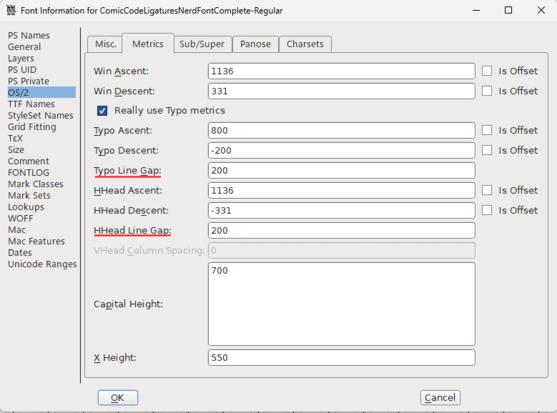
Windows Terminal does not yet support changing the line height, so I found another solution. I downloaded FontForge (the same one used in the Nerd Font patcher) and compared both font versions. To get the correct line height - such as in the original font you need to change two values:

Typo Line Gap: 0 -> 200
HHead Line Gap: 0 -> 200

I hope this can help you at some point.

@notthebee
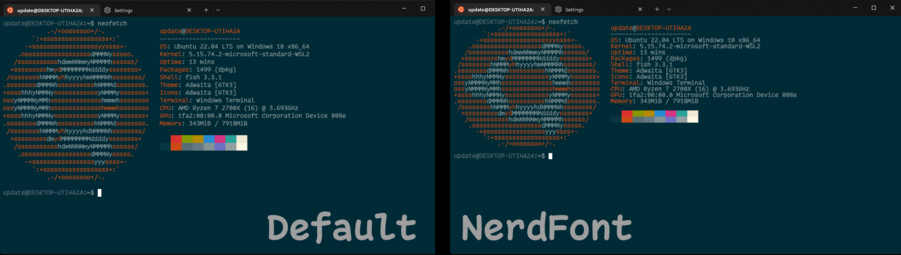
Hi, I've been using the Comic Code font you made a video about for a few months now. I recently decided to have it patched with the Nerd Font patcher and encountered the problem shown in the image below. For some reason, the line break is significantly reduced making the font look awful. I know it's been almost 7 months since the video was uploaded, but maybe you remember your patcher settings and would like to share them.

Thanks in advance.