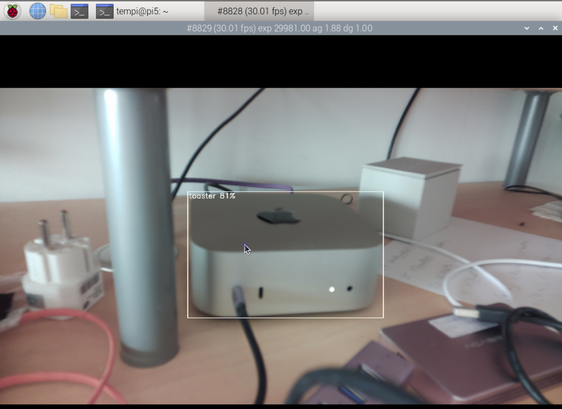
Pretty confident it's a toaster.

| Apps by me | https://apps.tempel.org |
| Find Any File (Mac) | https://findanyfile.app |
| @tempelorg |
Aaaand I release another Mac developer tool without a proper icon: StringsTranslator.
This one scans nib and strings files, e.g. from Finder, and then lets you search for text, for which it will then show you the desired translations.
Get it at https://apps.tempel.org/
Boosts welcome.


In case you want to look for yourself, here's the rule to find those large dirs, using a scripted rule from https://findanyfile.app/scripting.html
I'm sure this can also be done with a Terminal cmd, but well, this looks easier IMO.

Here's a reason why it was a good idea of including the manual in my macOS app as an html file and not in any other format.
Basically, I get translation into _any_ language (provided the browser supports it) for free. Now even images with text get translated. Not ideal but much better than no translation at all.

I was just going to rant about TestFlight-installed apps (on macOS) not to share their Security (TCC) permissions with the regular MAS-installed app of the same bundleID, but this is even worse – a warning that installling such a beta might "lose the app's data".
WTF, Apple?!
Which dev would write their app so that it deletes the user's data without warning just because it's a beta? That's a bad general assumption and hurtful to us devs, as it'll cause unncessary worries with our testers.

macOS (15.4.1) constantly fails to get my iPhone 14's connection state and battery level right:
iPhone (18.4.1) is on 5G and battery is nearly full but Mac thinks it's low battery and with bad connection.
*kopfschüttel*

