Some sights and sounds from our Superbooth26 Berlin visit https://www.youtube.com/watch?v=tDN3In6wuA4
| Finalist | https://finalist.works |
Notes is the biggest swing in 3.x and I'm calling it a collaborative experiment. If you've been waiting for this, the beta is open.
TestFlight: https://finalist.works/beta
I'd love to hear what you think.
Global search and the Tags section in the Notes tab pull from native notes and file notes in the same space. Tags from your markdown files show up next to native ones.
Create Note and Append to Note are Shortcuts actions, hands-free capture from anywhere on your devices.
Want every task in a note due on a specific day? Name the file `https://2026-04-28.md` and Finalist treats those tasks as due that day.
Frontmatter is bidirectional. Edit a tag chip or the pin-date in Finalist and the `.md` file updates underneath. Anything Finalist doesn't recognize stays untouched.
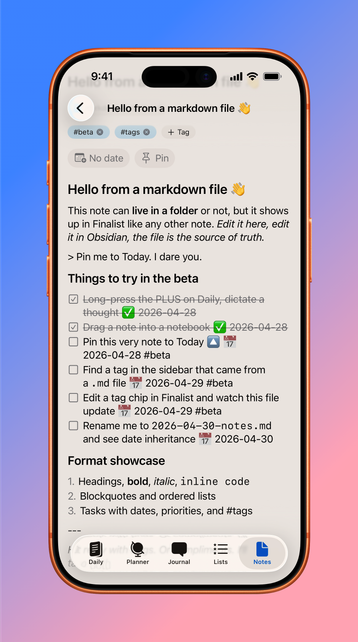
Date a note and it joins your day. It shows up on Daily next to your dated tasks and calendar events. Useful for meeting notes, ongoing thoughts, anything tied to a specific day.
Want an undated note on Today? Just Pin it. Shows up in Today, tap to open, unpin when you're done.
Native notes are super flexible. With a simple markdown editor, they hold their own tasks and even other notes (sub-notes). Tag them, date them, pin them. They sync via CloudKit like everything else.
There's also an Inbox. For the "uncategorized" thoughts. Capture first, file later (or never).
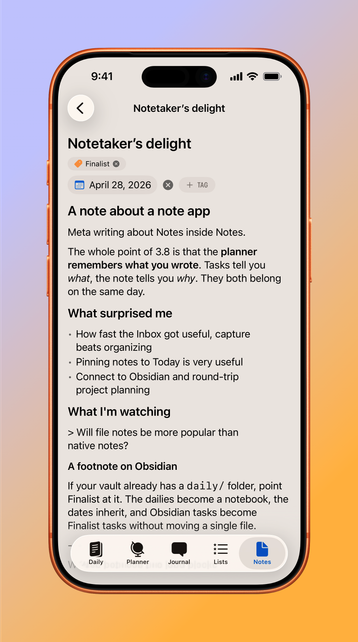
Finalist 3.8 beta just started, with a new very-demanded tab: Notes. It's something I've been working on for a while, as I wanted to blend native notes with Obsidian-style markdown files.
Simplest way to try it out: hold the big PLUS on Daily and start talking. Your dictated note appears.