Test toot

Rusty 🌺
@rustyk5
- 231 Followers
- 31 Following
- 21 Posts
Not here, follow @fka_tabs
How to confirm this!
1. Copy and paste the saltpack message above into a file, let's call it "rusty-proof" from "BEGIN..." to the last "...SIGNED MESSAGE."
2. Install the keybase tools if you haven't
3. Run: keybase verify < rusty-proof
4. It should tell you I signed it and who I am on Mastodon
1. Copy and paste the saltpack message above into a file, let's call it "rusty-proof" from "BEGIN..." to the last "...SIGNED MESSAGE."
2. Install the keybase tools if you haven't
3. Run: keybase verify < rusty-proof
4. It should tell you I signed it and who I am on Mastodon
BEGIN KEYBASE SALTPACK SIGNED MESSAGE. kXR7VktZdyH7rvq v5wcIkHbsLinOyO gzGnUU50nzZIGut pvyQEW9Ge6UF6qR d9GPLzAIyIsOr9o fXsK2bQZtsQbBkC 8kdncRhyVs57Uia TdnrFNBBAlD4PHN j0GhAwgSQwUEfsh KLLAcaLJMqwxHs6 jjjxhT2QnKpKchb KFyv1Frjy8k2HZK VNCvZx605gzs7ed hhrq3uGxDGS7CSH pnrSzPeUg7y6WjR oF1mE6lRJFGnLs2 pxC7HFqlP6tobD5 nm3NZYly2VOxsAQ EHzvb30lPBB5W4w s1NP2fnTtpfbR7E EACmsWszWWyZ3Fi ZMr9j5JTRReOIcz sWcjUgTnC3PTVd0 U5xOjpECc4G0. END KEYBASE SALTPACK SIGNED MESSAGE.
Ok I guess it's working so follow me at @rustyk5 instead of here :tada:
It was bad
I don't understand what's supposed to be on my home timeline but it hasn't updated in hours
Remember Mastodon before @sarahjeong ruined it?
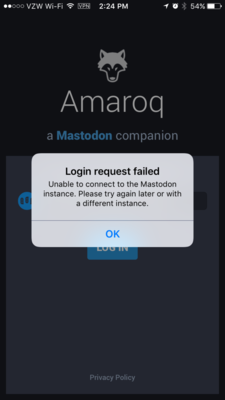
@eurasierboy hey, I'm trying to use Amaroq to connect to a Mastodon instance I run inside a VPN and it's refusing to connect. I'm wondering if it tries to force https on the connection? I don't have ssl enabled, because it's on a VPN anyway and not available to the outside. My phone is on the VPN and I can reach my mastodon using a browser. Any ideas?
https://mastodon.social/media/RyAZeHhXn9SXvKqhwFg
https://mastodon.social/media/RyAZeHhXn9SXvKqhwFg