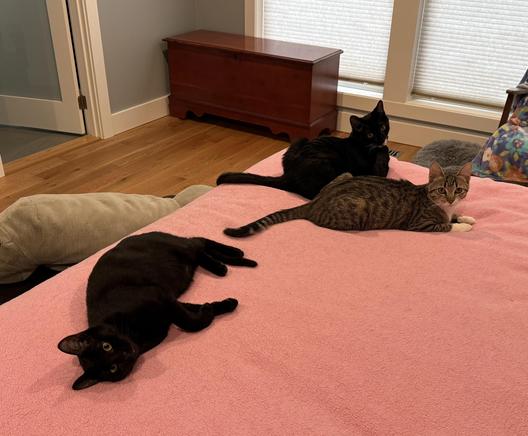
The beauty having kittens AND Legos is that you will always have something to (re)build.
(A game of chase took a bad turn and wiped out the Cobra.)


| Blog | https://robservatory.com |
| Work | https://manytricks.com |
The beauty having kittens AND Legos is that you will always have something to (re)build.
(A game of chase took a bad turn and wiped out the Cobra.)
PSA: If you live in the States, Costco is clearing out prior-gen 11" M4 iPad Pros in various configurations. We upgraded from M2 Airs to M4 Pros with nanotexture glass at roughly half the cost of the same thing in an M5 iPad Pro. The textured glass is a real difference maker; more so than I was expecting (there are only two nano glass models left).
https://www.costco.com/s?keyword=11%22%20m4%20ipad%20pro
Not cheap, but WAY cheaper than the M5 versions! ($2300 vs $1200 for the 11" 2TB nano cellular, for instance).

We released Hudlum 1.1 today, an update to our "in the right spot" volume changing indicator for macOS Tahoe. If you’re a fan of the old-school segmented volume change indicator, well, this update’s for you!

"Delivery—your kittens have arrived! Where do you want them?"
'Oh, just pile them anywhere'
"You got it!"

Apple makes it tough to run unsigned apps—and enabling such apps the Apple way involves multiple clicks in dialogs and System Settings (or a trip to Terminal). I got tired of this, so I wrote a simple @KeyboardMaestro macro that wipes the quarantine flag (which the OS sets to mark apps as dangerous).
Now in Finder, I select an app bundle, press Control-Option-Q, and the quarantine flag is removed. So much simpler.
https://forum.keyboardmaestro.com/t/macro-easily-clear-the-quarantine-flag-on-an-app/51083
Warning: Trust your app sources before proceeding :).

Can anyone tell me how to actually delete these photos from my phone? They show in Photos as Already Imported, but they show every single time, even if I check the "Delete items after import" box. Do I really need to scan through the thousands of photos on my phone and delete them, one by one as I find them?
They cover years and years of photos, seemingly randomly. Very annoying.

My laptop is on macOS Tahoe (so I can support our customers), but my main Mac remains on Sequoia, because I don’t like Liquid Glass and some of the functional changes in macOS Tahoe. But I was tired of the constant "UPDATE TO TAHOE NOW YOU SLACKER!" dialogs that Apple sends my way.
You *can* block this stuff, but it requires installing a device management profile. It’s not as scary as it may sound, and the end result is Tahoe-free Mac usage, at least in 90 day chunks.
https://robservatory.com/block-the-upgrade-to-tahoe-alerts-and-system-settings-indicator/


I wanted to transcribe a bit of a podcast, and I was curious if @claudeai101 could do transcriptions. Claude said no problem, so I sent the audio file, and I got the transcript. I know the host (@mcelhearn), so I showed him a bit of the output, saying "neat!" He said, "Umm, we didn’t say anything like that." WTF?
I then asked Claude if it’d simply made up the transcript…and yes,it had! Completely! Without telling me.
This is the future people are spending billions on?

To start each day, I play a lot of word games, including the New York Times’ Connections. I wanted to visually rearrange the words in the puzzle, as it helps me see their groupings more clearly. So I "created" an HTML/JS page to do just that. (I put "created" in quotes because Claude the AI actually created 99% of the final code.)
If you play Connections, don’t mind AI code, and want to drag-and-drop words to test-fit your solutions, grab the helper.
https://robservatory.com/a-helper-for-connections-style-word-games/
