
435 Followers
5 Following
27 Posts

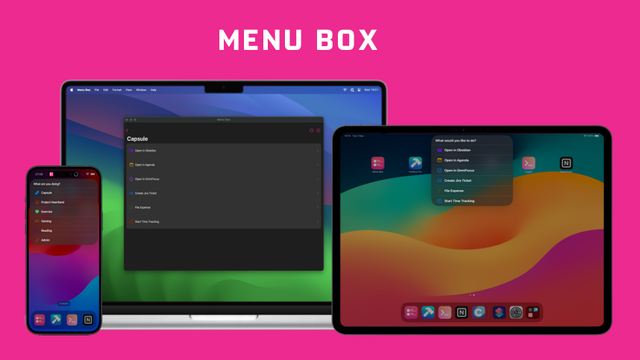
We're very excited to be able to announce the official release of Menu Box!

Menu Box is an app designed to provide beautiful custom menus for use in your advanced Shortcuts. Menu Items are fully customisable, including allowing you to add an SF Symbol, an existing App Icon, or your own image, as well as allowing you to add a data payload to be read in via your Shortcuts.

Menu Box helps make your Shortcuts even more powerful and is especially perfect when paired with the Action Button to make your phone even more useful as you go about your life.

Find out more at https://menubox.app
@MattPackwood Hi, sorry for the delayed replies. We've had quite a backlog recently but this is monitored.
The [email protected] is still the best address for us.
-David

@achisto Hey! Family Sharing is enabled for Lifetime, but it's different from the subscriptions. There are two types of sharing:
- Subscription Sharing, where any family member can pay for a subscription and share it with the rest of the family.
- Purchase Sharing, where anyone can purchase but all payments are charged to the family organiser.

Pushcut Monthly and Annual are subscriptions, so they fall under Subscription Sharing. Pushcut Lifetime is a one-time purchase, so it falls under Purchase Sharing. This means that some family setups will be able to share the subscriptions but not Pushcut Lifetime.
I think this is quite confusing but, unfortunately, it’s under Apple's control and there's not a lot we can do about it!
- David

Toolbox Pro 2023.1 is released and available for download in the App Store!

2023.1 brings fixes to Apple Music integration, the "Scan Documents" and "Get Location from What3Words" actions, as well as other minor fixes.

Due to the transfer from Alex Hay's developer account to ours, Global Variables as well as File and Folder bookmarks have been unfortunately reset. We apologise for the inevitable inconvenience caused.
If you have a Mac, you can recover your Global Variables by following the guide here. https://toolboxpro.app/docs/find-variables-macos

find-variables-macos — Toolbox Pro

Toolbox Pro

02:47 UTC - Full service has been resumed.

We're aware of a current issue preventing devices from connecting to our servers. We've confirmed there is an issue with Google's Firestore service which provides our databases, which Google are investigating.

We're awaiting an update from them, but are working to resume service as soon as possible.

We apologies for the inconvenience this causes in the meantime.

@MattPackwood Have you imported the widgets into Pushcut (copy the JSON, create a new Widget Content and hit the "import" button in the bottom toolbar)? -David
@MattPackwood Hey, sorry we missed that message. I've posted a reply in the topic -David

2023.06 and 2023.07 have been out for a while now:

In 2023.06 (https://www.pushcut.io/release-notes/2023-06) we added threading to our “Send Notifications” shortcut, a new Find Automation Server Requests shortcut action, and updated our Find Devices shortcut to support filtering for connected Automation Servers.

In 2023.07 (https://www.pushcut.io/release-notes/2023-07) we extended our drag-and-drop support for widget components (try dragging one into Files!) and added support for running integrations (IFTTT, Zapier, etc) when you tap a widget.

Configuring the new “Run Integration” action is currently supported in our Shortcuts, API, and Zapier Integration (https://zapier.com/apps/pushcut/integrations). Support for IFTTT is coming soon.

We’re currently hard at work on the Automation Server for macOS and supporting the new widget features in iOS 17. Watch this space!

2023.06: Get Your Automation Server Requests in Shortcuts

Trigger iOS shortcuts from anywhere! Automation superpowers through smart notifications. Trigger the right action based on location, time, HomeKit, or any online event. Connect to HomeKit, IFTTT, Zapier, Flow, Make, or anything connected to the internet.

Pushcut
@dennis83
Hi,
Currently the Run Integration action can’t be configured via IFTTT. We’re working on adding this to our integration and hope to have it available soon.
As for the notification log: We’re a very small team and don’t feel comfortable making promises on future features.

2023.05 has been out for a while now: We’ve rolled out support for new “on tap” actions into IFTTT and added support for previews in the editor.
In addition, for those of you with a lot of notifications, 2023.05.2 now allows you to search them!

https://www.pushcut.io/release-notes/2023-05

We’ve also added a new Update Widget action to our Zapier Integration (https://zapier.com/apps/pushcut/integrations) that makes it even easier to update your custom widgets!

2023.05: Build a Dynamic Home Screen Dashboard with Widgets

Trigger iOS shortcuts from anywhere! Automation superpowers through smart notifications. Trigger the right action based on location, time, HomeKit, or any online event. Connect to HomeKit, IFTTT, Zapier, Flow, Make, or anything connected to the internet.

Pushcut