Old Stack Journal

@oldstackjournal
1 Followers
19 Following
17 Posts
Practical tech for solo builders who want useful tools, not more noise.
AI tools, web workflows, build notes, and simple-stack thinking for people building real things on the web.
Most web projects are still pages, forms, users, records, uploads, emails, reports, and scheduled jobs. For that shape of work, LAMP is still a practical choice. Old Stack Journal: https://oldstackjournal.com/web-tech/lamp-is-still-enough-for-most-web-projects/?utm_source=mastodon

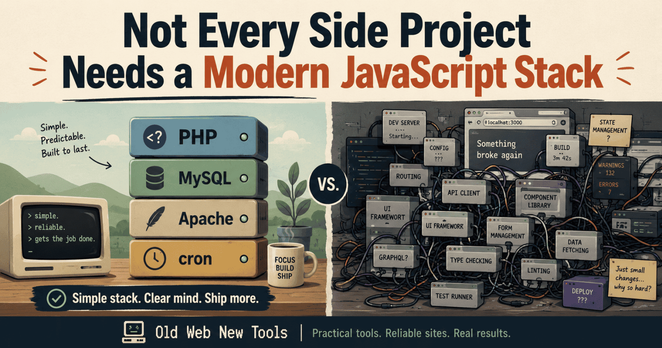
Not every side project needs a modern JavaScript stack.

For a lot of small tools, PHP + MySQL + Apache + cron is still enough. If the job is forms, tables, and scheduled updates, keep the stack small.

https://oldstackjournal.com/workflows/not-every-side-project-needs-a-modern-javascript-stack/?utm_source=mastodon

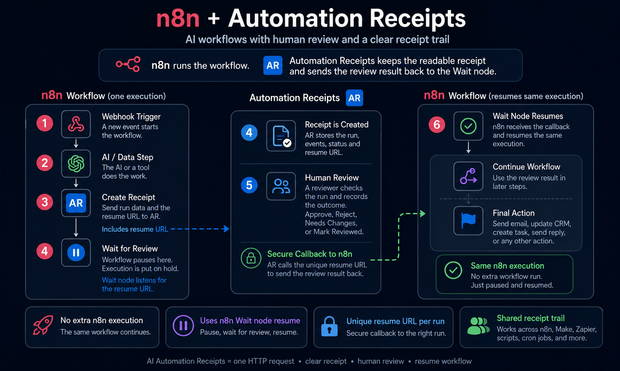
updated the diagram

@BartV I think I framed the diagram too much like a separate callback workflow,

The cleaner n8n version is what you’re describing: the workflow sends the receipt + Wait node resume URL to Automation Receipts, pauses at the Wait node, then AR calls that resume URL with the review result. Same n8n execution continues, so no extra workflow run.

AR’s role is the external receipt/review record — one readable receipt trail across n8n, Make, Zapier, scripts, cron jobs, etc — not a replacement for n8n

If you keep typing the same setup prompt into ChatGPT, a custom GPT can be a practical way to save time. OSJ’s take: less repetition, less drift, more reusable workflow. https://oldstackjournal.com/workflows/why-you-should-build-your-own-gpt-instead-of-repeating-yourself-forever/?utm_source=mastodon

@BartV Totally fair question. I wouldn’t use this instead of a loop for normal repeat/retry logic. This is for a different case: n8n creates a receipt, waits for an external human review in Automation Receipts, then AR calls back with approved/rejected/needs changes so the workflow can continue.

Loop = repeat inside n8n. Callback = resume after outside input.

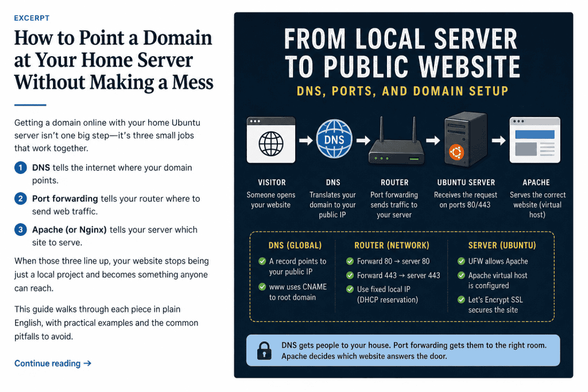
Pointing a domain at a home server is not one job. It’s DNS, port forwarding, Apache, and sometimes CGNAT or a dynamic IP getting in the way. This guide breaks the setup into parts and keeps the public surface area small. https://oldstackjournal.com/how-tos-guides/point-a-domain-at-your-home-server/?utm_source=mastodon
Practical n8n notes from a real workflow: HTTP Request, Wait node, webhook callback, human review, continue. I also wrote about where Automation Receipts fits beside it as the receipt/review layer. https://oldstackjournal.com/?p=241&utm_source=mastodon&utm_source=mastodon
#n8n #Automation

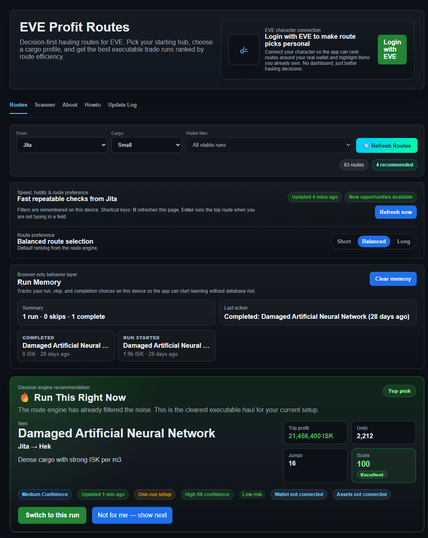
EVE Online haulers and market runners: we built Eve Trade Routes at https://terralog.online/.

Decision-first route checking before you undock, with a practical focus on route planning.

@eveonline

Old PC or mini PC? You can turn it into a useful Ubuntu home server for local web dev. This guide covers Ubuntu Server, Apache, MySQL, PHP, SSL, local domains, and safer outside access. Practical home lab stuff, not enterprise noise. https://oldstackjournal.com/how-tos-guides/how-to-set-up-a-fresh-ubuntu-home-server-for-local-web-development/?utm_source=mastodon
How to Set Up a Fresh Ubuntu Home Server for Local Web Development – Old Stack Journal