Marco Oliver Grunwald

@mgrunwald
0 Followers
3 Following
5 Posts
Ghostmoon.app - The essential powertool for macOS.

Every feature you need. Two clicks away. The essential powertool for macOS.

Features:
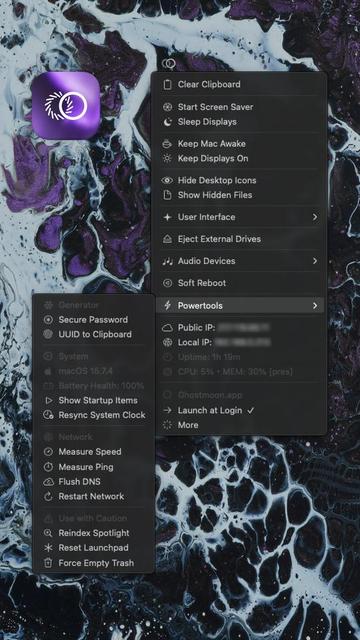
Keep Mac/displays awake | Mass eject external drives | Hide/show hidden files and desktop icons | Switch between dark/light mode | Switch audio output devices | Mute internal microphone | Cryptographically secure password and UUID generator | Battery health display | CPU usage and memory pressure display | System uptime display | Public/local IP display with copy to clipboard functionality | Quick access to startup items and daemons | Measure connection speed and latency, and more.
Note:
This is a pre-release. The app is not yet signed/notarized, so after launching it for the first time – which will give you the typical macOS Gatekeeper warning – you'll have to go to System Settings > Privacy & Security, scroll to the bottom and click "Open Anyway".

The app is written in native, highly optimised Swift, uses almost no system resources and plugs into the system like a native component of macOS.

Works on Apple Silicon and Intel Macs. macOS 13 Ventura or newer.

You can download and use it for free.
https://mgrunwald.com/ghostmoon
There is also Ghostmoon XE (Extended Edition) with extra features. Available to Project Supporters.

Ghostmoon.app - The essential powertool for macOS.

Every feature you need. Two clicks away. The essential powertool for macOS.

Ghostmoon.app [pre-release]

I created a macOS utility app called Ghostmoon. It lives in the macOS menu bar and gives you easy access to hidden system settings, essential stats, maintenance routines and other functionalities useful in everyday work.

It currently has over 30 features normally found in multiple separate apps. All that in the smallest, most efficient package possible.

#macOS #IndieApp #BuildInPublic #MacApps #MenuBar #SideProject #IndieHackers #Swift #Fediverse