Line Jump To Buttons [New little feature]
Added up and down buttons on lines for convenient hopping between page sections

Thinking canvas for whiteboarding, research, moodboards, and note-taking that works how our brains work.
No sign up required.
By @pirijan
| kinopio | https://kinopio.club |
| changelog | https://kinopio.club/changelog |
| discord | https://kinopio.club/discord |
Line Jump To Buttons [New little feature]
Added up and down buttons on lines for convenient hopping between page sections
Drag Lines Higher Up [new little detail]
Lines can be positioned higher up for more flexibility. They'll neatly shift themselves out of the way of the toolbar.
Updated Share → Links
When you paste Kinopio spaces or invites into Discord, Slack, or wherever, the link preview now contains more useful information to make the best first impression when sharing Kinopio with new users or with your team.
PSA: To fix an issue with Slack wrongly caching the wrong url preview information for space or group invite links, the format of invite links is changing so that the spaceId or groupId is in the path of the url (instead of a query string).
This means that Invite links that were generated previously won't work anymore (they'll 404), so you'll want to update any reference invite links to the new format (via the Share menu).
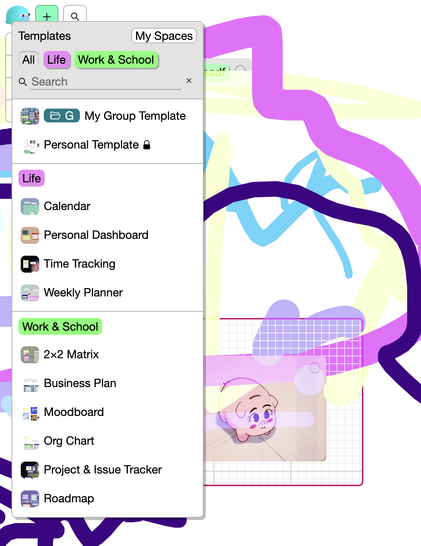
All-new Templates [New]
The Templates picker was rebuilt from the ground up with a bunch of all-new and more useful templates that use modern Kinopio features like Boxes, Lines, and Lists.
(Even if you're a long-time user, you might find some of them handy, like the Calendar or Time Tracker.)
Jump To [New]
Navigate your space's Table of Contents by jumping between lines, lists, and boxes sorted by Y position.
(This replaces the old 'Minimap' dialog)
