Nice touch on the new Sketch landing page: You can drag items around like it's on an artboard.
P.S. I still think Sketch is a great product ✌️

| https://www.linkedin.com/in/jrdnbwmn | |
| Website | https://jordanbowman.design |
First, understand how color blindness determines what a person sees (and, in turn, how it affects your designs).
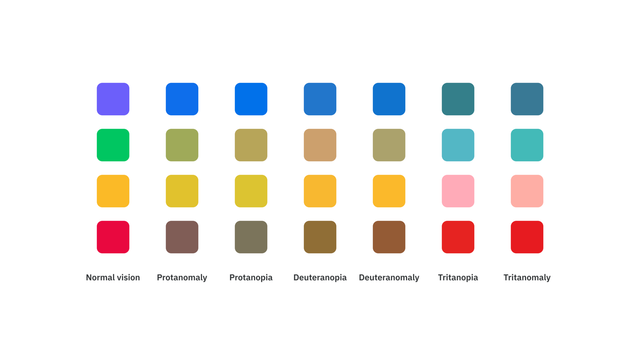
There are several different kinds of color blindness, which affect your ability to see red, yellow, and/or blue.
See the chart below for examples.
Nice touch on the new Sketch landing page: You can drag items around like it's on an artboard.
P.S. I still think Sketch is a great product ✌️
6. If you use your mouse wheel with your cursor on the color picker, it will slide up and down the hues.
Hold ⌥ Option and you’ll slide up and down the opacity instead.
5. In the color panel or color input, use ↑↓ arrows to nudge it lighter or darker.
Adding ⇧ Shift makes bigger jumps.
3. You can use real color names like “green” or “purple” in the color input.
I like using “lightblue” and “pink” to block out colored sections or do some rapid designing.
2. The eyedropper can be a crutch: it’s sometimes better to avoid it entirely to be more consistent.
Utilize the document colors panel, which shows all the colors used on every page in your current document.
Or make and use color variables.
1. Tap "I" to bring up the eyedropper without losing your current flow.
Did you know you can press & hold your mouse button to *preview* different colors instead of clicking around trying to find what you need?
🌈 Color tip: Ditch HEX for HSB
HSB is a more intuitive, accurate, flexible way to control color.
It allows you to do things like find complementary colors just by changing the hue, or make saturation/brightness adjustments to get the specific feel you're looking for.
Designers sometimes make picking color shades too complicated 😬.
There's a systematic process for creating an accurate color scale.
It’s only 3 steps (🎥 watch the video)!