James Woo

@jameswoo
5 Followers
5 Following
124 Posts
Making videos and teaching others about AI, tech, etc. at https://jameswoo.net
Websitehttps://jameswoo.net
YouTubehttps://www.youtube.com/c/JamesWoo
Instagram
Twitterhttps://twitter.com/RealJamesWoo/

RE: https://phire.place/@phire/116167753188355563

"...sensitive and personal footage captured by [Meta Smart Glasses]—including people going to the bathroom, getting dressed, and having sex—is being reviewed by contractors who see all of it uncensored."

https://gizmodo.com/dear-meta-smart-glasses-wearers-youre-being-watched-too-2000728928

This site with a database of car repair manuals is good to have handy

https://charm.li/about.html

About Operation CHARM, the free Collection of High-quality Auto Repair Manuals

Learn about Operation CHARM, the first completely free online repository of car and truck service manuals.

Sad that new Sora not available where I am

An owl gliding through a cloud of helium-filled soap bubbles reveals wingtip and tail vortices.

Video credit: Usherwood et al.
Source: https://journals.biologists.com/jeb/article/223/3/jeb214809/223686/High-aerodynamic-lift-from-the-tail-reduces-drag

Are we living in a golden age of stupidity?

From brain-rotting videos to AI creep, every technological advance seems to make it harder to work, remember, think and function independently …

The Guardian

I revised and updated the Official Shotcut Training is here.

It took a bit longer than anticipated because there were some unrelated task I need to take care off.

Anyway check it out here.

https://jamesw.gumroad.com/l/kivyb

Video Editing Made Easy With Shotcut - Updated Edition

Learn How to Create Videos Fast with Shotcut (Updated In 2025)New revised lessons.This is what you will learn in this training. A quick overview of Shotcut’s interface and tools Basic edits like how to trim, split, rearrange and join video clips. Add and adjust transitions Using text, titles and annotation to your video Animating text Adding images and overlays to your video to create watermarks or logo How to add, remove and adjust audio like music and voiceovers How to create motion like pan and zoom with keyframes Multi track editing to create Picture-in-Picture and also green screen effect Other advance tips and tricks Apply as you learnEach video lesson is kept short so you can zoom into a particular lesson learn and apply immediately.That way you save time without having to watch a lengthy video just to get to the part you want.You should be able to create your video in about 60 minutes even if you are new.There are more advanced lessons when you are ready to show you how to create videos with more effects.Review from the lead developer of Shotcut“As the lead developer of Shotcut, I reviewed the entire course, and I think it is very good. James clearly and accurately explains many thing from basics to more advanced techniques such as picture-in-picture, chroma keying, and using custom HTML.The lessons are sequenced in a nice progressive manner, but you can also directly visit specific topics ~ Dan DennedyReview from past traineesAbsolutely loved the class. Very detailed and I learned a lot from the class. James is very knowledgeable and goes through all the topics in detail. ~ Shakir MohaseenThe course has it all and would still be a bargain at twice the price ~ Chris“Compared to individual YouTube tutorials, this course lays out in a menu-like format all you need to know about the software, which makes it so easy to know where you are, where you’ve been, and where you’re going.” ~ André“Okay. I'm thrilled, so far. Your videos are bite-sized, allowing me to comfortably learn without overwhelming me. I am so happy I bought this course.Thank you for being thorough and taking the time and effort needed to make it comprehensible for me. I was completely overwhelmed and intimidated by the Shotcut interface until watching you first two video chapters of this course.”“This course got me up and running with Shotcut in no time” – Dave Ives"Let's just say, within a day I was doing more with video than the goal I had set for myself. I started with one video prior to this course to over 30 plus, less than a week. Thanks for bringing a newbie into focus.” – Johnny Baker“His instruction is very methodical and clear.” – David VarnauNote - the videos for this course is streamed i.e. you watch it on Gumroad. It is Not for download.Download Shotcut Software here.Not ready to sign up? Get the free Shotcut Filters Cheatsheet PDF.

Gumroad
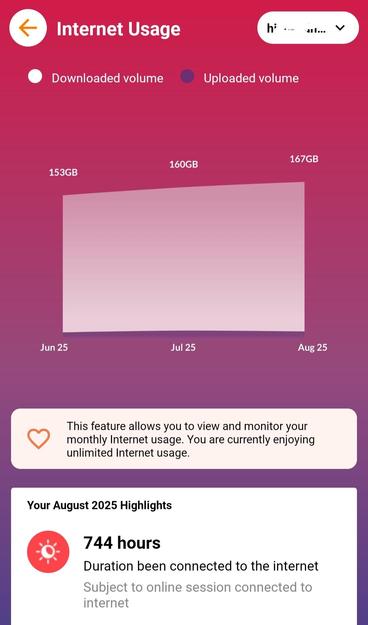
Looks like I use a lot less data on broadband than I thought. Thinking of switching providers.

Here are 10 extra tips to maximize DemoCreator if you choose to use it.

https://youtu.be/A1esWsunC4w

If you want to create on screen demos or tutorials, here's a software that allows you to do so with little to no editing.

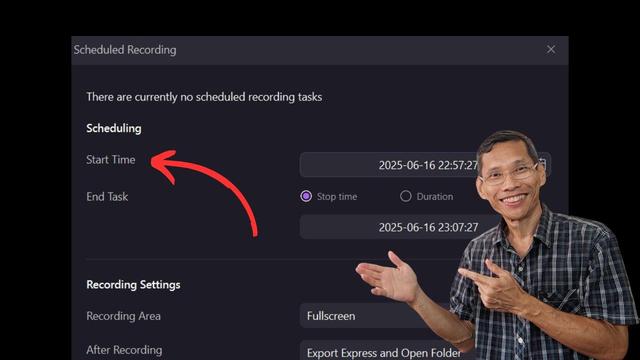
One of the features I like most is the ability to schedule screen recording. You can use this to record a webinar or presentation that you are not able to attend.

https://youtu.be/aEZ01Tj4FyQ

Vapor pressure deficit (VPD) in hydroponics – Science in Hydroponics