
Eric Horacek

@erichoracek
430 Followers
159 Following
60 Posts
Building ChatGPT for iOS & Mac at OpenAI, previously design systems and iOS at Airbnb
Githubhttps://github.com/erichoracek
Twitterhttps://twitter.com/erichoracek
Websitehttps://erichoracek.com

I built my first ChatGPT app! 🚀

It connects with my Philips Hue lights so I can control them directly from ChatGPT. After logging in with my Hue account, I can view the status of my lights and control them with natural language.

Here’s a short demo 👇

Wild to think that SwiftUI doesn't let you put views inline with Text six years in and counting. Text-heavy interfaces are obviously very popular right now and Browsers are so much better equipped to compose them.
Joe Pesci Santa
Take a look at how we’ve bootstrapped well over ten thousand snapshot tests for ChatGPT from our SwiftUI previews with Emerge https://www.emergetools.com/blog/posts/openai-on-mobile-development-previews-and-snapshot-testing
Emerge Tools Blog | OpenAI on Mobile Development, Previews, & Snapshot Testing

A deep dive into how OpenAI approaches snapshot testing in their ChatGPT mobile apps

My latest blog post shows how SnapshotPreviews (https://github.com/EmergeTools/SnapshotPreviews) is able to render Preview macros using the private #SwiftUI SPI #iosdev https://www.emergetools.com/blog/posts/calling-hidden-swift-functions
GitHub - EmergeTools/SnapshotPreviews: 📸 Automatic snapshots from Xcode previews. Supports UIKit/AppKit/SwiftUI on iOS/macOS/watchOS/visionOS/tvOS. Browse previews in-app with the Preview Gallery, or save them to PNGs with an XCTest

📸 Automatic snapshots from Xcode previews. Supports UIKit/AppKit/SwiftUI on iOS/macOS/watchOS/visionOS/tvOS. Browse previews in-app with the Preview Gallery, or save them to PNGs with an XCTest - E...

GitHub
The ChatGPT for macOS update that enables interacting with Xcode and VSCode directly is kind of a low-key game changer.

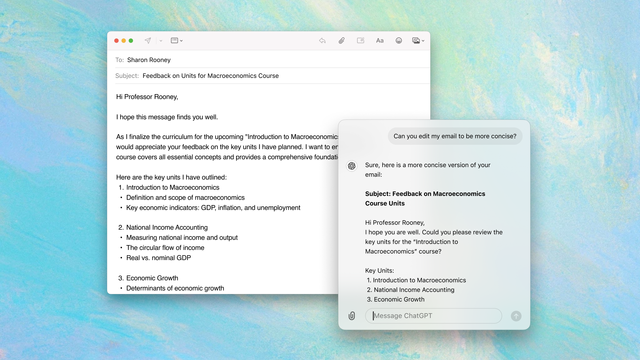
We're continuing to make some great updates to ChatGPT for macOS—it can now bring in context directly from running apps on your Mac—no copy-paste required!

Check out https://help.openai.com/en/articles/10119604-work-with-apps-on-macos or Romain's video explanation for more details on how it works with apps like Xcode and Terminal.

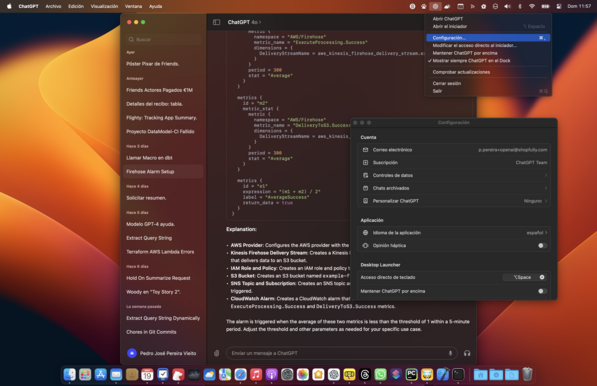
Nice update to ChatGPT for Mac: option-space now brings up results in a small floating window. Good for quick answers, but can still be collapsed back into the main window. Whoever is working on the Mac app is doing good work. It’s like a case study in sticking with AppKit.

We’re launching a brand new way to interact with ChatGPT on your Mac today—a lightweight companion window to make it easy to chat without leaving your context. To try it out bring up the chat bar with either the opt-space shortcut or by clicking the ChatGPT menu bar item and send a message.

A fun little detail is that you can toss the companion window out of the way if it’s covering something on the screen and it will dock to the nearest screen edge. Hope this helps streamline your workflows!

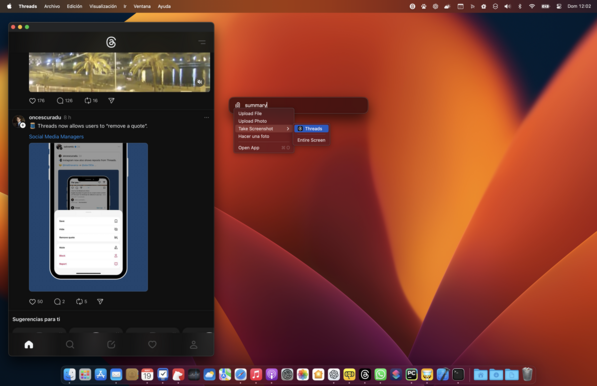
The ChatGPT macOS app is a clear mark of the triumph of Apple approach with SwiftUI: a fully native Mac app based on the iOS ChatGPT app code base with Mac specific features (the Menu Bar item, the system-wide launcher with screen-capture support…).

No other Desktop platform has this advantage of developers being able to deploy fully native apps based on their mobile counterpart.