
XPipe - A connection hub for all your servers: Status update for the v20 release

XPipe - A connection hub for all your servers: Status update for the v20 release
XPipe - A connection hub for all your servers: Status update for the v20 release

XPipe - A connection hub for all your servers: Status update for the v16 release
XPipe - A connection hub for all your servers: Status update for the v16 release
XPipe - A connection hub for all your servers: Status update for the v15 release

XPipe - A connection hub for all your servers: Status update for the v15 release Today I can share a major development status update of XPipe [https://github.com/xpipe-io/xpipe], a new connection hub that allows you to access your entire server infrastructure from your local desktop. It can make your life easier when working with any kind of servers by eliminating all the commonly tedious tasks that come up when interacting with remote systems, either from the terminal or from a graphical interface. XPipe comes with integrations for SSH, docker and other containers, various hypervisors, and more without requiring setup on your remote systems. You can also keep using your favourite text/code editors, terminals, password managers, shells, command-line tools, and more with it. Hub [https://i.imgur.com/tSXWF75.png] ## Tailscale SSH support You can now connect to devices in your tailnet via Tailscale SSH and your locally installed tailscale command-line client. This integration supports multiple accounts as well to switch between different tailnets. ## Custom icons You can now add custom icons to use for your connections. This implementation replaces the old model of shipping the icons from https://github.com/selfhst/icons [https://github.com/selfhst/icons] along XPipe. Instead, you can now dynamically add sources of icons. This can either be a local directory or a remote git repository that can be cloned and pulled by xpipe. XPipe will pick up any .svg files in there, rasterize them to cached .pngs, and display them in XPipe. As default icon sources, it will still come with the https://github.com/selfhst/icons [https://github.com/selfhst/icons] repository enabled, but now it can fetch these icons at runtime. If you are using the git vault sync, you can also add icons to a synced directory in your git vault to have access to them on all systems. [https://i.imgur.com/rIyEPgK.png] ## New docs There is a new documentation site at https://docs.xpipe.io [https://docs.xpipe.io]. The goal is to expand this over time to provide proper documentation for many features. Since it came up quite a bit last time I posted about XPipe here, I hope that any questions about what exactly XPipe is, how it makes your life easier, what it can do, and more, can now be answered in detail by the documentation. ## Webtop enhancements The webtop, a container-based KDE desktop environment, received a general overhaul. The list of terminals, editors, and rdp clients has been updated. The language support has been improved so that you can now easily run the desktop environment in any language you want. There were also many new additions and fixes for preinstalled tools of the desktop environment. There is also now more webtop documentation at https://docs.xpipe.io/guide/webtop [https://docs.xpipe.io/guide/webtop] [https://github.com/xpipe-io/.github/raw/main/img/webtop.png] ## Package manager repositories There is now an apt repository available at https://apt.xpipe.io [https://apt.xpipe.io] and an rpm repository available at https://rpm.xpipe.io [https://rpm.xpipe.io]. You can add them as sources to apt or your rpm-based package manager. This allows you to also install and upgrade xpipe via your native package manager instead of using the built-in self-updater. ## Other - Add support for Gnome Console and Ptyxis Terminal - Add support for cursor, windsurf, and trae editor - Add support for cosmic-term of the new cosmic desktop environment - Add the ability to launch connections from the command-line with the xpipe launch [https://docs.xpipe.io/guide/connection-launch#from-the-terminal] command - Add new action to run scripts in the file browser and show their output without having to open a terminal - You can now import saved PuTTY sessions on a system when searching for available connections. This also works for KiTTY - Improve application performance when having many connections and categories ## A note on the open-source model Since it has come up a few times, in addition to the note in the git repository, I would like to clarify that XPipe is not fully FOSS software. The core that you can find on GitHub is Apache 2.0 licensed, but the distribution you download ships with closed-source extensions. There’s also a licensing system in place with limitations on what kind of systems you can connect to in the community edition as I am trying to make a living out of this. I understand that this is a deal-breaker for some, so I wanted to give a heads-up. ## Outlook If this project sounds interesting to you, you can check it out on GitHub [https://github.com/xpipe-io/xpipe] or visit the Website [https://xpipe.io/] for more information. Enjoy!
XPipe - A connection hub for all your servers: Status update for the v14 release

I’m proud to share a major development status update of XPipe [https://github.com/xpipe-io/xpipe], a new connection hub that allows you to access your entire server infrastructure from your local desktop. XPipe 14 is the biggest rework so far and provides an improved user experience, better team features, performance and memory improvements, and fixes to many existing bugs and limitations. If you haven’t seen it before, XPipe works on top of your installed command-line programs and does not require any setup on your remote systems. It integrates with your tools such as your favourite text/code editors, terminals, shells, command-line tools and more. Here is what it looks like: Hub [https://i.imgur.com/i7xQ3t8.png] Browser [https://i.imgur.com/00Sp1J0.png] ## Reusable identities + Team vaults You can now create reusable identities for connections instead of having to enter authentication information for each connection separately. This will also make it easier to handle any authentication changes later on, as only one config has to be changed. Furthermore, there is a new encryption mechanism for git vaults, allowing multiple users to have their own private identities in a shared git vault by encrypting them with the personal key of your user. ## Incus support - There is now full support for incus - The newly added features for incus have also been ported to the LXD integration ## Webtop For users who also want to have access to XPipe when not on their desktop, there exists the XPipe Webtop [https://github.com/xpipe-io/xpipe-webtop] docker image, which is a web-based desktop environment that can be run in a container and accessed from a browser. This docker image has seen numerous improvements. It is considered stable now. There is now support for ARM systems to host the container as well. If you use Kasm Workspaces [https://kasmweb.com/], you can now integrate the webtop into your workspace environment via the XPipe Kasm Registry [https://github.com/xpipe-io/kasm-registry]. ## Terminals - Launched terminals are now automatically focused after launch - Add support for the new Ghostty terminal [https://ghostty.org/download] on Linux - There is now support for Wave terminal [https://www.waveterm.dev/] on all platforms - The Windows Terminal integration will now create and use its own profile to prevent certain settings from breaking the terminal integration ## Performance updates - Many improvements have been made for the RAM usage and memory efficiency, making it much less demanding on available main memory - Various performance improvements have also been implemented for local shells, making almost any task in XPipe faster ## Services - There is now the option to specify a URL path for services that will be appended when opened in the browser - You can now specify the service type instead of always having to choose between http and https when opening it - There is now a new service type to run commands on a tunneled connection after it is established - Services now show better when they are active or inactive ## File transfers - You can now abort an active file transfer. You can find the button for that on the bottom right of the browser status bar - File transfers where the target write fails due to permissions issues or missing disk space are now better cancelled ## Miscellaneous - There are now translations for Swedish, Polish, Indonesian - There is now the option to censor all displayed contents, allowing for a more simple screensharing workflow for XPipe - The Yubikey PIV and PKCS#11 SSH auth option have been made more resilient for any PATH issues - XPipe will now commit a dummy private key to your git sync repository to make your git provider potentially detect any leaks of your repository contents - Fix password manager requests not being cached and requiring an unlock every time - Fix Yubikey PIV and other PKCS#11 SSH libraries not asking for pin on macOS - Fix some container shells not working do to some issues with /tmp - Fix fish shells launching as sh in the file browser terminal - Fix zsh terminal not launching in the current working directory in file browser - Fix permission denied errors for script files in some containers - Fix some file names that required escapes not being displayed in file browser - Fix special Windows files like OneDrive links not being shown in file browser ## A note on the open-source model Since it has come up a few times, in addition to the note in the git repository, I would like to clarify that XPipe is not fully FOSS software. The core that you can find on GitHub is Apache 2.0 licensed, but the distribution you download ships with closed-source extensions. There’s also a licensing system in place as I am trying to make a living out of this. I understand that this is a deal-breaker for some, so I wanted to give a heads-up. ## Outlook If this project sounds interesting to you, you can check it out on GitHub [https://github.com/xpipe-io/xpipe] or visit the Website [https://xpipe.io/] for more information. Enjoy!
XPipe - A connection hub for all your servers: Status update for the v13 release
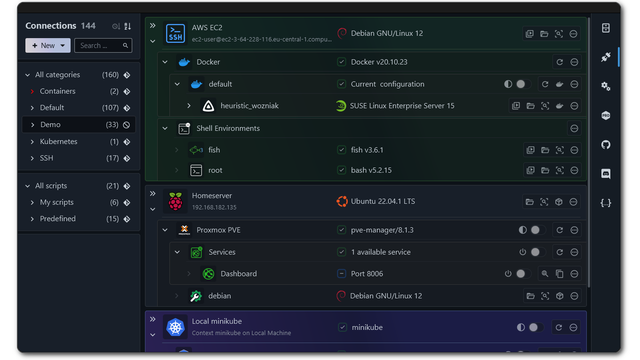
I’m proud to share a major development status update of XPipe [https://github.com/xpipe-io/xpipe], a new connection hub that allows you to access your entire server infrastructure from your local desktop. It works on top of your installed command-line programs and does not require any setup on your remote systems. XPipe integrates with your tools such as your favourite text/code editors, terminals, shells, command-line tools and more. Here is how it looks like if you haven’t seen it before: Hub [https://i.imgur.com/i7xQ3t8.png] Browser [https://i.imgur.com/00Sp1J0.png] ## VMs - There is now support for KVM/QEMU virtual machines that can be accessed via the libvirt CLI tools virsh. This includes support for other driver URLs as well aside from KVM and QEMU. This integration is available starting from the homelab plan and can be used for free for two weeks after this release using the new release preview - You can now override a VM IP if you’re using an advanced networking setup where the default IP detection is not suitable. For example, if you are using a firewall like opnsense on your hypervisor - Fix remote VM SSH connections not being able to use the keys and identities from the local system - There is now a new restart button for containers and VMs ## File browser - There is now a new option in the context menu of a tab to pin it, allowing for having a split view with two different file systems - There is now the option to dock terminals in the file browser (this is only available on Windows for now). You can disable this in the settings if you don’t like it - The previous system history tab is now always shown - You can now change the default download location for the move to downloads button Pin [https://i.imgur.com/NWVAQ1V.png] Dock [https://i.imgur.com/9EPDFwU.png] ## Other - The application style has been reworked - Improve license requirement handling for systems. You can now add all systems without a license and also search for available subconnections. Only establishing the actual connection in a terminal or in the file browser will show any license requirement notice. This allows you to check whether all systems and installed tools are correctly recognized before considering purchasing a license. - Rework Windows msi installer to support both per-user and system-wide installations. The installer will also now respect the properties ALLUSERS. This makes it possible to install XPipe with tools such as intune - Add download context menu action in file browser as an alternative to dragging files to the download box - Fix proxmox detection not working when not using the PVE distro and not logging in as root - The settings menu now shows a restart button when a setting has been changed that requires a restart to apply - There is now an intro to scripts to provide some more information before using scripts - Add ability to enable agent forwarding when using the SSH-Agent for identities - Closing a terminal tab/window while the session is loading will now cancel the loading process in XPipe as well - A newly opened terminal will now regain focus after any password prompt was entered in xpipe - Add warning message when the incompatible coreutils homebrew package is in the PATH on macOS - The .rpm releases are now signed ## Shell sessions Many improvements have been implemented for the reusability of shell sessions running in the background. Whenever you access a system or a parent system, XPipe will connect to it just as before but keep this session open in the background for some time. It does so under the assumption that you will typically perform multiple actions shortly afterward. This will improve the speed of many actions and also results in less authentication prompts when you are using something like 2FA. ## Security updates There’s now a new mechanism in place for checking for security updates separately from the normal update check. This is important going forward, to be able to act quickly when any security patch is published. The goal is that all users have the possibility to get notified even if they don’t follow announcements on the GitHub repo or on Discord. You can also disable this functionality in the settings if you want. ## Fixes - Fix Proxmox detection not working when not logging in as root - Fix tunnels not closing properly when having to be closed forcefully - Fix vmware integration failing when files other than .vmx were in the VM directories - Fix Tabby not launching properly on Windows - Fix SSH and docker issues with home assistant systems - Fix git readme not showing connections in nested children categories - Fix Windows Terminal Preview and Canary not being recognized ## A note on the open-source model Since it has come up a few times, in addition to the note in the git repository, I would like to clarify that XPipe is not fully FOSS software. The core that you can find on GitHub is Apache 2.0 licensed, but the distribution you download ships with closed-source extensions. There’s also a licensing system in place as I am trying to make a living out of this. I understand that this is a deal-breaker for some, so I wanted to give a heads-up. ## Outlook If this project sounds interesting to you, you can check it out on GitHub [https://github.com/xpipe-io/xpipe] or visit the Website [https://xpipe.io/] for more information. Enjoy!
XPipe - A connection hub for all your servers - Status update for the v12 release - Now with selfhst icons!

I’m proud to share a major development status update of XPipe [https://github.com/xpipe-io/xpipe], a new connection hub that allows you to access your entire server infrastructure from your local desktop. It works on top of your installed command-line programs and does not require any setup on your remote systems. XPipe integrates with your tools such as your favourite text/code editors, terminals, shells, command-line tools and more. Here is how it looks like if you haven’t seen it before: Hub [https://i.imgur.com/wEKhJKu.png] Browser [https://i.imgur.com/WIo6MBC.png] ## Icons A big new feature, which is probably going to be interesting for the selfhosted crowd here, is the addition of custom icons for services. A huge shoutout to https://github.com/selfhst/icons [https://github.com/selfhst/icons], without them this would have not been possible. Essentially, you can now set icons for any connection to better organize individual ones. For example, if you connect to an opnsense or immich system, you can now mark it with the correct icon of that service. Icons [https://i.imgur.com/xYvuNMW.png] ## Other additions There is now a popup to automatically save a file with sudo when permissions are denied in the file browser. This should make it much less of a hassle when forgetting to elevate to root before editing a file, which is a trap I also often fall into. You can now restart any ended terminal session by pressing R in the terminal. This makes it much easier to reconnect, for example, if you restarted a server or your connection isn’t stable. There are new actions in the file browser to compress/uncompress zip/tar/tar.gz/7z files. There are options to compress both individual files or complete directory contents. This will save you having to deal with remembering tar CLI parameters. You can now use the Windows Credential Manager as a password manager in XPipe. XPipe does no longer use wmic on Windows as it seems like Microsoft actually pulled through and removed wmic from the latest Windows 11 releases. This fixes various errors on Windows ARM systems. I implemented various performance improvements for lower-end systems, so hopefully things will run more smoothly on these as well now. There is now support to specify SSH keys and change the SSH port for Proxmox VMs. There has also been a lot of work going into the git sync feature to fix various issues. There is more documentation in the git settings, the workflow has been improved, and various bugs with xcode git and gpg were fixed. There have been many other bug fixes, e.g., for csh, fish, opnsense, pfsense shells being broken, fixes for dashlane, some Proxmox VM issues, and much more. ## XPipe Webtop XPipe is a desktop application first and foremost. It requires a full desktop environment to function with various installed applications such as terminals, editors, shells, CLI tools, and more. So there is no true web-based interface for XPipe. Since it might make sense however to access your XPipe environment from the web, there is now a so-called webtop docker container image for XPipe. XPipe Webtop [https://github.com/xpipe-io/xpipe-webtop] is a web-based desktop environment that can be run in a container and accessed from a browser via KasmVNC. The desktop environment comes with XPipe and various terminals and editors preinstalled and configured. You can use this with the git sync to have access to all your connections remotely as well. ## A note on the open-source model Since it has come up a few times, in addition to the note in the git repository, I would like to clarify that XPipe is not fully FOSS software. The core that you can find on GitHub is Apache 2.0 licensed, but the distribution you download ships with closed-source extensions. There’s also a licensing system in place as I am trying to make a living out of this. I understand that this is a deal-breaker for some, so I wanted to give a heads-up. ## Outlook If this project sounds interesting to you, you can check it out on GitHub [https://github.com/xpipe-io/xpipe] or visit the Website [https://xpipe.io/] for more information. Enjoy!