
34 Followers
72 Following
28 Posts
This update includes some smaller UI/UX improvements too, like the title bar now having a subtle background to hide the scrolled content.
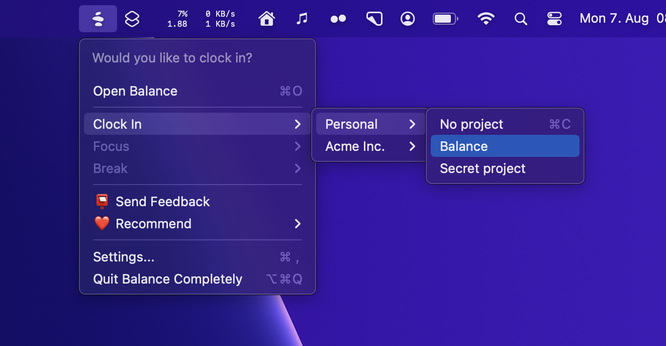
You can now clock into a specific workspace/project from the menu bar/dock icon without having to open the app.

🚀 1.6 is now available and brings some long-awaited improvements and fixes.

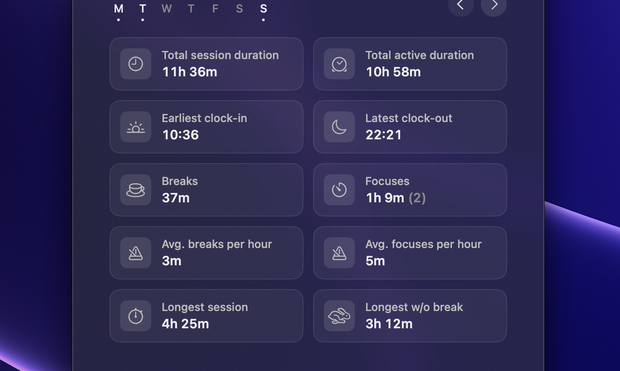
The active session duration is now available in the log as well. This is great for those who like to exclude breaks in their time tracking, e.g. for freelancers who track billable hours.
🚀 Session notes are now available in Balance 1.5!

This is a Pro feature for those who like to associate notes with their sessions. ✍️

🚀 Super excited to release Project Management with 1.4!

Pro users can now log sessions in different workspaces and projects.

This is useful for those who like to label/categorize their sessions, and great for e.g. freelancers who like to track client work.

This feature integrates with macOS Focus filters, allowing you to show/hide workspaces based on Focus.

For instance, you can use this to hide a Work workspace on weekends—discouraging you from clocking into work sessions on your time off.

There are some other smaller improvements and bug fixes as well that you can find in the App Store changelog.

Enjoy! ❤️

https://trybalance.app

Balance: Mindful time tracking by Alexander Sandberg

A time tracking app with focus on work-life balance.

Alexander Sandberg · Product-minded iOS/macOS Engineer

You can now right-click the Balance icon in the dock to access some session actions.

These are also still available in the menu bar app as well.

There's now an easily accessible button to start a break. You can also right-click this one to quickly add a past break.

It's still always recommended to lock your screen or close your laptop while taking a break though, as it's good to step away from the screen once in a while.

The session reminders now open in a popover instead of a sheet.