346 Followers
1 Following
58 Posts
The macOS app for effortlessly rewriting Git history.
Websitehttps://retcon.app
Supporthttps://retcon.app/help
By@Cykelero
The new icon makes the most of the new style and constraints. It pairs well with Xcode’s own icon, but remains true to its predecessor, expanding on its design. Hopefully, Retcon will still feel right at home in your Dock!

Retcon 1.5 releases today! It brings an updated UI on Tahoe, a redesigned icon, and an assortment of improvements and fixes. Update from the Retcon menu, or get the app from https://retcon.app.

(please also update to macOS 26.1, which resolves many system bugs, some of which impact Retcon)

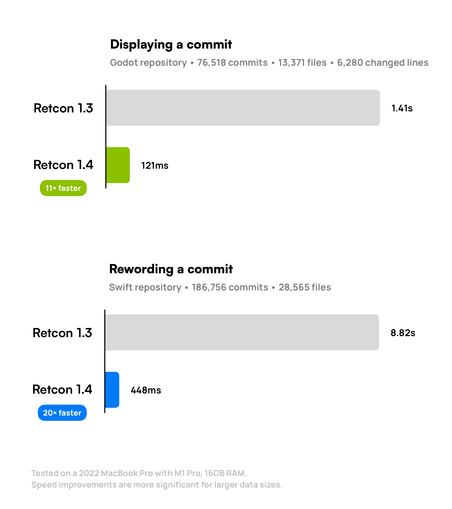
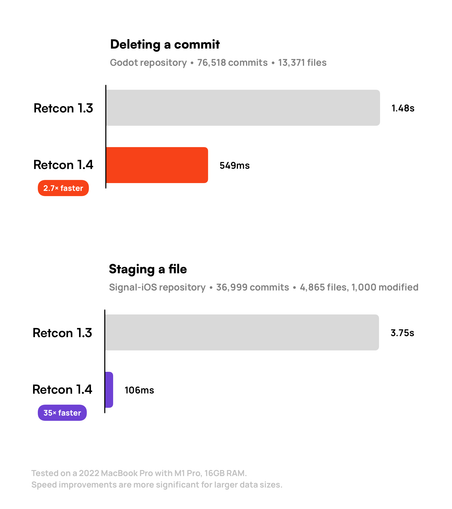
2.7× faster commit manipulation. 12× faster diff rendering. 35× faster file staging. Retcon 1.4 is now available, with staggering performance improvements. The app is now incredibly responsive, and easily handles Git histories with hundreds of thousands of commits. Every last part of Retcon was throughly tuned—with zero compromises.

See for yourself with the refreshed free trial: https://retcon.app

Retcon 1.3.1 releases today! It’s a smaller update, with an assortment of fixes and improvements.

It also adds a single new setting, “Check for beta updates”, that’ll come in handy pretty soon.

If “~/.ssh/config” means something to you, then you'll like this update: Retcon 1.3 adds support for custom OpenSSH configurations!
Assign dedicated keys to specific remotes, conditionally override any connection parameter, use different SSH agents for different hosts—this update enables the SSH setup of your SSH dreams.

(It also upgrades important internals, which paves the way for future updates. Nice!)

Get Retcon now, with a 30-day free trial: https://retcon.app

#macOS #Git

Retcon

The macOS app for effortlessly rewriting Git history.

Click to open, right-click to drill down, and drag to… well, drag. New in Retcon 1.2.1, quickly work with your files using the new diff header.

Update now, or get the app at https://retcon.app.

Retcon

The macOS app for effortlessly rewriting Git history.

Also new in last week's update: jump between tagged commits using ⌥⌘↑ and ⌥⌘↓. Handy for finding recent releases in your repo.

(and why not: add ⇧ for selecting intermediary commits, then copy their messages with ⌥⌘C, and you've got a head start on writing release notes!)

#macOS #Git

Commit splitting is finally here! In just a few clicks, split any commit in two. Just Edit, unstage, and confirm. ✨

Focused commits are legible commits. They're much easier to absorb when reviewing someone else's code, and much easier to find and understand when digging through even your own Git history. And now, they're as easy to make as they are to read—nothing between you and perfect encapsulation.

Try it for yourself now with the refreshed free trial: https://retcon.app

#macOS #Git

Retcon

The macOS app for effortlessly rewriting Git history.

As of macOS Sequoia, you can open shortcut menus for the selection using ⌃⏎.

Fewer key combos to learn, more time spent with your hands on the keyboard.

#macOS

① Releasing today: A bevy of assorted fixes and refinements. Update now from the Retcon menu.