Wait, are you telling me that if I want a linked-cloneable Win11 VM, I need to create a Win10 VM and then upgrade it to Win11? That sounds silly. Can't I just use Rufus to achieve the same goal?
Of course it is silly. But also silly (IMO) is that Rufus doesn't have a "Save as ISO" option. You must have a physical USB drive. But fear not, we can achieve the same goal in a couple of steps:
Make a bootable Win11 thumb drive with Rufus. Note the default options of disabling TPM and removing Microsoft Account requirements. Make sure to select the MBR / BIOS (or UEFI-CSM) options in Rufus.Copy the contents of the drive (e.g. mine is an E: drive):robocopy E:\ C:\rufus_iso_root /E /XD "System Volume Information"
Make a bootable ISO using Microsoft's oscdimg.exe from the ADK.oscdimg -m -o -u2 -udfver102 -bootdata:2#p0,e,bC:\rufus_iso_root\boot\etfsboot.com#pEF,e,bC:\rufus_iso_root\efi\microsoft\boot\efisys.bin C:\rufus_iso_root C:\tmp\Win11_25h2_noprereqs.iso
Enjoy your installable Windows 11 ISO without the requirements you don't want.


 Kevin Beaumont
 BleepingComputer
 Will Dormann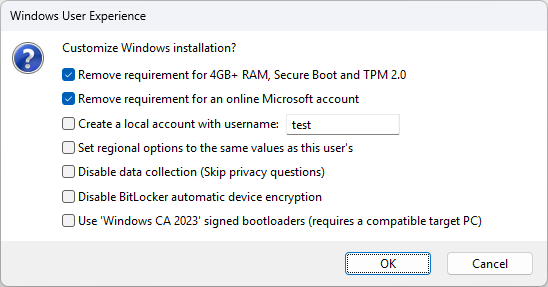

 Taggart