Finally adding the file browser felt good. Been thinking about this for months but finally found inspiration to just code it. Originally I wanted to extend the first function that lists all the files (I have since added functionality there with being able to go back and forth in that screen too) but I broke it out into it's own file to deal with the cursor better. Really happy with how it came out! I also have already reused it for the edit function, just need to add that to insert.
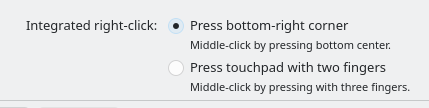
Is there a way to disable this middle click on touch pad in Debian? I just want to have two mouse buttons on the touch pad. This middle click on the center is really throwing me off as I never had to deal with this in Windows. It's bad enough when these touch pads don't have physical buttons in order for me to right click, but this is just a terrible experience.
Been goofing around with this some more. I know it doesn't really do anything but it's just really cool that I can compile code and run it on a PSP. Everything is just printf stuff here, but it's still neat. Gotta start somewhere. 😁
Wanted to find out if I could figure out adding music the screen before you launch the game. "PREVIEW_PATH" was for this CMakeList.txt argument, it it was indeed what I thought it was. Took some stuff from the "BOOM! The Ghost!" event from NIKKE for this.
Haven't been working on my DOS stuff for the last month, just can't get in the programming groove. I somehow did stumble into a PSP mood? I think cause of the recent LGR video lol. So I ended up buying a battery and SD card adapter (cause I have a 16GB memory stick only). Looked up how to make homebrew, and just tried the simple "Hello World" program but this is still really neat. Captured off of a PSP-3000 using the AV cables connected to an OSSC hooked up to a HD60Pro. I wanted native. :D
Demonstration of my latest DOS program (basically base feature complete at this point) browsing through a file generated by my previous program. Some inspiration from EDITART (Duke3D/Build Engine tool) in regards to the interface.
Here is a demo of the current form of the program I'm working on to view the file format I created. This one I want to do some work with graphics mode, but for now, it does what I want and verifies that my custom file format works how I want it to. It also confirms my other programs spits out the file as expected. 😁 Here is a video with some test images. (Entry 0 and 1 are the same file so that's why both show the same image). The Wolf3d palette is hardcoded at the moment into the program.
Here is the demo of my program (CATGRAPH) in its current form. Button presses should be self explanatory. The red/yellow letters on menus/prompts are the button you press to do that function. Prompts that ask for Yes or No require you to press Y or N. Sometimes it says press Enter to continue, other times Esc to cancel. Windows with input fields need to be filled first, then Enter confirms. TAB swaps between multiple input fields. F1 displays the list of .CGP files in the program directory. 😁