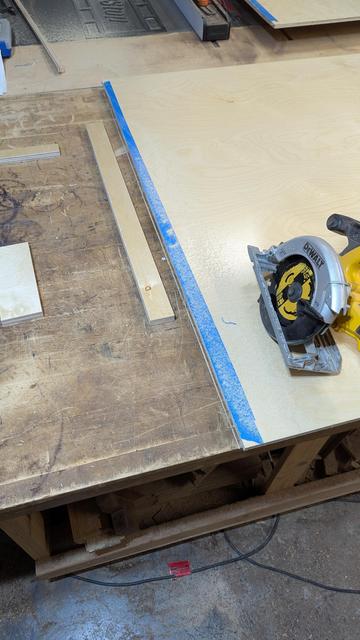
Woo Pig Sooie Push Block
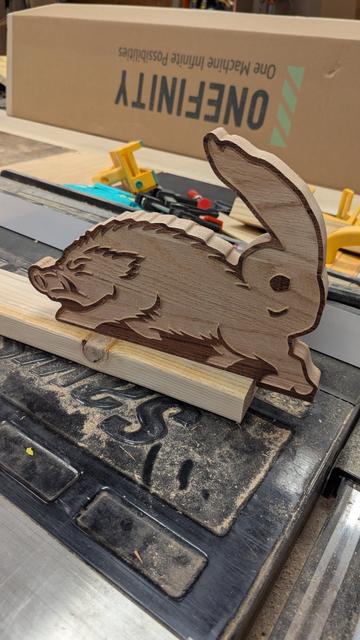
NVIDIA drivers borked after zypper dup
Hello! I am running Tumbleweed on a desktop with an RTX 4070 and I am have tried to run sudo zypper dup 3 times now over the last 2 months and each time it has messed up my nvidia graphics drivers somehow causing me to revert to the snapshot taken just before the zypper dup. I thought at the time that there was just some issue that would be resolved which is why I kept reverting but at this point I just need to bite the bullet and figure out how to fix it. I have attempted to uninstall and reinstall the drivers several times using the command. sudo zypper remove \*nvidia\* && sudo zypper install x11-video-nvidiaG06 The only notable thing that this seems to do is fix my resolution from like 480p to 1080p, but only for the next reboot. However even with the resolution change it seems that the nvidia gpu is not being used at all. sudo prime-select get-current tells me that there is “no driver configured” The command xrandr --listproviders prints Providers: number : 1 Provider 0: id: 0x40; cap: 0x2 (Sink Output); crtcs: 1; outputs: 1; associated providers: 0; name: modesetting output None-1 Also task manager (or whatever) can’t detect the gpu I guess? ::: spoiler screenshot [https://sh.itjust.works/pictrs/image/5560cf32-2bda-4f77-830a-ee61449e55d1.png] ::: I’m still pretty new to linux so any and all guidance is greatly appreciated. Thanks!
Need help setting up new SSD as boot drive.
Howdy All! I recently got a bitchin’ new SSD, a Samsung 990 EVO Plus 4TB and I am struggle bussing trying to make it my new boot drive on my computer while keeping all of my programs and settings and things just the way I like them. Specs are I7 13700K cpu and an RTX 4070 gpu plugged into an MSI MAG Z790 Tomahawk Wifi mobo all working harmoniously to run Opensuse Tumbleweed. Things I have done so far: 1. Googled that shit, didn’t find much that helped me unfortunately. Found some forum where a guy was trying to move over to an SSD from a HDD and then remove the HDD, whereas I just want to change the boot drive to SSD and continue using both drives in the same rig. Someone else in that thread recommended clonezilla but then further down I read something about UUIDs(?) being copied as well and being unable to use both drives in the same computer or it can cause issues and corrupt data. That scared me off that. 2. Tried using the Yast Partitioner tool but the scary warning box it makes you click through and the general lack of any clue what I’m doing scared me off that. 3. Decided to just fresh install Opensuse Tumbleweed onto SSD with usb and then mount the HDD so that I can just copy everything over that way. Or so I thought. First I ran into the issue of the /home located in HDD not being viewable by my user on the SSD, I guess. Fixed that by unmounting the drive and remounting it with the following appended to the end of the mount command ‘-o subvol=/’ , I got that from google as well. Now I’m able to view things in /home on HDD from the user on SSD and I’ve even copied some things over. However I’m unable to access the .snapshots folder in the root directory of HDD which I intended to copy over the latest snapshot and use it on the SSD install to bring all of my non /home stuff over. So I’m kinda stuck in the middle of transferring over now. I have an inclination toward being lazy so I don’t really want to spend time installing all of the flatpaks and configuring the OS again if I don’t have to. Mostly because I’ve already had one false start with Linux and went ahead and started fresh so this would be the third time having to set everything up again from scratch. Any help or suggestions are greatly appreciated!
Help with systemd (I think)
Howdy, I have very recently installed Opensuse Tumbleweed alongside Windows 10 (On a seperate drive) and am trying to get things setup to where I can fully transition to linux. One of the first things I have hit a wall on is getting a file to execute on boot using systemd. I am trying to use this package [https://software.opensuse.org/package/google-drive-ocamlfuse] to be able to access my google drive from Dolphin. And so far it works okay. Except that it doesn’t survive a reboot. I have to run the command: google-drive-ocamlfuse ~/googledrive after each reboot in order for the google drive directories to be accessible. So I googled how to make that happen automagically on boot and found this guide [https://www.baeldung.com/linux/run-command-start-up] that helped me get a startup script going. I created /usr/local/bin/ocamlfuseStartup.sh as a file that contains the command from before: google-drive-ocamlfuse ~/googledrive and verified that it works as intended when I enter ./ocamlfuseStartup.sh from that directory. I then created another file at /usr/lib/systemd/system/startup.service that contains the following: [Unit] Description=Startup Script [Service] ExecStart=/bin/bash /usr/local/bin/ocamlfuseStartup.sh [Install] WantedBy=multi-user.target I have no idea what the /bin/bash portion [https://stackoverflow.com/questions/45776003/fixing-a-systemd-service-203-exec-failure-no-such-file-or-directory#45778018] is for because I found it from a googling but without it I get the following error: startup.service: Main process exited, code=exited, status=203/EXEC However with it I get this error: startup.service: Main process exited, code=exited, status=2/INVALIDARGUMENT which I take to mean that there is something wrong with my ocamlfuseStartup.sh [http://ocamlfuseStartup.sh] file maybe? But since it works when I manually execute the file I’m kind of at a loss. I found this thread [https://superuser.com/questions/693514/systemd-service-will-start-manually-but-not-at-boot#693647] where it seemed like someone else was having a similar issue but I didn’t really grok what they were talking about. Any and all help is greatly appreciated!
How high?
Oops! I accidentally made art again...

Left is Wenge with some yellow species of wood from Asia(I think?) idk I found it in the splinebrary (Which is just a bucket in my shop right now, but one day it will be something beautiful too). Right is walnut and purple heart with a strip of either Padauk or bloodwood for shits and gigs. Left is my favorite. I got more and more excited to turn it as I glued up the blank like 3 or 4 times.
If you're on the fence about building or buying a 3d printer enclosure, please let me give you a push.
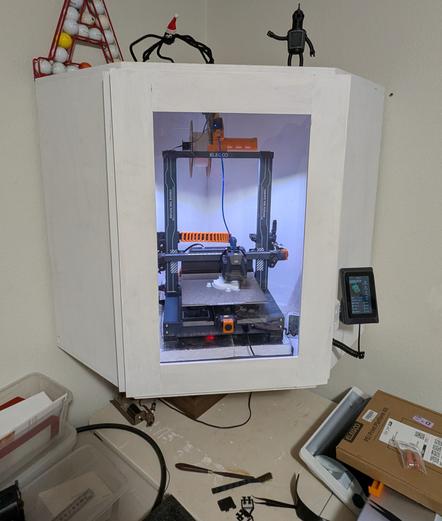

I should have built this thing from the word go. I ran this printer for almost a year on my desk right next to my computer. But it was loud and smelly and the high traffic area played havoc on print quality and caused a lot of warping. Now that it’s tucked away in a back room suspended in a corner by French cleats and sitting directly on top of dense foam and a big ass paver it is merely “audible” but certainly ignorable. There’s also no more headaches from the smell, and my print quality has never been better. Do yourself and your printer a favor and get an enclosure sorted out asap.