
@sama from Sora 2 gets tricked
- 0 Followers
- 0 Following
- 1 Posts
Definitely Not GustavoM. :^)
Guess I must be an alien then. (That’s ‘pure’ sway – no toolbars, icons… nothing. I use my own dmenu-esque app to run binaries.)
Funny of you to say that. I’ve got a Orange pi 5 MAX (which I’m pretty sure it can fall into the “not a easy machine to install Linux” category) and the experience, for the most part, was straightforward. (You’ve mentioned an issue regarding mices --I’ve got a “Ragnok 2 gun mice” and it “just werked” on it. No tweaks or “mental gymnastics” required.). Hell, even enabling hardware acceleration was very straightforward as is – you just have to know where and what to look for.
I’m not trying to defend Pewdiepie – just saying that Linux can be “user friendly” just like Windows if you know what you are dong.
Now introducing "haxx", a nonsense hacking generator.
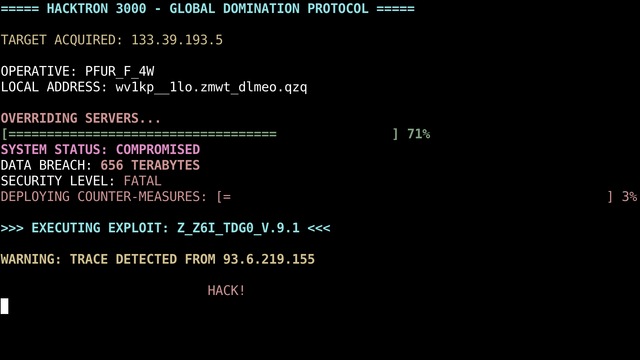

Now introducing "haxx", a nonsense hacking generator. - Lemmy.World
Gives you a bollywood experience right into your terminal, with more than 1000 ips simulated! An INFINITE amount of simulated names! Over 100 different types of glitches! An overly dramatic hack, just like seen in the movies! And more (If you -REALLY- have a lot of time to spend staring at this command.) Click here [https://gitlab.com/gee.8ruhs/writteninc/-/raw/main/haxx.c] to grab the C code, followed by instructions on how to compile it.
You will go back to your “usual” linux setup when you realize that most packages you set up with LFS are now broken and you’ll need to redo the whole process again.
t. arch linux minimal installation only master race
Absolutely yes. You’d be better buying a dedicated PC for Linux tho.
t. Got a Orange pi 5 MAX with Linux installed. It’s tricky to set up, but worths a lot in the end (low power usage while providing a decent performance – can be used as a “mini server” to host your own personal file server or anything else you’d like while providing a smooth experience for anything your job may require from it.)
“Oh, but it’s a technical detail!” does not make it a false argument.
…which these “customized kernels” can (also) be applied to any other distro.
All distros are the same – none packs a exclusive feature that makes gaming “better”. Other than having predefined changes/packages that are more suitable for gaming.
"tm". Todo manager on the CLI for potatoes.


"tm". Todo manager on the CLI for potatoes. - Lemmy.World
(The date + clock and the menu can be hidden via a toggle for extra flexibility and space. They are in the screenshot just to show em off.) Manage your to-do tasks in a compact, slick and straightforward manner. Includes a built-in clock for an extra flex. Click here [https://gitlab.com/gee.8ruhs/writteninc/-/raw/main/tm.c] to grab the code and compile it with “gcc tm.c -o tm -static -O2”. And then type “sudo mv tm /usr/local/bin/.” to send the binary into the user binary directory. To run it, simply type “tm”. This code, alongside all my codes are under the “Do Whatever You Want” license. Modify this, sell it using a different name, whatever you want – I don’t care.