Heads up for folks looking at resizable iPhone apps on iOS 27:

If you use constraint variations in your storyboards to detect compact/regular widths, you have a lot of rework in your future. That is because on iPhone the horizontalSizeClass is always compact and your storyboard layouts will not change when the UI is resized. Instead, you will have to track size changes and update constraints in your own code.

Initially I thought this was a bug, but it's not: https://fatbobman.com/en/posts/from-size-class-to-available-space/
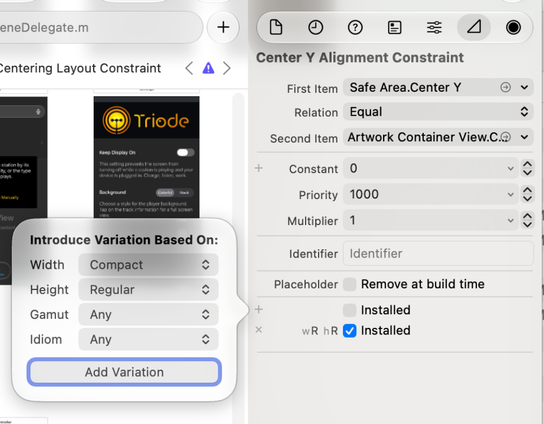

Unfortunately, this major change to storyboards wasn't explicitly stated in the "Modernize your UIKit app" video.

Also, there is no warning while compiling the storyboard or a runtime indication that something that used to work now doesn't.

I never liked the idea of size classes, and I like them even less now. But they were the "right" way to do things - and now they are "wrong". Grrrr.

https://developer.apple.com/videos/play/wwdc2026/278/

Modernize your UIKit app - WWDC26 - Videos - Apple Developer

Discover the latest updates to UIKit. Learn how to update your iPhone app layouts to work great when resized with iPhone Mirroring and on...

Apple Developer

For an app with a reasonable amount of interface complexity (e.g. a UI that adapts between a portrait layout and a tablet landscape layout) there are A LOT of these constraint variations.

And the only way to find/fix them is by digging through that complex interface's storyboard.

Time consuming & error prone & a pain in the ass. The irony is the folks who treated the iPad as a big iPhone had it right all along 😫

@chockenberry yeah. This video for UIKit changes is the most critical for wwdc26. Apple was deprecating and warned about “this day will come” for ten years or so. Now they did it. And yeah, we also having a trouble now 🫡😅