
My elderly mom recently got scammed out of $17,500 by a close friend & had to get all new bank accounts. I'm currently visiting her & setting up all of her automatic bill payments. While using her desktop computer, I realized that it doesn't qualify for Windows 11 so I'm looking at new PCs, comparing them to her old one... It seems like all of the affordable options would be a downgrade in RAM. Lol, her current computer is from 2017 & she still has the original box it came in.
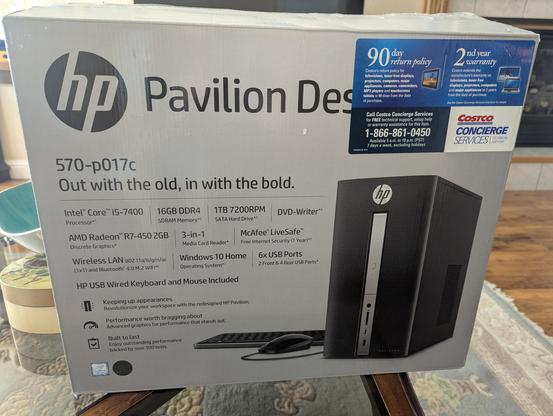
Feeling very angry at Microsoft for changing the minimum system requirements for windows. My mom uses her computer for online banking & her medical portal ONLY. There's absolutely zero reason her computer needs to be turned into e waste. Yes, i know linux exists but i don't personally feel comfortable putting a new OS on my 83 year old mother's PC rn. There's nothing wrong with her current computer other than Microsoft wants more money.
@CosmicTraveler Microsoft has a great protection racket going, for sure.

What about buying a shitty but barely Win11 compatible PC on eBay used? Lots of orgs unload old computers via eBay to recoup costs of upgrading.
@CosmicTraveler I'm still using Win10 on my laptop & desktop, ran a script that makes it still get security updates. I need a new desktop computer though, looking at this one (the $500 version) and would install Linux on it, perhaps dual boot with the pre-loaded Win11 with local user only (no MS account). https://www.geekompc.com/geekom-it13-mini-pc/
GEEKOM IT13 2026 Edition Mini PC with 13th Gen Intel i9

GEEKOM IT13 2026 Edition mini PC is powered by Intel 13th CPU. On sale NOW! Choose i9-13900HK 2026 edition for top performance, ideal for gaming & daily uses.

GEEKOM
@Nonya_Bidniss Thanks, yes shopping for a new computer is like a whole new world. I didn't know these mini computers existed until yesterday. Unfortunately I'm only looking at the old fashioned kind that have the correct ports for her 9 year old monitor, mouse, keyboard, speakers & printer... I guess they probably make converters but that seems a lot more complicated
@CosmicTraveler It'd probably be easier to set her up with modern peripherals but that's technology obsolescence for you. And it's hard to switch gadgets when you get older, I feel it myself.

@CosmicTraveler I don’t mean to be That Guy, but this is a rare case where I have first-hand experience.

I’ve had some elderly relatives on Debian for almost a decade now.

They really only use the web browser, including for mail (ISP webmail offering) and banking. Once I told them where the browser was, they were off to the races.

@CosmicTraveler I don’t mean to be That Guy, but this is a rare case where I have first-hand experience.

I’ve had some elderly relatives on Debian for almost a decade now.

They really only use the web browser, including for mail (ISP webmail offering) and banking. Once I told them where the browser was, they were off to the races.

@CosmicTraveler you could try using massgrave to activate the windows 10 ESU to extend the life for a few more years https://massgrave.dev/tsforge#windows-esu
TSforge Activation | MAS

Overview

@smn Thank you! 🙏 I think this is exactly what I've been looking for