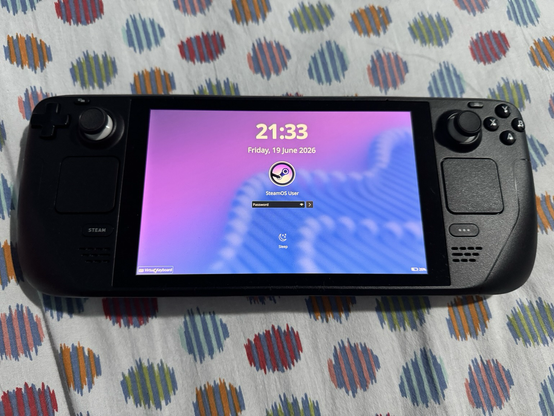
Updated to the newest version of SteamOS, which switches the Linux windowing system from X11 to Wayland. Now the virtual keyboard in desktop mode lock screen does not appear, making unlocking impossible without connecting an external keyboard.
This is a specialised distro made for this hardware, and it still has stupid little issues. I try my best to enjoy Linux, but things like this are why I still use Windows #steamdeck #steamos

@compguy96 Steam button + x doesnโ€™t work?

Big oversight by steam, even if Iโ€™m not sure screen locking is on by default.

@amd No it doesn't.
Screen locking is on by default if you set a password in desktop mode.
The virtual keyboard in the KDE Plasma lock screen (button on bottom left) is supposed to pull up a very simple keyboard which is different than the Steam+X one. It worked before the update, but now it does nothing

@compguy96 Just went to update the steamdeck this morning and saw patch notes that claim to fix your issue.

Wanted to pass along the heads up

@amd Brilliant! Thank goodness they fixed it quickly

@compguy96 is this post yours? https://steamcommunity.com/app/1675200/discussions/1/570415324159241488/

If not, post in there, just tested and confirmed myself

Desktop lock screen keyboard not popping up :: Steam Deck Bug Reports

Anyone running into an issue where the keyboard button in the bottom left doesn't work?

@gamingonlinux No but thanks.
@compguy96 okay, have prodded Valve about it ๐Ÿ‘๏ธ
@gamingonlinux I replied to that thread with a few details like the SteamOS version. Hope this gets solved soon!
@compguy96 Iโ€™m sure it will with more eyes on :)