It seems that development of #p2p browsers has fallen by the wayside. When they first appeared some years ago they seemed like a great addition to #cypherpunk toolkits.

For example Beaker Browser and Impervious Browser seem to have been shelved several years hence.

Are there any other peer-to-peer browsers worth inspection?

#p2p #browsers

@[email protected]
@retro @cypherpunk The only #p2p browser I know of still being developed is @agregore by @mauve
@craigoverend @retro @cypherpunk @agregore @peersky @akhileshthite There's also been some bittorrent attempts. We have a matrix channel with some folks here: https://matrix.to/#/%23decentralized-browsers:matrix.org
You're invited to talk on Matrix

You're invited to talk on Matrix

@[email protected] @[email protected] @[email protected] @[email protected] @[email protected] @[email protected]

I am looking at agregore browser.

Question: what would be a quick onramp to share a directory of files or browse a remote directory of files using a decentralized protocol? Which protocol might be simplest to set up and configure?

My idea is to avoid having to study another programming language or DSL to use a new tool.
agregore-browser/docs/Fetch-Hyper.md at master 路 AgregoreWeb/agregore-browser

A minimal browser for the distributed web (Desktop version) - AgregoreWeb/agregore-browser

GitHub

@retro @mauve @craigoverend @cypherpunk @agregore @peersky

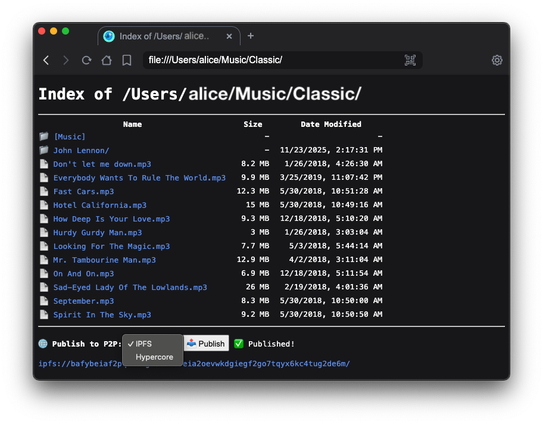
In PeerSky you can browse your local files with file:// protocol and also you'll get an option to publish those directories to P2P.

@retro @craigoverend @cypherpunk @agregore Yeah sadly there's no clean no-code option yet. I'm working on adding folder uploads to the `file viewer` app. https://github.com/AgregoreWeb/website/blob/main/apps/fileviewer.html First I added some stuff to make it easier to write text files. Sadly it's all in my spare time between work and existing in meatspace. 馃槄
website/apps/fileviewer.html at main 路 AgregoreWeb/website

Website for Agregore. Contribute to AgregoreWeb/website development by creating an account on GitHub.

GitHub
@craigoverend @mauve @agregore @akhileshthite @peersky @cypherpunk @retro ftp or nfs are the simplest. but there're really many p2p nettworks that are based on user shared data, like zeronet, retroshare, etc. the choise depends on goals.
@retro @craigoverend @cypherpunk @agregore @peersky @akhileshthite Oh! If you're comfy setting up servers, we mad this a while ago: https://distributed.press/
Home

DP

Distributed Press
@retro @craigoverend @cypherpunk Hey! I added a button to upload files to the file viewer. You can make a new p2p site and upload whatever you want into it and share the link with another agregore instance. hyper://agregore.mauve.moe/apps/create.html
@[email protected]

I installed Release 2.24.0 debian package from GitHub. It opens a blank window on Debian Bookworm. The window is just a blank, white canvas. What should I check?

@retro Dang! I think I've heard this before but I lack a debian box. Does the AppImage or running from source work? or setting NODE_ENVdebug when running it from the cli should show more debug info. https://github.com/AgregoreWeb/agregore-browser/blob/master/package.json#L10

we're tracking it here: https://github.com/AgregoreWeb/agregore-browser/issues/331

agregore-browser/package.json at master 路 AgregoreWeb/agregore-browser

A minimal browser for the distributed web (Desktop version) - AgregoreWeb/agregore-browser

GitHub
@mauve @retro @cypherpunk
Nice, works well here in both Agregore and Peersky. Though I am encountering a rendering bug on agregore://sites on Windows not loading css. If I reload the page it renders fine. Any plans to add Create under the File menu?
@craigoverend @retro @cypherpunk Dang I think I saw the rendering bug on Linux once too. Is every time? Having create in the File menu is a great idea! Maybe a separate one for a new p2p site or a new file in your default site? I was thinking if adding it to the welcome page beside the link to make a new app.
@[email protected] @[email protected] @[email protected]

The blank canvas is all I get every time I run the app.