 Jordan Hipwell
The HIG was updated to provide official guidance for button placement! 👀 Close/Cancel on left and Done on right

@jordanhipwell For modals, that's luckily what I've been doing - but good to have guidance!
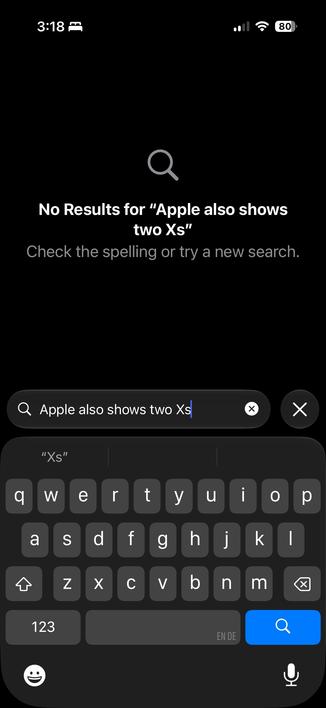
I’d love folks’ opinions on another weird scenario I tried in @DaylishApp that’s inspired by search bars in iOS 26 system components: text input field with a cancel affordance right of it
One neat thing here is that it allows me to rotate the plus button to turn it into an X 🙃
But I'm still a bit worried that some may struggle to figure out you have to hit return to “confirm/save” … 😟 Thoughts?
@hendrik_kueck @manuel @jordanhipwell good point - the red was meant to communicate destructiveness but it also does draw unnecessary attention ‼️
I did add an inline confirmation dialogue when users are about to discard changes that are not persistent yet. So It is a lot less destructive now allowing me to actually tone down the color choice!
I share your concerns regarding the two X buttons close to each other. It is actually a UI design pattern I adapted from several of Apple’s system apps in the Liquid Glass era.
The little X only shows up after you start typing and I hope that due to its position inside the text field, it is intuitive that it clears the text versus discarding the whole draft.
But it's certainly something people need to learn. I hope folks will have encountered this pattern and will be familiar with it by now 😅
 Manuel Kehl
 Hendrik
 Daylish App