 Discourse
Discourse just made it much easier to create events!
The Calendar and Events plugin now has a simplified event creation flow...
🧵
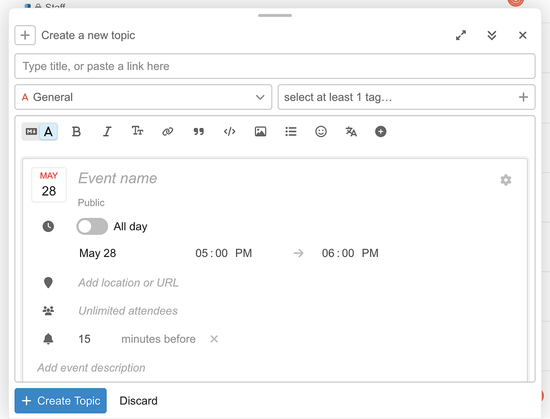
Instead of wrestling with markup or hunting through settings, you can insert an event from the composer’s additional options menu and edit it directly inside the composer.
The new flow adds an interactive event editor right where you are.
That means event creation feels less like configuring a plugin and more like composing a post.
For people using rich text mode, the event editor appears directly in the composer.
For people using markdown mode, it shows up as part of the preview, alongside the event BBCode.
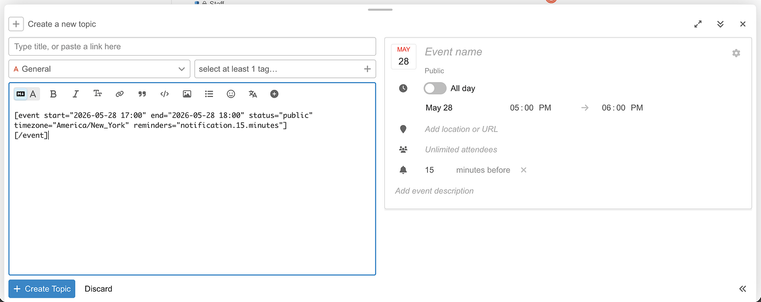
You can still work in markdown (it's how we write at Discourse, too! without losing the benefit of a clearer visual editor.
Advanced settings are still there: you can open them with the cog icon in the upper right of the event editor.
Our goal is to reduce friction for common event setup tasks while keeping more detailed controls available when needed.
There's also a faster way to create events from the calendar view.
You can now click, and optionally drag, directly on the calendar to create a new event.
That makes event creation feel much closer to what people expect from a modern calendar interface.
These updates are part of a broader set of improvements to Calendar and Events in Discourse.
The direction is clear: make community events easier to create, easier to manage, and less dependent on technical knowledge!
The best version of a community tool is one that gets out of the way.
This update does exactly that.
Let us know your thoughts!
https://meta.discourse.org/t/its-easier-than-ever-to-create-events-in-discourse/404041

If you update Discourse today, you’ll have access to a simplified event creation flow in the Calendar and Events plugin. Now when inserting an event from the additional options menu in the composer, you’ll get an interactive editor directly in the composer! This editor is also available as part of the preview in markdown mode: Advanced settings are still available if you click the cog icon in the upper right of the editor. We’ve also clarified some of the advanced settings by revisi...