
edit: or apparently on Firefox you can also just open https://noai.duckduckgo.com, right click the search text box, and click add search engine. lol

previous:
how to switch to noai.duckduckgo.com on firefox without installing any extensions or plugins:

• open settings > search
• scroll down to search shortcuts and click add
• fill out according to the image below (text in alt text)
• click add engine
• scroll back up and select "DuckDuckGo No AI" under "default search engine"
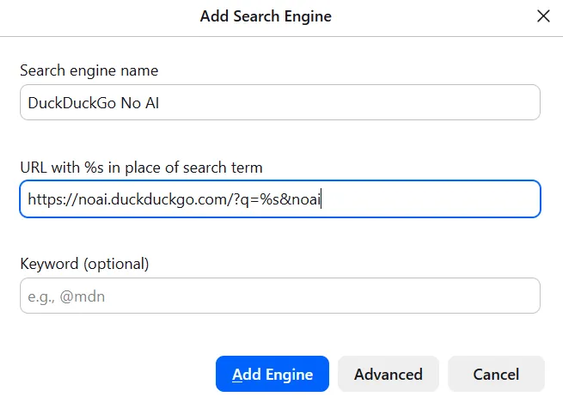

@eniko What does the &noai parameter do? (Other than that, it's identical to what I added a few days ago.)
@jedimb i cannot remember >_>
@eniko Oh well. I suppose adding it couldn't hurt, at least...

@jedimb i think its what you used on regular duckduckgo to disable ai features before they rolled out the subdomain

and i just added it just in case

@eniko @jedimb
That’s just how they format their urls it seems. I’ve seen it before with the ddg html and lite variants where they redirect to html.duckduckgo.com/html when you append the html part. (The same for lite).

I don’t know why they do it, but I have a theory. I think it’s a choice to allow people to navigate to their urls in two different ways. Either by prefixing ”html.” Or by suffixing ”/html/”. Maybe some people are more used to prefixing/suffixing?

But that’s just a theory! A prefix and suffix search engine url theory! And cut! :D
