 tylerhall
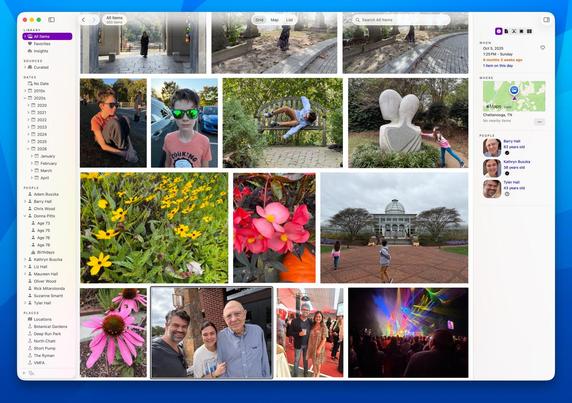
Iris for macOS is available. It's the native photo and video library I always wanted. I hope you like it, too. https://irisphotos.app
@tylerhall This looks really nifty, and I'm looking forward to giving it a try.
One question and one thought:
Question (which I think I've picked up the answer too, but want to be sure): Does it play nicely with Apple Photos if you keep using Photos? That is, if I keep adding photos to Photos (ugh, I hate modern naming conventions), will Iris pick them up (immediately, soon, or on next launch)? If I add photos to Iris, will Photos pick them up? Mainly, I have enough photos that I value Apple's "keep screen res on-device, download the high-res when requested" approach, so might want to continue using Photos on the backend even if I move to Iris as my primary front end. Plus, it's nice having iPhone photos just magically appear in my library without having to manually move them in.
Thought: Triggered by the bit in the blog post about the Explore Mode's “b/c a photo can’t be in more than one at a time” — maybe they can? Not really _in_ more than one place at a time, but with landscape photos, I often tag mine with both where I was when I shot it and what I'm looking towards, like this shot of Mt. Hood (in Oregon) shot from Fort Vancouver (in Washington): https://www.flickr.com/photos/djwudi/55220297880/in/dateposted-public/ Not sure that helps or hurts the thought process for that mode, but it popped into my head.

@djwudi It’s best to think of Iris as a “read-only lens” on top of a “source” of photos/videos.
A source could be Apple Photos, or a folder on your Mac, or an external drive, or even a NAS. And you can connect as many sources as you want.
Iris scans your files, indexes them, makes thumbnails, and keeps a database of cached metadata. It never writes back to your files or Apple Photos.
As you add new photos to your sources, Iris will (not instantly) find them, index the new ones, and make them visible in Iris.
If you disconnect a source (unplug a hard drive, etc) Iris will keep working just fine. You can search and browse as usual - although you’ll see Iris’s thumbnails instead of the full-res originals.
 Michael Hanscom