Dear LazyFederation - How do I excise or at least disable all #AI from #NextCloud?

I'm not here to discuss the merits of "AI" technology.

I want the documentation showing me how to remove the feature as thoroughly as possible.

If that's not possible, then I'd like to know the exact config options that will pinch it off at the most basic level available.

How do I do that?

Reshares appreciated.

Thanks.

#nextcloud #ai #EtTuBrute #ahsass #lazyweb #lazyfederation

@Monkeymind It's not active by default. If you want to use it, you need to actively enable stuff (and install specific Apps). You should be fine.

@preya I don't even want the code to be there that *could* talk to an ai model.

I don't want any nagware disabled stubs in the UI.

How do I get rid of this?

@Monkeymind AFAIK all the code is in separate Nextcloud Apps, there is no AI-related code in the core project.

@preya well, there is a "✨ AI" tab in the "apps" admin setting which certainly is not due to any installed app.

There is an "✨ Assistant" tab in my personal settings, and I damn sure didn't install any AI apps.

How do I rip out this crap?

@Monkeymind Sounds like you have the "Assistant" app installed. Can you find it in your App list?

@preya nope, the only hit for "ass" in my "Your apps" or "Active apps" list is for "Password policy".

Look, thanks for being helpful, but I already hit my head against this for a couple of days.

If you don't know the answer, please don't bother.

@Monkeymind it doesn't provide its own AI models - you have to actively connetct it to your own chosen models. Without setup, it does nothing.

Also, even if you did connect models to it, it doesn't automate anything by default, it's activated on purposeful requests from you, and automation is another feature that requires setup.

@casraf Look, I just don't want even the code that *could* talk to an ai model. How do I cut it out?

I don't want the disabled stubs of ai integrations staring me in the face when I call up my self-hosed nextcloud. How do I cut them out?

That's all. If you have no idea how to do that, spare us both our precious lifetime and leave me alone.

@Monkeymind jeez, why be so hostile. You can try disabling the AI apps in the settings, not sure if that works or not. But next time you're asking for help, try not being an asshole about it.

@casraf You know, I was asking for something specific, i.e. docs, config options, not apologistics or reasons why what I want to do is wrong. I'm too old for mastodon.

Sorry for the rant, though.

@Monkeymind Last time I checked, it was the other way around: AI features in #Nextcloud were disabled by default.

@cloud42 I want to remove the code and the UI stubs.

If you have no idea how to do that, do us both a favor and stfu.

@Monkeymind

Seriously: the people to whom you were hostile were correct. I have no AI "stubs", because I installed it myself, and simply didn't install any AI anything. If you were lazy and installed someone else's distribution of it (like an "AIO" docker container or something), then you explicitly accepted their curation of what was to be installed.

I could help you install it the right way, but... nah. You're toxic to those who try to help. You deserve to have to figure it out yourself.

@fossham

For some reason, I object to being treated condescendingly.

You know, I was asking for something specific, i.e. docs, config options, not apologistics or reasons why what I want to do is wrong or guesses about my set-up. I'm too old for mastodon.

Sorry for the rant, though.

@Monkeymind

How could anyone know you object to being treated condescendingly, after you treated others condescendingly? If you don't want to be treated that way, don't treat others that way. Thank them politely and move on.

@Monkeymind

In point of fact, you're wrong about what you observed. The "AI" choice in the apps list is not a "stub," and doesn't communicate with any AI sevice in any way. It is merely a topic heading under which you *can* install apps if you want to, but don't have to. It doesn't need to be removed according to your original request.

You received this advice because you misunderstood what you were seeing. Be nice to those who gave you this correct advice. They're right, and they're helpful.

@fossham

Your self-righteousness must make your peers so proud.

https://docs.nextcloud.com/server/stable/developer_manual/digging_deeper/task_processing.html

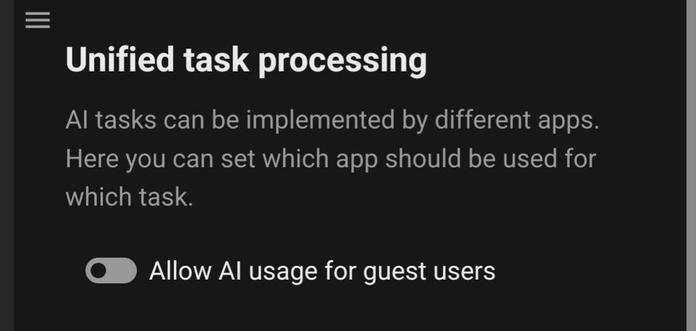
Scroll down, see the stub, or framework, or whatever. If you know how to restrict which apps can use it (in my case, I'd like no app to be able to use it), let me know!

Also, if you know how to disable AI usage for all users, not just guest users, as per the schreenshot, I'm all ears!

Sorry you didn't like how I said that I wanted a question answered, rather than be lectured on how to be a good nc user.

@Monkeymind

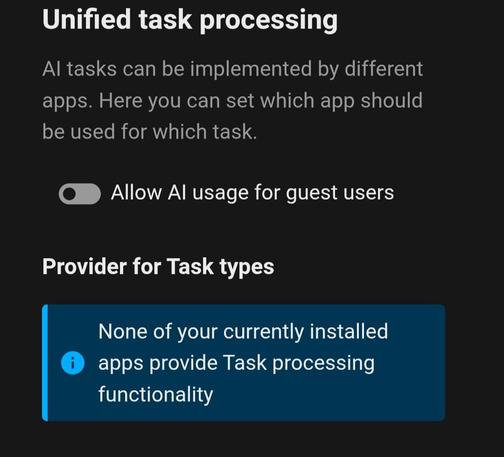
Mine comes right out and tells me I don't have any AI apps installed. (See the blue info box.) It's almost as if... my very first reply to you (and others' advice) has been 100% correct all along! 🤣

@Monkeymind

YES I could help you get your nextcloud installation to look like mine. NO I do not believe you can afford the fees I would tack on to deal with your hostile, abrasive, condescending attitude. Next time, consider that it might not be your age that makes you a poor fit for Mastodon.