 Klaus Frank
That moment when #OpenSSH takes minutes to connect and even a "clear" takes almost 10 seconds to execute.
What the f crashed/locked-up and wtf?!?
Let's see how long it takes for htop to start and tell me...
That moment when #OpenSSH takes minutes to connect and even a "clear" takes almost 10 seconds to execute.
What the f crashed/locked-up and wtf?!?
Let's see how long it takes for htop to start and tell me...
CPU load 2.4%
Memory 494/504 GB
Swap 131/554GB
double-wtf?!?
Hmm, the tasks list also doesn't add up, there are these 192 beesd processes, but they are supposed to operate on shared memory and only have 300GB reserved right now.
And the next task (when sorted by memory) is Thunderbird with something around 1.5GB.
I know that two #KDE #Konsole windows I left open from yesterday just vanished.
Assuming they had a memory leak and they already crashed, shouldn't that memory have been freed already?
what is allocating all of this?!?
After "systemctl kill nixos-upgrade.service" I'm now down to a responsible system with:
CPU 91.7% (as it now is unblocked and can actually do things instead of waiting for the NVME to swap blocks back into memory)
RAM 398/504GB
Swap 10.7/554GB (probably some other process that has a mem leak and got swapped out to disk before)
Well never had such issues on ArchLinux or Alpine with automated updates. There they "just worked"...
I never use the automatic rebuild
WHen you ask "what the fuck?"
Just know that the g++ processes corresponds to building project from source
If you want things to just work, maybe you should choose a linux distro that just works, not one that installs and manage and build stuffs
Just a suggestion
If you're more curious, and want to you know what happens: your system is rebuilt (super partially because lots come from cached nix packages)
Nah, the "wtf" was more of that this behaviour was unexpected.
I'm still quite new to NixOS, so I may just not have configured something it would expect me to (the onboarding documentation really isn't that great).
Esp. because I did a "nixos-rebuild switch --upgrade-all" yesterday and it didn't rebuild anything from source.
But doing it now I can see that it compiles mongodb for some reason now...
I happen to have those "blocking" updates, when I have a huge config (tons of apps installed), and an update that touches something basic like bash or gcc, which impact the whole entire nixos configuration, and when the update is super fresh, so there are not all nix packages being cached => lots of rebuild
That's the reason I always update manually
Also you can play with some parameters for the build:
In my rebuild I tend to use:
sudo nice -n 19 ionice -c 3 nixos-rebuild boot \
--max-jobs 1 --cores 1 \
--option sandbox false \
--option log-lines 10 \
-p "$entire_generation_name"
to be more responsive
But if I have a big update I want to build with most of my machine ressources:
I uncomment this
# sudo nixos-rebuild boot \
# --max-jobs 2 --cores 5 \
# --verbose --show-trace \
# -p "$entire_generation_name" \
# 2>&1 | tee -a "$logfile"
But my machine may choke. It has already happened: for example if I see I have to rebuild firefox, that has already happened.
For you the line -max-jobs 1 --cores 1 may be the most important: there will still be a lot of g++ and cc1plus lines... but much much less
In my case also, I try not to launch nixos-rebuild in case I have more than 50% of my RAM used
Last remark: I never do nixos-rebuild switch --upgrade-all
I do seperately: nix-channel --update and nixos-rebuild switch/boot
nix-channel --update will update your pointers to nix-pkgs
nixos-rebuild acts with respect to the nixpkgs state provided by nix-channel
It tend to think that the rollback feature on nix-channel is more important that the rollback on nixos generations
This can help as well: https://search.nixos.org/options?channel=25.11&query=nix#show=option%253Anix.daemonCPUSchedPolicy
I generally don't do automatic updates because I had bad surpises on all the systems at inconvenient times.
Yep. I have also adapted them, but it was not the change that was the most striking, IIRC. In my configuration;
nix = {
daemonCPUSchedPolicy = "idle"; # Run the daemon at 'idle' priority (only uses CPU when nothing else wants to)
daemonIOSchedClass = "idle"; # Run the daemon at 'idle' IO priority (won't choke your SSD/HDD)
daemonIOSchedPriority = 7;
settings.sandbox = true; # Optional: Standard nice level
};
does daemonIOSchedClass also cover memory?
Funnily it utilised more than the 100GB of memory that still were free and ran >100GB into swap. (See the actual numbers I posted earlier above)
All of this swapping in and out (even though it was from an NVME) still starved the CPU. It was almost not used at all.
@binarious @stphrolland @nebucatnetzer
Oh that's why it did build it. I'm on 25.11 but I'm pulling in the unifi package from unstable and it in turn pulls in mongodb.
@binarious @stphrolland @nebucatnetzer
ngl trying to build mongodb already appears to be more challanging than google chrome.
It used 100GB of RAM + another 120 GB from swap. Then all of the "swapping action" starved the cpu down to 2.6% which caused other processes on the system to fail because they now also were affected by the pagefaults.
I hoped I wouldn't have such issues with 500GB of ram but yet here we are. It is apparently never enough...
@agowa338 @binarious @nebucatnetzer
I already have had mongodb or nodejs jumping in my back for mischievous reasons :-)
@nebucatnetzer @binarious @stphrolland
Yep, but funnily both ArchLinux and Alpine Linux just work in that regard for me.
The only thing you've to take care of with them is to update early and update often. Best to update once per day. If you wait for e.g. 6 months and try to update it is way more likely to shit itself.
@binarious @nebucatnetzer @stphrolland
How did you configure your Arch that you ran into such issues? (Seriously curious)
What you're describing is my experience with Ubuntu. Arch updates always just worked. In fact that's the reason I'm running it with auto updates turned on on my vservers.
@agowa338 @binarious @stphrolland
For me it was a few years ago but Arch once killed my Network after an upgrade.
Can't remember the details but it wasn't that fun to recover from.
With NixOS I never had an issue that I couldn't just recover from by selecting the previous generation.
@nebucatnetzer @agowa338 @binarious
Never used Arch & Gentoo, only Debian+Ubuntu.
When in front of instability, for me, more than often it's selecting the previous nix-channel point in /nix/var/nix/profiles/per-user/root with a channel rollback, then regenerating a new generation with nixos-rebuild
I don't know why: Maybe it's the step to mentally differenciate nixpkgs evolution from my own configuration evolution.
@stphrolland @agowa338 @binarious
I don't use channels because I want to pin the version specifically and don't want any surprises across systems.
As for the rollback vs. generation.
It depends on the issue I have, when the system doesn't boot (e.g. because I played around with initrd stuff) then generations have to be the first step.
Afterwards I revert the commit and rebuild of course.
@nebucatnetzer @stphrolland @binarious
Yea, that would have been what I preferred as well, but flakes were still an experimental feature and the beginner documentation already does a poor job at introducing you to channels. So I kinda didn't know how to set it up that way.
So now I've a git repo with two folders:
./root that contains the .nix-channels and
./etc/nixos/configuration.nix (+ the hardware.nix, ...)
and copy both over to the actual paths and nixos-reconfigure....
@nebucatnetzer @stphrolland @binarious
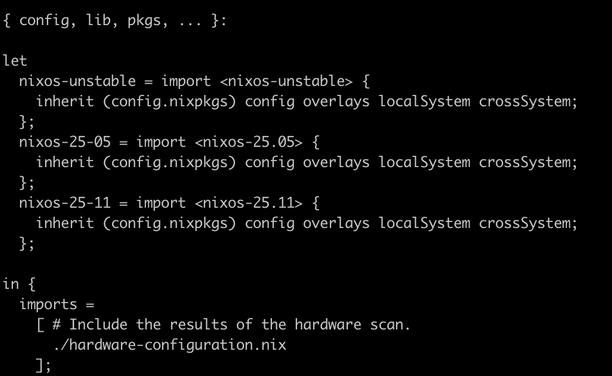
Yea I guess I could do that but I kinda like to have the git repo detached (for now). What bothers me way more is that I can't just put the URLs for the nix-channels in the import statement here inside of the configuration.nix
@nebucatnetzer @stphrolland @binarious
Tbh I guess it would bother me way less if the nix-channels for the system wide configuration were also placed in /etc/nixos and not in the per-user folder (even though it is root) of /root...
@agowa338 @stphrolland @binarious Something like this would probably work: https://nix.dev/tutorials/first-steps/declarative-shell#a-basic-shell-nix-file
But honestly I have no experience at all with Channels as I never bothered to learn them😅
Not saying that Flakes are the way to go but the workflow with the lock file just made more sense to me.
@binarious @nebucatnetzer @stphrolland
Well it didn't say that anywhere and tbh as someone that is quite new to NixOS it being experimental and needing two overwrite switches to enable it together with the lack of good (beginner friendly) documentation kinda deterred me...
@nebucatnetzer @stphrolland @binarious
well I already was confused enough by the rest of nix at the time and I wasn't able to find any documentation around flakes that I - as a beginner at the time - understood even remotely...
@nebucatnetzer @binarious @stphrolland
Ubuntu killed my infra multiple times. In fact trying to use ubuntu always ended up badly. Including data loss and all...
@nebucatnetzer @binarious @stphrolland
And regarding NixOS I had one such issue a while ago. But that was when I didn't know that certain changes to the configuration.nix just do not apply with a "switch" but need a full reboot.
So I ended up in a situation where none of the states was functional and I also couldn't go back way further cause I had already cleaned up the extremely old ones...
@binarious @agowa338 @nebucatnetzer
I do not do auto upgrades, simply because with manual upgrades I have had issues **repeatedly** with enormous configurations (more than 100GBytes footprint for one generation) *
I also like to know in which state my configuration is, and the monitoring of nix-channel help me do this, with a clean defined sequence of channel points, that can be consulted here:
/nix/var/nix/profiles/per-user/root
and which can be rollbacked to a previous state, just like nixos generations can be rolled back, but as nix channels
I tend to think I should start managing all my chosen programming languages as nixos flakes rather than the old school way with nix-channel. I hope to look at that soon.
* : by issue... the word is not well chose. It's really more a blocking side effect than a real issue.
@wamserma It looks like it was specifically mongodb as the only package I'm pulling in from unstable is unifi and that depends on mongodb.
Everything else is using the 25.11 channel.
Except 25.11 is also affected by stable advancing?
 nebucatnetzer
 Steph. Luis Rolland-Brabant ⁂
 binarious
 Markus Wamser