Nightmare-Eclipse has published two new toys to GitHub: GreenPlasma and YellowKey.

TL;DR:

  • GreenPlasma looks interesting, but it's not a complete exploit. It's at best a building block toward LPE on Windows.
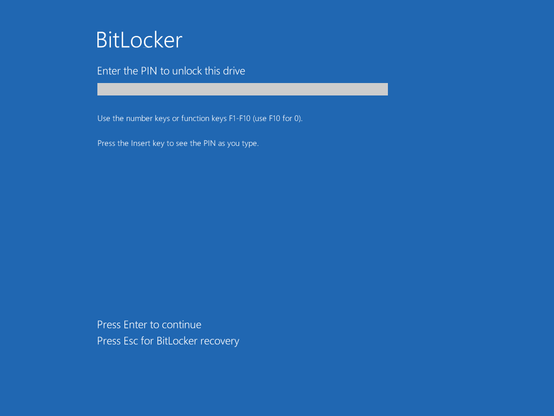
  • YellowKey is a Windows login bypass for an attacker with physical access. Use case: Your roomate wants to get into your roomate's poorly protected (potentially work-owned) laptop. Mitigation: Use Bitlocker with a PIN. (Note: The YellowKey author disagrees that PIN is a protection 🤔)

1) GreenPlasma
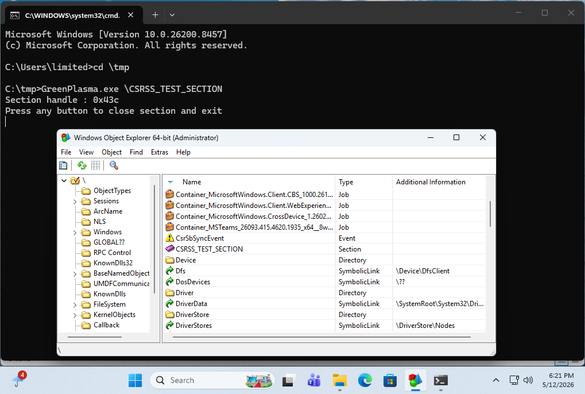
Here , an unprivileged user can create an arbitrary memory section in an object. While the first time I tried it it hung at the UAC prompt, but subsequent attempts worked to go from low-privileged to creating a \CSRSS_TEST_SECTION object.
It is worth noting that the PoC as it is does not have the bits that would turn it into a true LPE, as that is left as an exercise to the user.

2) YellowKey
This one is a bit hand-wavy to me, But I eventually was able to reproduce it. Via an attached USB drive. I could NOT reproduce it via putting the FsTx directory on the EFI partition. Potentially because the FsTx replay happened before my triggering of Recovery. I was able to reproduce with a USB drive attached.

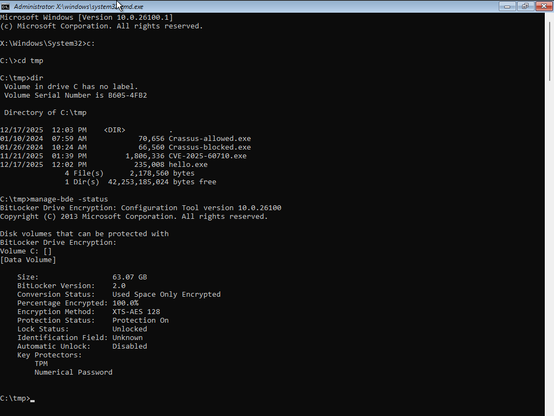
The target is a TPM-only bitlocker, which is known to be insecure. The use case is that, with physical access, you can access the filesystem with root privileges. Which even TPM-only bitlocker would prevent.

There is a thread on Twitter that claims to have reverse engineered the YellowKey Bitlocker bypass. And it talks about RecoverySimulation.ini and how it skips re-locking a bitlocker drive. The thing about this is:
1) This RecoverySimulation.ini stuff was talked about publicly last year
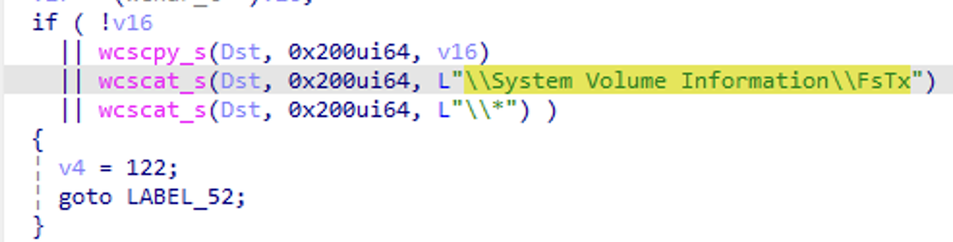
2) The actual bits in the YellowKey GitHub repo are the contents of an FsTx directory. Which appears to be be related to be used by autofstx. Also note that by looking at Windows' fstx.dll, we can see code that explicitly looks for \System Volume Information\FsTx in the FsTxFindSessions() function.

And if one looks at the contents of this FsTx directory in the GitHub repo, there are no strings related to RecoverySimulation.ini in it at all. Only of interest is perhaps:
\??\C:\Windows\win.ini
and
\??\X:\Windows\System32\winpeshl.ini

Where X:\Windows\System32\winpeshl.ini is what controls what WinRE does when it fires up.

But anyway, yes it works.
But what's intriguing to me is: Why can the presence a \System Volume Information\FsTx directory on one volume affect the contents of ANOTHER VOLUME when it's replayed? 🤔

In a normal WinRE session, you have a X:\Windows\System32 directory that has a winpeshl.ini file in it:

[LaunchApp]
AppPath=X:\sources\recovery\recenv.exe

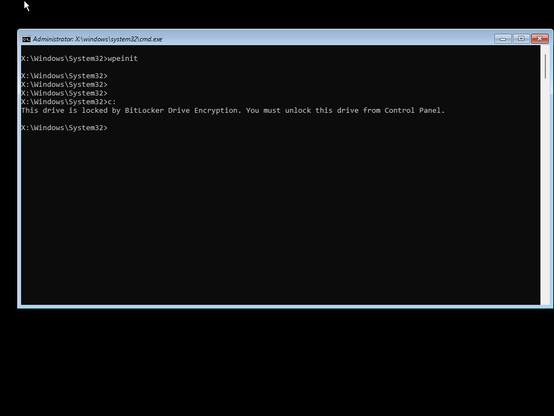
However, with the YellowKey exploit, it looks like Transactional NTFS bits on a USB Drive are able to delete the winpeshl.ini file on ANOTHER DRIVE (X:). And we get a cmd.exe prompt, with bitlocker unlocked instead of the expected Windows Recovery environment. While the TPM-only Bitlocker bypass is indeed interesting, I think the buried lede here is that a \System Volume Information\FsTx directory on one volume has the ability to modify the contents of another volume when it is replayed. To me, this in and of itself sounds like a vulnerability.
Note that I've found the hold CRTL and do NOT lift your finger off it part of YellowKey to be completely unnecessary.

From the beginning, I wondered why that was even part of the instructions (what does it accomplish?). And I guess the answer to that question is: Nothing?
🤷‍♂️

Microsoft has released CVE-2026-45585 to document YellowKey mitigations.

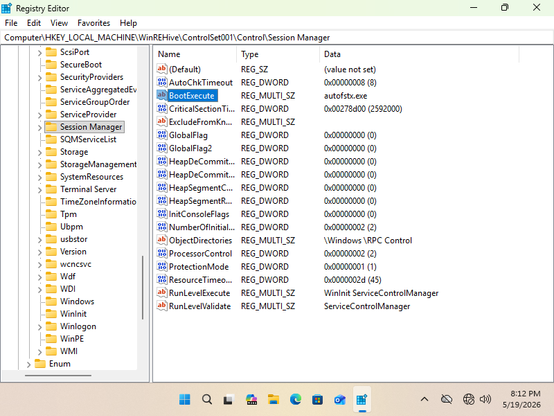
Specifically, you prevent the FsTx Auto Recovery Utility, autofstx.exe, from automatically starting when the WinRE image launches.

With this change, the Transactional NTFS replaying that deletes winpeshl.ini no longer happens. It also recommends switching from TPM-only to TPM+PIN.

But wait!, you clever security-conscious person exclaims. If the WinRE partition is unencrypted, what stops an attacker from simply splatting back a vulnerable WinRE partition/image? You are right, you can indeed do this and you'll get a CMD prompt when WinRE is entered. However, the modification of WinRE will cause the trust relationship between bitlocker and WinRE to fail. And as such, while you are at your handy cmd.exe prompt, you will not get an automatically-decrypted bitlocker partition.

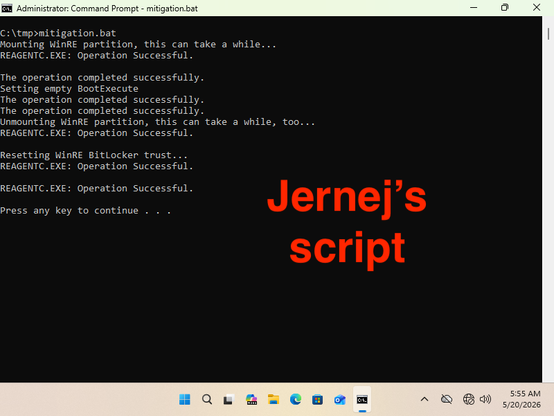
If the Microsoft guidance is too sloppy (e.g. linefeed in a single command with arguments or lack of clarity as to which registry modification happens, or how), @jernej__s has provided a CMD script to do it all

@wdormann Why document this "remove this entry" nonsense, why wouldn't they provide a Powershell script that admins could just run without having to pick apart?

@jsmall @wdormann Have a batch file that does it all:

@echo off
setlocal enabledelayedexpansion
net.exe session 1>nul 2>&1 || (
powershell -command "Start-Process -FilePath '%~dpf0' -Verb 'runas'"
exit /b
)
set MP=%SYSTEMDRIVE%\WinREMount
mkdir %MP%
echo Mounting WinRE partition, this can take a while...
reagentc /mountre /path %MP%

reg load HKLM\WinRESys %MP%\Windows\System32\config\SYSTEM
set REG=HKLM\WinRESys\ControlSet001\Control\Session Manager

for /F "usebackq tokens=2,* skip=2" %%A IN (`reg query "%REG%" /v BootExecute`) DO set OLDVAL=%%B
if "%OLDVAL%"=="" set OLDVAL=x
if "%OLDVAL%"=="%OLDVAL:autofstx.exe=X%" (
echo autofstx.exe not present in WinRE
) else (
if "%OLDVAL%"=="%OLDVAL:\0=X%" (
echo Setting empty BootExecute
reg add "%REG%" /v BootExecute /f /t REG_MULTI_SZ /d ""
) else (
set NEWVAL=%OLDVAL:autofstx.exe=%
set NEWVAL=!NEWVAL:\0\0=\0!
if "!NEWVAL:~0,2!"=="\0" set NEWVAL=!NEWVAL:~2!
echo Setting BootExecute to !NEWVAL!
reg add "%REG%" /v BootExecute /f /t REG_MULTI_SZ /d "!NEWVAL!"
)
)
reg unload HKLM\WinRESys

echo Unmounting WinRE partition, this can take a while, too...
reagentc /unmountre /path %MP% /commit
rd %MP%

echo Resetting WinRE BitLocker trust...
reagentc /disable
reagentc /enable

pause

@jsmall
Their advice is quite unpolished:

  • Having a newline in

    mkdir C:\mount
    reagentc /mountre /path C:\mount

    when it's a single mkdir command with two arguments.

  • Imprecise wording and hand-waving of how (regedit.exe? reg.exe?) to remove the autofx.exe item (Entry? Data?)

    Remove autofstx.exe entry here: 'HKLM\WinREHive\ControlSet001\Control\Session Manager, BootExecute'

  • @wdormann btw, autofstx/fstx is unrelated to transactional ntfs, it's a new component in the servicing stack added in germanium, which explains why the original author only got it to work in latest win11 - the vulnerable component literally does not exist in cobalt and prior releases
    @Rairii
    Thanks!
    (Serves my right for believing ChatGPT! 😂)

    @wdormann

    At this point (absent a PoC) we must assume that TPM + PIN is also an effective mitigation against YellowKey.

    I haven't seen anything from MS that explicitly states this fact. The CVE only mentions it as if it were an afterthought.

    Also, do we understand why Win10 systems are not vulnerable to YellowKey?

    @Billbremer
    I belive that the FsTx stuff appeared sometime during the Win11 lifespan. YellowKey uses that.
    @Billbremer @wdormann I notice that the Nightmare Eclipse blog claimed last week that TPM+PIN does not protect against YellowKey: "[..] I asked myself this question, can it still work in a TPM+PIN environment ? Yes it does, I'm just not publishing the PoC, I think what's out there is already bad enough", towards the end of this post: https://deadeclipse666.blogspot.com/2026/05/were-doing-silent-patches-now-huh-also.html
    We're doing silent patches now huh, also a quick note about YellowKey

    -----BEGIN PGP SIGNED MESSAGE----- Hash: SHA512 I just noticed that Microsoft silently patched the RedSun vulnerability, no CVE, no nothing,...

    @galaxis @Billbremer
    Yeah, I saw that.
    To which I say: PoC||GTFO
    @wdormann @Billbremer With the ongoing escalation after the Nightmare-Eclipse Github account was deleted, it's probably a matter of time only...

    @galaxis

    For now, I'm calling BS on his claim that he has a working exploit against TPM+PIN.

    Why are you so quick to assume that BitLocker + PIN will be proven insecure?

    Show me the money!