Hey #wordpress folks! I'm stumped.

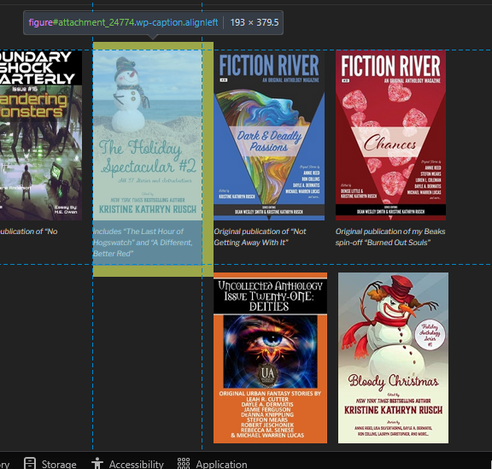
My web site has shows book covers for everything I've written or appeared in. The images are have "align=alignleft".

Most pages, this is fine.

On a couple, though, as you widen the page, certain pics appear on the far right on short rows. It's like there's a hard line break somewhere? https://mwl.io/fiction/anthologies is an example.

I'd rather have nice tidy rows. Any suggestions what I should look at? Or the search terms I need to use?

Anthologies – Michael W Lucas

@mwl I think the bounding boxes interact in weird ways to cause unpredictable wrapping. You can verify by forcing the figure element to have a fixed height like 300px

I think if you make a div that only contains the figures, you can set it to display:flex and flex-wrap:wrap and it's all good

maybe a person with more CSS smarts can recommend a better solution 🤷‍♀️

@annika @mwl Thats it. Use this CSS:

.entry-content > figure {
height: 360px;
}

Or combine all pictures in one group block and configure this as grid or flex.

@threadi @annika

Thanks, folks! Will try that.

The images should (important word, *should*) all be 300px tall. I resized them all by hand, though, so I could well have screwed up.

At least they're all small...

@mwl yeah it probably wraps weird when a caption is extra long

Yeah, looking at it in dev-tools, there's already a div wrapper around the list of figures with that class="entry-content" that can take @annika's suggestion of adding those two lines to

.entry-content{

display:flex;
flex-wrap: wrap;
}

which produces fewer weird artifacts. I'd hesitate to hard-code the height in units of px since those tend not to work well if the user has zoomed in/out. That said, the default height-calculations for display:flex does a decent job without hard-coding the height.

@threadi @mwl

@gumnos @annika @mwl No, by default, anything entered in the editor is treated as a flexbox. This completely ruins the layout - even for other pages on the website. You actually have to wrap the images in a group block to achieve that.
@threadi @annika @mwl yeah my understanding is this is a quirk of using float: left, which was designed with text wrapping around images in mind.
If using flex with wrap is a possibility, it would solve this.