With Windows 9x Subsystem for Linux you can run all your favourite Windows and Linux apps side-by-side with a modern Linux kernel running cooperatively with the Windows kernel in ring 0. And unlike modern WSL, no hardware virtualisation is used so even your 486 can run it!

Please enjoy, I think this might be one of my greatest hacks of all time
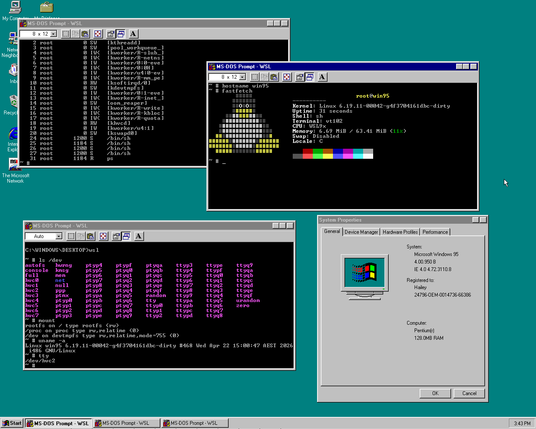
https://codeberg.org/hails/wsl9x

@hailey Is this like CoLinux? It was running User Mode Linux as a Windows process on XP, no virtualisation needed. Basically WSL2 way ahead of it's time!

The only caveat is that it relied on both arches having compatible pointer sizes which excluded 64bit, so it was never ported to win7.

On a technical aspect though WSL1 is IMHO even better than it's successor, it's literally implementing POSIX and Linux on the NT microkernel. After all NT was supposed to also run OS/2 and Xenix...

@dermoth @hailey Yup. It made me feel like they were bypassing an underlying feature in the Windows architecture as if it was a bug.

@alda @dermoth @hailey
They were by passing indeed.

Picoprocess: process creation is heavy weight on Windows, so Microsoft had to implement picoprocesses in the kernel on which WSL1 could rely.

@dryak @alda @hailey There was a great series of writeups about WSL1 with accompanying prestations... The videos have unfortunately been taken down but I think everything is covered in the articles. I linked them from this superuser answer: https://superuser.com/a/1406372/293731
What's this error in SSH on Windows Subsystem for Linux? setsockopt IPV6_TCLASS 16: Operation not permitted

I am using Windows Subsystem for Linux. When I login to my home server using SSH, I first get the following error setsockopt IPV6_TCLASS 16: Operation not permitted: and then everything works as

Super User

@dryak @alda @hailey I could find at least the first video, I will post what I find below.

1. Windows Subsystem for Linux: Architectural Overview: https://learn.microsoft.com/en-us/shows/seth-juarez/windows-subsystem-linux-architectural-overview

1/6

Windows Subsystem for Linux: Architectural Overview

In this video Deepu Thomas lays down the real scoop behind the Windows Subsystem for Linux. There was a lot of speculation surrounding how this feature actually worked so I decided to find out. This architectural overview gets into exactly how an operating system separates functionality into user and kernel mode. Deepu then uses that understanding to show how this new subsystem works in that context. The whole explanation is thoroughly enlightening and often stretched my understanding of how the underlying operating system works. Accompanying blog post Guthub (issues) UserVoice (feature voting) There's a ton to learn on this topic! In addition to our Channel 9 Live coverage at //BUILD 2016 and we have a number of deep dives that really get into how the feature works at an operating system level: Process Architecture Syscall Translation File System Windows and Ubuntu Interoperability If you prefer to read more on the Windows Subsystem for Linux make sure to catch up on the official documentation and blog.

Windows Subsystem for Linux: Process Architecture

Once we had a better architectural understanding of how the whole Windows Subsystem worked, I thought we should get more into how processes actually run in this new context. It turns out to be way more interesting than I would have otherwise thought thanks to our resident superhero Nick Judge. He dives into a new kind of process called a "PicoProcesses" which are a brand new lightweight, secure process infrastructure coming to Windows 10. I thought this sounded a little scary until Nick explained how these things are governed and fit into the larger functionality that we've come to know as the Windows Subsystem for Linux (which enables Bash on Ubuntu on Windows). Enjoy!

Windows Subsystem for Linux - Syscall Translation

Exploring the Windows Subsystem for Linux, we have looked at the architectural overview and deep dived into the Pico Processes. In this video we focus our attention on the way the subsystem redirects system calls. Stephen Hufnagel will explain how system calls work in general on Windows and Linux, then dive into the mechanics of WSL's translation. He'll discuss system calls which are easily mapped, as well as some which are a little more difficult. The more I get to dive into this awesome technology the more impressed I become with the amount of engineering effort that went into the Windows Subsystem for Linux. Enjoy! WSL System Calls (more details)

Windows Subsystem for Linux: File System

One of the key goals for the Windows Subsystem for Linux is to allow users to work with their files as they would on Linux, while giving full interoperability with files the user already has on their Windows machine. Unlike a virtual machine, where you have to use network shares or other solutions to share files between the host and guest OS, WSL has direct access to all your Windows drives to allow for easy interop. Windows file systems differ substantially from Linux file systems,. In this video I had the pleasure of talking to Sven Groot who discusses how WSL bridges those two worlds. Overall I have been thoroughly impressed with the sheer engineering prowess it took to get this working. I hope you enjoy the discussion as much as I have.

Windows Subsystem for Linux: Windows and Ubuntu Interoperability

The Windows Subsystem for Linux was announced as a beta feature at //Build 2016. Since then, we have explored an architectural overview, how Pico Processes work, System Calls redirection and File System support. Today we explore a new WSL feature: the ability for WSL to call Windows executables, and for Windows to call Ubuntu binaries. Ben Hillis will deep dive into the inner workings of our most requested feature and show how these two environments can complement each other in some very interesting ways.

@dryak @alda @hailey And the last one, it was renamed which made it a bit difficult to find!

6. Windows Subsystem for Linux: Networking Overview: https://learn.microsoft.com/en-us/shows/seth-juarez/windows-subsystem-linux-networking-overview

6/6

Windows Subsystem for Linux: Networking Overview

Exploring the Windows Subsystem for Linux, we have looked at the architectural overview, the Pico Processes, syscalls and filesystem. In this video we focus on the networking layer. Sunil Muthuswamy discusses some of the differences between Windows and Linux networking and where the translation happens. Sunil will also walk us through the translation of typical TCP and UDP calls as well as touch on how Unix sockets are used by Linux for inter process communication.