 Awet Tesfaiesus, MdB
RE: https://mastodon.social/@AwetTesfaiesus/116452877190283068
This looks kind of cool. Anybody qualified to tell me if this is legit?
RE: https://mastodon.social/@AwetTesfaiesus/116452877190283068
This looks kind of cool. Anybody qualified to tell me if this is legit?
It's #Android in #DesktopMode, which is still a bit experimental. You need a display or monitor that supports DP Alt mode (essentially, receiving video via a USB-C cable).
Desktop Mode still experimental, but looks usable for basic tasks, from what people are reporting. Here's a longer video showing it:
It doesn't hurt to just try it out, if your monitor supports DP Alt Mode and you have a USB-C cable that supports it (or Thunderbolt), too.
Most regular cables won't do. If you recently bought a monitor that is capable of DP Alt Mode, have a look at the cables that came with it.
@katzenberger @AwetTesfaiesus hey, not to be too pedantic, but you don't need a special monitor - just a USB-C -> DisplayPort cable.
DP Alt Mode is something that a phone needs to support - which all Graphene supported phones should. :)
If you have one of these, it works, yes!
Many modern monitors have a USB-C port that is compatible with DP Alt Mode, and also supports Power Delivery – they're meant for plugging in a Laptop directly, so you need only a single cable for receiving power, and delivering video.
@katzenberger @jernej you saying, that If I bring
1. a portable display (which I think my bigger half has) and
2. a powerbank and
3. a keyboard
I can basically leave my tablet and/or laptop at home?
That would be a value proposition to consider.
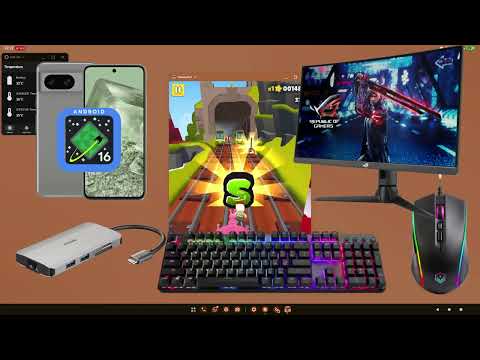
I found some time for a little testing.
What I used:
In general, everything worked. For all office-style apps I used, there were no performance problems (I do not use Google products, though). Gaming would probably not be very satisfying, though.
Screen resolution was a bit "meh", but still tolerable for occasional work. On an older monitor that I tried, the screen kept flickering, too. I wouldn't compare the experience to that on a nice smartphone screen, despite having more screen space was a bonus.
Responsiveness of the mouses and touchpads I tried were ok, with occasional "jerkiness".
My recommendation: Before investing into a decent Bluetooth keyboard for traveling, I'd run some tests using a similar docking station (maybe you already have one, for a notebook), so you can use the keyboard and mouse you are accustomed to.
Two caveats, since you're an MP and probably have a more interesting threat model than most regular citizens:
The lock screen did not always reliably kick in, even after a longer time away from the keyboard. Tapping the power button on the phone reliably locked the screen, though.
I'm used to keeping the USB-C port of the phone set to "Charging only" in GrapheneOS (Settings > Security & privacy > Exploit protection > USB-C port), disabling all data transfer. I only enable it when I really need it, which reduces the attack surface. I fancy that if you keep working with an external monitor, you might forget to disable it, one day.
 katzenberger
 Jernej Virag