 Awet Tesfaiesus, MdB
RE: https://mastodon.social/@AwetTesfaiesus/116452877190283068
This looks kind of cool. Anybody qualified to tell me if this is legit?
RE: https://mastodon.social/@AwetTesfaiesus/116452877190283068
This looks kind of cool. Anybody qualified to tell me if this is legit?
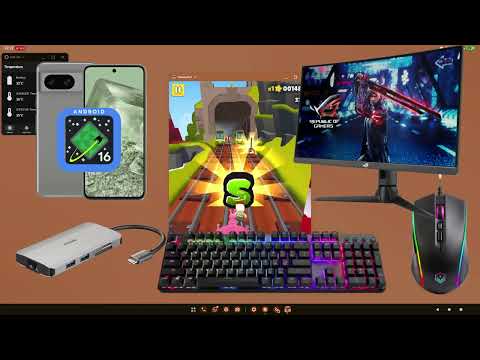
It's #Android in #DesktopMode, which is still a bit experimental. You need a display or monitor that supports DP Alt mode (essentially, receiving video via a USB-C cable).
Desktop Mode still experimental, but looks usable for basic tasks, from what people are reporting. Here's a longer video showing it:
It doesn't hurt to just try it out, if your monitor supports DP Alt Mode and you have a USB-C cable that supports it (or Thunderbolt), too.
Most regular cables won't do. If you recently bought a monitor that is capable of DP Alt Mode, have a look at the cables that came with it.
@katzenberger @AwetTesfaiesus hey, not to be too pedantic, but you don't need a special monitor - just a USB-C -> DisplayPort cable.
DP Alt Mode is something that a phone needs to support - which all Graphene supported phones should. :)
If you have one of these, it works, yes!
Many modern monitors have a USB-C port that is compatible with DP Alt Mode, and also supports Power Delivery – they're meant for plugging in a Laptop directly, so you need only a single cable for receiving power, and delivering video.
@katzenberger @jernej you saying, that If I bring
1. a portable display (which I think my bigger half has) and
2. a powerbank and
3. a keyboard
I can basically leave my tablet and/or laptop at home?
That would be a value proposition to consider.
Well, I said "is still a bit experimental". The bottom line of the video, at the end, is that they would not use it as their daily driver. My recommendation would be to test it in your home setup, without investing too much money.
Like @jernej said, you can use an adapter cable if your monitor isn't that new. Unfortunately, the video doesn't show whether they actually used the docking station shown in the title screen (the silver thing left of the keyboard). If that works, that would be an even easier and cost-effective way to attach all kinds of stuff to the phone.
If you wish, I can try it out this evening when I'm back at my desk.
@katzenberger @AwetTesfaiesus in general all the same approaches that work for USB-C laptops should work: USB-C docking stations, multiport adapters and cables. I successfully tested with an ASUS portable display and several MacBook adapters.
I'd test the power bank first though - those might not give out enough power for the monitor and the phone.
 katzenberger
 Jernej Virag