 interrupt_tv
Steady Hand EEPROM Programmer
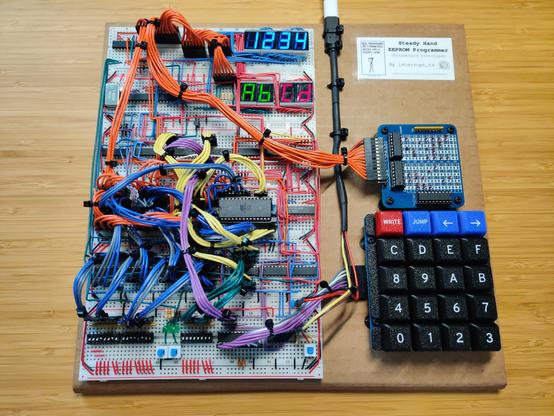
After about 6 months, my project is finally complete. It’s the first significant circuit that I’ve designed myself, rather than just implementing someone else’s design:
https://codeberg.org/interrupt_tv/steadyhand
Steady Hand is a digital circuit for programming EEPROMs by hand. It’s inspired by this video by Ben Eater, where he creates a circuit for programming an EEPROM using DIP switches and jumper wires. Steady Hand is much more ergonomic than his design, though it is somewhat more complex.
While Ben Eater provides the “how” inspiration, the “why” inspiration comes from Jeremiah Orians’ stage0 project, and the general concept of bootstrapping: creating a computer software environment from nothing. When building a homebrew computer, one would typically use a significantly more complex modern computer to write the homebrew computer’s software to an EEPROM. I created Steady Hand as a first step towards resolving this problem.
After I’d wired everything up, I was a little afraid something would melt when I plugged it in. While the schematic is separated into smaller modules, the breadboard layout ended up being pretty monolithic. I didn’t do any testing as I was assembling it, so it seemed likely there would be a mistake somewhere. No magic smoke escaped though, and it mostly worked on the first try. There were a few bugs:
The address display was connected backwards, with the most significant digit on the right instead of the left. Easy enough to fix, but the relevant wires were no longer the right lengths to neatly reach their connection points. This trend continued as I had to do further circuit surgeries, leaving things messier than I’d like.
The auto-skip function would cycle endlessly if the byte value to skip matched what was in the write registers. The write registers’ output lines are connected to the EEPROM’s I/O lines in order to be able to write to it. The comparator is also connected to these so that it can compare the EEPROM’s output to the skip value. When it’s time for the multiplexed display to show one of the write nibbles, the EEPROM’s output is disabled and the write registers’ output enabled. This meant that the comparator would now be comparing with the write value instead of the value read from the EEPROM, and would give the signal to skip to the next address.
Disabling the comparator when it’s getting invalid input would have required some additional logic, and at the time I didn’t have any extra gates available. I solved this by using one of the display digit enable lines as the auto-skip function’s clock signal, instead of having it hooked directly to the clock. This ensured that the rising edge would only occur when the comparator had a valid input.
After writing a byte or when auto-skipping past a large number of addresses, the EEPROM would occasionally output
FFinstead of the byte that was actually stored at that address. It wouldn’t do this with any kind of consistency, but theFFwould persist until the address was changed. I thought this was a power issue, but no combination of decoupling capacitors or pull-up resistors would make it go away. After wrestling with it for a long time, I eventually concluded that the AT28C256 just doesn’t like being always enabled. Once I added proper logic to control both the output enable and chip enable lines, the problem went away.
Since I needed at least one more logic IC to solve that last bug, I decided to add a 74HC7266 quad XNOR IC. This allowed me to add a search function alongside the auto-skip function, by just using an XNOR gate to invert the comparator’s output.
I used dupont cables to group related signal lines together, but I’m not sure how I feel about them now. I thought that they’d result in a cleaner layout than if I’d used several additional layers of solid core wire, but I still ended up with a rat’s nest. That was likely inevitable with how densely packed the components are. If I were to redo everything, I’d probably spread them out onto more boards, group them into individual modules, and allow for more redundancy in the glue logic.
Still, I’m happy with how the project turned out overall, and that I can now move onto the next one.
 Rimu
Rimu